Continuing the trend for adding a dash of artificial intelligence to everything, the latest beta version of WhatsApp for Android has a new feature. While currently without a name, the feature makes it possible to “easily see and organize your chat history” using the power of Meta AI.
The new feature appears on the recently discovered Meta AI tab which looks to be the future home of all of WhatsApp’s AI-powered components. So, what is chat history analysis using Meta AI all about?
Like so many AI-powered features, just what you get from this will depend on how you think and how your use WhatsApp generally. Chats with family, chats with friends, chats with work colleagues all contain very different types of information and content, and some of it better lends itself to working with AI.
In short, WhatsApp is giving users a way to use Meta AI to save having to manually trawl through a lengthy conversation, making it possible to very quickly pull together the information you need.
WABetaInfo shares the following description:
Some beta testers can access a new feature that lets them explore their conversations with Meta AI. When users send a new prompt to Meta AI, the chatbot initiates a new conversation. The details shared in the new conversation are used by Meta AI to understand the context and generate responses for subsequent commands. At the moment, all messages shared with Meta AI appear in a single interface, even when they belong to different conversations.
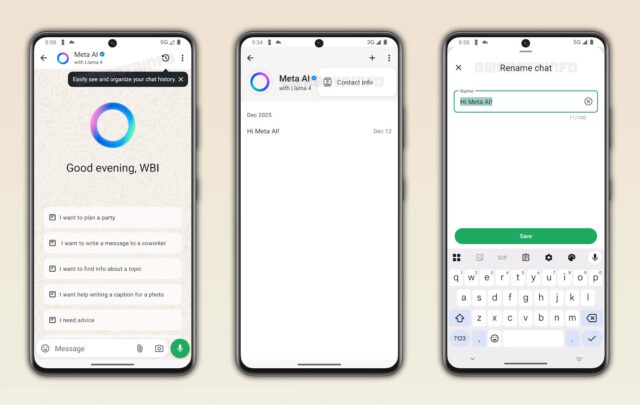
With the latest update, WhatsApp is making it easier for users to track information shared in specific conversations with Meta AI. Each conversation is now treated as a separate thread, so information from one chat is not automatically carried over to another. However, memory is still shared across all AI threads unless users choose to disable it from the contact info screen. Users included in this rollout will see a popup within the Meta AI chat interface. The popup says that users can now easily see and organize their chat history with Meta AI.
When users tap the new entry point placed within the top app bar, they will see the full chat history. This section includes the list of all conversations initiated with the chatbot. It also includes a shortcut to quickly open the contact info screen. To quickly locate a conversation, users can refer to its name and the date when it was created. This new approach keeps user interactions with Meta AI organized. This also makes it simpler for users to manage different topics independently. Users can return to any conversation at any time to review previous interactions or continue the discussion.
With every chat with Meta AI being automatically uniquely named and kept separate, there is minimal scope for confusion. But there is the benefit of a “shared memory” between conversation threads which can be invoked to draw on information from different chats if this would be helpful in certain scenarios.