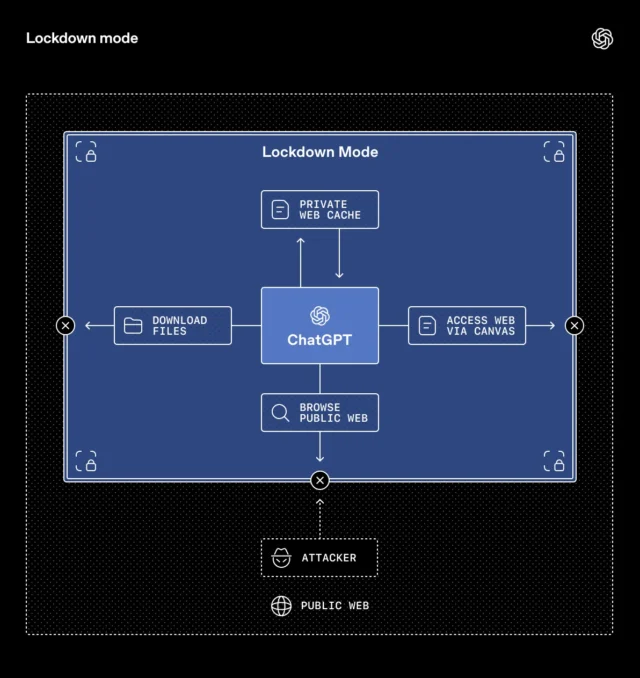
OpenAI has introduced two new security features to ChatGPT that can reduce the risk of prompt injection attacks and give users clearer visibility into potentially risky tools. The new Lockdown Mode and “Elevated Risk” labels protect sensitive data while helping organizations and individuals make informed choices about how connected features are used.
As AI tools take on more complex tasks involving the web and external apps, potential security risks have grown and adapted. One major concern is prompt injection, whereby a third party attempts to manipulate an AI system into following harmful instructions or exposing private information.
The new protections make these attacks harder to carry out without making the product harder to use.
ChatGPT Lockdown Mode
Lockdown Mode is an optional security setting for higher-risk users such as executives or security teams that will benefit from stronger protection. It introduces tighter controls on how ChatGPT interacts with external systems, reducing opportunities for data to leave secure environments via prompt injection attacks.
It works by deterministically disabling or restricting certain tools and capabilities. By removing some routes that attackers could exploit, Lockdown Mode reduces the chance that sensitive information could be extracted from conversations or connected apps.
One example is web browsing. When Lockdown Mode is enabled, browsing is restricted to cached content instead of live internet requests, keeping network activity within OpenAI’s controlled systems and limiting exposure to outside attackers. When there isn’t a reliable way to guarantee data protection, some features will be disabled entirely
This in the latest security addition for ChatGPT business environments, alongside sandboxing, protections against URL-based data exfiltration, monitoring, enforcement systems, and enterprise controls such as role-based access and audit logs.
Workspace admins can enable Lockdown Mode via workspace settings by creating specific roles, and also decide which apps and actions remain accessible while Lockdown Mode is active.
Separate from this, a Compliance API Logs platform offers clear visibility into app usage and shared data, helping organizations track activity and maintain oversight across connected tools. The feature is available for ChatGPT Enterprise, ChatGPT Edu, ChatGPT for Healthcare, and ChatGPT for Teachers, with plans to offer it to consumers in the future.
Alongside Lockdown Mode, OpenAI is also introducing “Elevated Risk” labels that identify capabilities that involve added network or data exposure risks. They give clearer guidance before users enable features that could increase security concerns.
The label will appear across ChatGPT, ChatGPT Atlas, and Codex. In Codex, for example, users can grant network access so the assistant can look up documentation or interact with websites. The settings screen now includes an “Elevated Risk” label explaining what access changes, what risks come with it, and when enabling it could be appropriate.
The company says these labels will evolve over time as protections improve. Features that currently carry higher risk warnings could lose the label once safeguards reach a level considered safe for wider use.
What do you think about these new security features in ChatGPT? Let us know in the comments.