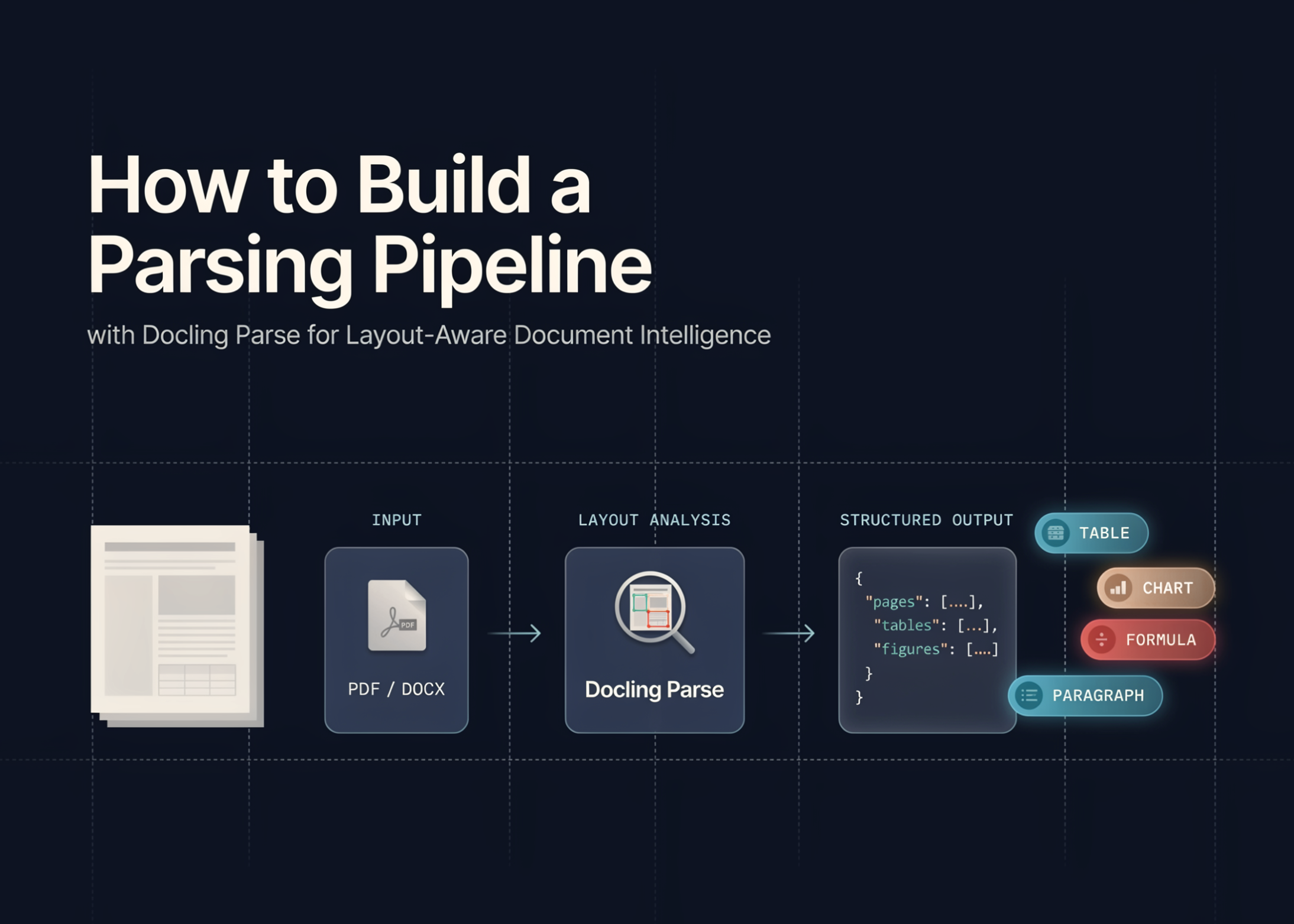
In this tutorial, we build a workflow for using Docling Parse to analyze PDF documents at a detailed structural level. We start by preparing a stable Python environment, handling common Colab dependency issues, and generating a custom multi-page PDF with text, columns, table-like content, vector shapes, and an embedded image. We then use Docling Parse to extract words, characters, and lines with page-level coordinates, render visual overlays, and save the results into structured JSON and CSV files. Through this workflow, we see how low-level PDF parsing can support document AI tasks such as layout analysis, reading-order reconstruction, table-aware processing, and retrieval-ready document preparation.
Setting Up the Docling Parse Colab Environment and Dependencies
import os, sys, subprocess, textwrap, json, time, shutil from pathlib import Path def run(cmd): print(f"n$ {cmd}") return subprocess.run(cmd, shell=True, text=True, capture_output=False) run(f'{sys.executable} -m pip install -q --no-cache-dir -U "pillow>=10.4.0,<12" reportlab pandas matplotlib docling-core docling-parse') try: from PIL import Image, ImageDraw except ImportError: print("nPillow import failed because Colab has a mixed PIL installation.") print("Reinstalling Pillow and restarting runtime. After restart, run this same cell again.") run(f'{sys.executable} -m pip uninstall -y pillow PIL') run(f'{sys.executable} -m pip install -q --no-cache-dir --force-reinstall "pillow>=10.4.0,<12"') os.kill(os.getpid(), 9) import pandas as pd import matplotlib.pyplot as plt from reportlab.lib.pagesizes import A4 from reportlab.lib import colors from reportlab.platypus import Table, TableStyle from reportlab.pdfgen import canvas from docling_core.types.doc.page import TextCellUnit from docling_parse.pdf_parser import DoclingPdfParser print("Environment ready.") print("Python:", sys.version.split()[0]) WORKDIR = Path("https://www.marktechpost.com/content/docling_parse_advanced_tutorial") WORKDIR.mkdir(parents=True, exist_ok=True) PDF_PATH = WORKDIR / "advanced_docling_parse_demo.pdf" OUT_DIR = WORKDIR / "outputs" OUT_DIR.mkdir(exist_ok=True) DEMO_IMAGE_PATH = WORKDIR / "demo_bitmap.png" We set up the Colab environment by installing Docling Parse, Docling Core, Pillow, ReportLab, Pandas, and Matplotlib. We also handle the Pillow import issue safely so the notebook can recover if Colab has a broken or mixed PIL installation. We then define the working directory, output folder, PDF path, and image path that we use throughout the tutorial.
Generating a Multi-Element Test PDF for Parser Evaluation
def create_demo_image(path): img = Image.new("RGB", (320, 180), "white") draw = ImageDraw.Draw(img) draw.rectangle([20, 20, 300, 160], outline="black", width=3) draw.ellipse([55, 45, 145, 135], outline="black", width=4) draw.line([180, 140, 285, 45], fill="black", width=4) draw.text((45, 145), "Embedded bitmap image", fill="black") img.save(path) create_demo_image(DEMO_IMAGE_PATH) def build_pdf(pdf_path): c = canvas.Canvas(str(pdf_path), pagesize=A4) width, height = A4 c.setFont("Helvetica-Bold", 20) c.drawString(60, height - 70, "Docling Parse Advanced PDF Parsing Tutorial") c.setFont("Helvetica", 11) intro = ( "This generated document is designed for testing text extraction, coordinate parsing, " "line grouping, vector path detection, bitmap resources, and layout-aware reconstruction." ) text_obj = c.beginText(60, height - 105) text_obj.setLeading(15) for line in textwrap.wrap(intro, width=90): text_obj.textLine(line) c.drawText(text_obj) c.setFont("Helvetica-Bold", 14) c.drawString(60, height - 170, "1. Two-column text region") left_para = ( "The left column contains compact explanatory text. A parser should expose words, " "characters, and line-level cells along with coordinates. These coordinates allow us " "to reconstruct reading order and inspect the spatial structure of a page." ) right_para = ( "The right column contains a separate paragraph. In document AI pipelines, layout " "features are useful for retrieval, table extraction, chunking, and downstream RAG " "applications where page position can matter." ) y_start = height - 200 left_text = c.beginText(60, y_start) left_text.setFont("Helvetica", 10) left_text.setLeading(13) for line in textwrap.wrap(left_para, width=42): left_text.textLine(line) c.drawText(left_text) right_text = c.beginText(325, y_start) right_text.setFont("Helvetica", 10) right_text.setLeading(13) for line in textwrap.wrap(right_para, width=42): right_text.textLine(line) c.drawText(right_text) c.setStrokeColor(colors.darkblue) c.setLineWidth(2) c.rect(55, height - 315, 225, 130, stroke=1, fill=0) c.rect(320, height - 315, 225, 130, stroke=1, fill=0) c.setStrokeColor(colors.darkgreen) c.setLineWidth(3) c.circle(140, height - 390, 40, stroke=1, fill=0) c.line(220, height - 430, 310, height - 355) c.setFont("Helvetica-Bold", 14) c.setFillColor(colors.black) c.drawString(60, height - 470, "2. Simple table-like structure") data = [ ["Section", "Signal", "Expected parser behavior"], ["Text", "Words and lines", "Return text cells with coordinates"], ["Vector", "Boxes and lines", "Expose page path/vector resources"], ["Bitmap", "Embedded image", "Expose or render image resources"], ] table = Table(data, colWidths=[100, 130, 260]) table.setStyle(TableStyle([ ("BACKGROUND", (0, 0), (-1, 0), colors.lightgrey), ("GRID", (0, 0), (-1, -1), 0.7, colors.black), ("FONTNAME", (0, 0), (-1, 0), "Helvetica-Bold"), ("FONTSIZE", (0, 0), (-1, -1), 9), ("VALIGN", (0, 0), (-1, -1), "MIDDLE"), ])) table.wrapOn(c, width, height) table.drawOn(c, 60, height - 590) c.setFont("Helvetica", 9) c.drawString(60, 55, "Page 1: generated programmatic PDF with text, table-like layout, and vector paths.") c.showPage() c.setFont("Helvetica-Bold", 18) c.drawString(60, height - 70, "Page 2: Bitmap, Dense Text, and Reading Order") c.setFont("Helvetica", 10) dense = ( "This page includes an embedded bitmap image and several short blocks of text. " "We use it to test whether rendering works, whether the parser preserves page-level " "coordinates, and whether our own reconstruction logic can group words into lines." ) y = height - 105 for para_idx in range(4): tx = c.beginText(60, y) tx.setFont("Helvetica", 10) tx.setLeading(13) for line in textwrap.wrap(f"Block {para_idx + 1}: {dense}", width=92): tx.textLine(line) c.drawText(tx) y -= 70 c.drawImage(str(DEMO_IMAGE_PATH), 110, height - 510, width=320, height=180, preserveAspectRatio=True) c.setStrokeColor(colors.red) c.setLineWidth(2) c.roundRect(95, height - 525, 350, 210, 10, stroke=1, fill=0) c.setFillColor(colors.black) c.setFont("Helvetica-Bold", 12) c.drawString(60, height - 570, "Coordinate-aware extraction lets us keep page, text, and position together.") c.setFont("Helvetica", 9) c.drawString(60, 55, "Page 2: embedded bitmap image and multiple text blocks.") c.save() build_pdf(PDF_PATH) print("Created PDF:", PDF_PATH) We generate a small bitmap image and create a custom two-page PDF for testing Docling Parse. We add text blocks, two-column content, vector shapes, table-like content, and an embedded image so the parser has multiple document elements to process. We use the generated PDF as a controlled input to check text extraction, layout structure, rendering, and coordinate-aware parsing.
Extracting Word, Character, and Line Cells with Docling Parse
def safe_to_dict(obj, max_depth=2): if obj is None: return None if isinstance(obj, (str, int, float, bool)): return obj if isinstance(obj, (list, tuple)): return [safe_to_dict(x, max_depth=max_depth - 1) for x in obj[:50]] if isinstance(obj, dict): return { str(k): safe_to_dict(v, max_depth=max_depth - 1) for k, v in list(obj.items())[:50] } if hasattr(obj, "model_dump"): try: return obj.model_dump() except Exception: pass if hasattr(obj, "__dict__") and max_depth > 0: try: return { k: safe_to_dict(v, max_depth=max_depth - 1) for k, v in obj.__dict__.items() if not k.startswith("_") } except Exception: pass return str(obj) def rect_to_dict(rect): d = safe_to_dict(rect) if isinstance(d, dict): return d attrs = {} for name in [ "l", "t", "r", "b", "left", "top", "right", "bottom", "x0", "y0", "x1", "y1", "width", "height" ]: if hasattr(rect, name): try: attrs[name] = getattr(rect, name) except Exception: pass return attrs if attrs else {"raw": str(rect)} def get_text_cell_records(page_no, pred_page, unit_type): records = [] try: cells = list(pred_page.iterate_cells(unit_type=unit_type)) except Exception as e: print(f"Could not iterate {unit_type} cells on page {page_no}: {e}") return records for idx, cell in enumerate(cells): text = getattr(cell, "text", "") rect = getattr(cell, "rect", None) records.append({ "page": page_no, "unit": str(unit_type).split(".")[-1], "index": idx, "text": text, "rect": rect_to_dict(rect), "raw_cell": safe_to_dict(cell, max_depth=1), }) return records def count_possible_resources(pred_page): resource_summary = {} names = dir(pred_page) keywords = ["path", "bitmap", "image", "resource", "line", "rect"] for name in names: lname = name.lower() if any(k in lname for k in keywords) and not name.startswith("_"): try: value = getattr(pred_page, name) if callable(value): continue try: resource_summary[name] = len(value) except Exception: resource_summary[name] = type(value).__name__ except Exception: pass return resource_summary parser = DoclingPdfParser() start = time.perf_counter() pdf_doc = parser.load(path_or_stream=str(PDF_PATH)) load_time = time.perf_counter() - start print(f"nLoaded PDF in {load_time:.3f} seconds.") all_records = [] page_summaries = [] rendered_paths = [] parse_start = time.perf_counter() for page_no, pred_page in pdf_doc.iterate_pages(): print(f"n--- Page {page_no} ---") word_records = get_text_cell_records(page_no, pred_page, TextCellUnit.WORD) char_records = get_text_cell_records(page_no, pred_page, TextCellUnit.CHAR) line_records = get_text_cell_records(page_no, pred_page, TextCellUnit.LINE) all_records.extend(word_records) all_records.extend(char_records) all_records.extend(line_records) resource_summary = count_possible_resources(pred_page) page_summaries.append({ "page": page_no, "words": len(word_records), "chars": len(char_records), "lines": len(line_records), "possible_resource_attributes": resource_summary, }) print("Words:", len(word_records)) print("Characters:", len(char_records)) print("Lines:", len(line_records)) print("Possible resource attributes:", resource_summary) print("nFirst 20 extracted words:") print(" ".join([r["text"] for r in word_records[:20]])) for unit_name, unit_type in [ ("word", TextCellUnit.WORD), ("char", TextCellUnit.CHAR), ("line", TextCellUnit.LINE), ]: try: img = pred_page.render_as_image(cell_unit=unit_type) out_img = OUT_DIR / f"page_{page_no}_{unit_name}_overlay.png" img.save(out_img) rendered_paths.append(out_img) print("Saved rendered overlay:", out_img) except Exception as e: print(f"Could not render {unit_name} overlay for page {page_no}: {e}") parse_time = time.perf_counter() - parse_start We define helper functions to safely convert Docling objects, rectangles, and page resources into readable Python dictionaries. We load the generated PDF with DoclingPdfParser and extract word-level, character-level, and line-level text cells from each page. We also render page overlays for different text units to visually inspect how Docling Parse detects and maps content on PDF pages.
Exporting Structured Outputs and Reconstructing Layout-Aware Text
records_path = OUT_DIR / "docling_parse_cells.json" with open(records_path, "w", encoding="utf-8") as f: json.dump(all_records, f, indent=2, ensure_ascii=False) summary_path = OUT_DIR / "page_summaries.json" with open(summary_path, "w", encoding="utf-8") as f: json.dump(page_summaries, f, indent=2, ensure_ascii=False) flat_rows = [] for r in all_records: rect = r.get("rect", {}) row = { "page": r["page"], "unit": r["unit"], "index": r["index"], "text": r["text"], } if isinstance(rect, dict): for k, v in rect.items(): if isinstance(v, (str, int, float, bool)) or v is None: row[f"rect_{k}"] = v else: row[f"rect_{k}"] = str(v) flat_rows.append(row) df = pd.DataFrame(flat_rows) csv_path = OUT_DIR / "docling_parse_cells.csv" df.to_csv(csv_path, index=False) summary_df = pd.DataFrame(page_summaries) summary_csv_path = OUT_DIR / "page_summaries.csv" summary_df.to_csv(summary_csv_path, index=False) print("nSaved structured outputs:") print(records_path) print(csv_path) print(summary_path) print(summary_csv_path) print("nPage summary:") display(summary_df) print("nCell dataframe sample:") display(df.head(20)) def extract_rect_numbers(rect): if not isinstance(rect, dict): return None possible_sets = [ ("l", "t", "r", "b"), ("left", "top", "right", "bottom"), ("x0", "y0", "x1", "y1"), ] for keys in possible_sets: if all(k in rect for k in keys): try: vals = [float(rect[k]) for k in keys] return vals except Exception: pass numeric = [] for v in rect.values(): try: numeric.append(float(v)) except Exception: pass if len(numeric) >= 4: return numeric[:4] return None word_df = df[df["unit"].str.contains("WORD", case=False, na=False)].copy() if len(word_df) == 0: word_df = df[df["unit"].str.contains("word", case=False, na=False)].copy() coords = [] for _, row in word_df.iterrows(): rect_data = {} for col in word_df.columns: if col.startswith("rect_"): rect_data[col.replace("rect_", "")] = row[col] nums = extract_rect_numbers(rect_data) coords.append(nums) word_df["coord_numbers"] = coords word_df = word_df[word_df["coord_numbers"].notna()].copy() if len(word_df) > 0: word_df["x0"] = word_df["coord_numbers"].apply(lambda x: min(x[0], x[2])) word_df["x1"] = word_df["coord_numbers"].apply(lambda x: max(x[0], x[2])) word_df["y0"] = word_df["coord_numbers"].apply(lambda x: min(x[1], x[3])) word_df["y1"] = word_df["coord_numbers"].apply(lambda x: max(x[1], x[3])) word_df["y_mid"] = (word_df["y0"] + word_df["y1"]) / 2 reconstructed_pages = {} for page, g in word_df.groupby("page"): g = g.sort_values(["y_mid", "x0"]).copy() y_values = sorted(g["y_mid"].tolist()) line_bins = [] threshold = 8.0 for y in y_values: placed = False for line in line_bins: if abs(line["center"] - y) <= threshold: line["values"].append(y) line["center"] = sum(line["values"]) / len(line["values"]) placed = True break if not placed: line_bins.append({"center": y, "values": [y]}) def assign_line(y): return min(range(len(line_bins)), key=lambda i: abs(line_bins[i]["center"] - y)) g["line_id"] = g["y_mid"].apply(assign_line) lines = [] for line_id, lg in g.groupby("line_id"): lg = lg.sort_values("x0") line_text = " ".join(lg["text"].astype(str).tolist()) lines.append((lg["y_mid"].mean(), line_text)) lines = sorted(lines, key=lambda x: x[0]) reconstructed_text = "n".join([line for _, line in lines]) reconstructed_pages[int(page)] = reconstructed_text recon_path = OUT_DIR / "layout_aware_reconstructed_text.json" with open(recon_path, "w", encoding="utf-8") as f: json.dump(reconstructed_pages, f, indent=2, ensure_ascii=False) print("nLayout-aware reconstructed text:") for page, text in reconstructed_pages.items(): print(f"n===== PAGE {page} =====") print(text[:2500]) print("nSaved reconstruction:", recon_path) else: print("nCould not build coordinate-based reconstruction because rectangle coordinates were not exposed in a numeric form.") We save the extracted parsing results into JSON and CSV files for later analysis. We flatten the parsed records into a Pandas DataFrame and display both the page summary and cell-level extraction sample. We also reconstruct text from coordinate information, which helps us understand how a layout-aware reading order can be derived from word positions.
Benchmarking Threaded Parsing and Checking CLI Availability
print("nAttempting threaded parsing benchmark...") threaded_results = [] threaded_available = True try: from docling_parse.pdf_parser import DoclingThreadedPdfParser, ThreadedPdfParserConfig from docling_parse.pdf_parsers import DecodePageConfig parser_config = ThreadedPdfParserConfig( loglevel="fatal", threads=4, max_concurrent_results=32, ) decode_config = DecodePageConfig() threaded_parser = DoclingThreadedPdfParser( parser_config=parser_config, decode_config=decode_config, ) t0 = time.perf_counter() doc_key = threaded_parser.load(str(PDF_PATH)) page_count = threaded_parser.page_count(doc_key) print("Threaded doc key:", doc_key) print("Threaded page count:", page_count) for result in threaded_parser.iterate_results(): item = { "doc_key": str(getattr(result, "doc_key", "")), "page_number": getattr(result, "page_number", None), "success": getattr(result, "success", None), "error_message": getattr(result, "error_message", None), } if getattr(result, "success", False): seg_page = result.get_page() timings = result.get_timings() item["word_count"] = len(getattr(seg_page, "word_cells", [])) try: item["total_time"] = timings.total() except Exception: item["total_time"] = str(timings) threaded_results.append(item) threaded_time = time.perf_counter() - t0 except Exception as e: threaded_available = False threaded_time = None print("Threaded parser is not available or failed in this environment.") print("Error:", repr(e)) if threaded_available: threaded_path = OUT_DIR / "threaded_parse_results.json" with open(threaded_path, "w", encoding="utf-8") as f: json.dump(threaded_results, f, indent=2, ensure_ascii=False) threaded_df = pd.DataFrame(threaded_results) print("nThreaded parsing results:") display(threaded_df) print("Saved threaded results:", threaded_path) benchmark = { "standard_load_time_seconds": load_time, "standard_iterate_parse_time_seconds": parse_time, "threaded_total_time_seconds": threaded_time, "total_cells_extracted": len(all_records), "output_dir": str(OUT_DIR), } benchmark_path = OUT_DIR / "benchmark.json" with open(benchmark_path, "w", encoding="utf-8") as f: json.dump(benchmark, f, indent=2) print("nBenchmark:") print(json.dumps(benchmark, indent=2)) print("nChecking CLI availability...") cli = shutil.which("docling-parse") print("docling-parse CLI:", cli) if cli: cli_result = subprocess.run( "docling-parse -h", shell=True, text=True, capture_output=True, ) print(cli_result.stdout[:1000]) else: print("CLI was not found on PATH, but the Python API worked.") print("nGenerated files:") for p in sorted(OUT_DIR.glob("*")): print(p) print("nRendering saved overlay images in notebook...") for img_path in rendered_paths[:6]: try: img = Image.open(img_path) plt.figure(figsize=(9, 12)) plt.imshow(img) plt.axis("off") plt.title(img_path.name) plt.show() except Exception as e: print("Could not display:", img_path, e) print("nTutorial complete.") print("Main outputs are stored in:", OUT_DIR) We test threaded parsing to see whether parallel page processing is available in the current environment. We store threaded parsing results, generate a benchmark summary, check whether the Docling Parse CLI is available, and list all generated output files. We finally display the rendered overlay images inside the notebook so we can visually confirm the parsing quality.
Conclusion
In conclusion, we have a complete document parsing pipeline that goes beyond simple text extraction. We created a test PDF, parsed its text at multiple granularities, inspected spatial metadata, exported structured outputs, reconstructed layout-aware text, and benchmarked threaded parsing where available. It gives us a base for building document intelligence systems that need both content and layout information. We can now extend this workflow to real-world PDFs, connect the extracted data with downstream NLP or RAG pipelines, and use Docling Parse as a lightweight but powerful component for structured PDF understanding.
Check out the Full Codes with Notebook. Also, feel free to follow us on Twitter and don’t forget to join our 150k+ML SubReddit and Subscribe to our Newsletter. Wait! are you on telegram? now you can join us on telegram as well.
Need to partner with us for promoting your GitHub Repo OR Hugging Face Page OR Product Release OR Webinar etc.? Connect with us

Sana Hassan
Sana Hassan, a consulting intern at Marktechpost and dual-degree student at IIT Madras, is passionate about applying technology and AI to address real-world challenges. With a keen interest in solving practical problems, he brings a fresh perspective to the intersection of AI and real-life solutions.