The update is rolling out to Pixels starting today.
A new Android 16 is rolling out. Credit: Ryan Whitwam
Google is following through on its pledge to split Android versions into more frequent updates. We already had one Android 16 release this year, and now it’s time for the second. The new version is rolling out first on Google’s Pixel phones, featuring more icon customization, easier parental controls, and AI-powered notifications. Don’t be bummed if you aren’t first in line for the new Android 16—Google also has a raft of general improvements coming to the wider Android ecosystem.
Android 16, part 2
Since rolling out the first version of Android in 2008, Google has largely stuck to one major release per year. Android 16 changes things, moving from one monolithic release to two. Today’s OS update is the second part of the Android 16 era, but don’t expect major changes. As expected, the first release in June made more changes. Most of what we’ll see in the second update is geared toward Google’s Pixel phones, plus some less notable changes for developers.
Google’s new AI features for notifications are probably the most important change. Android 16 will use AI for two notification tasks: summarizing and organizing. The OS will take long chat conversations and summarize the notifications with AI. Notification data is processed locally on the device and won’t be uploaded anywhere. In the notification shade, the collapsed notification line will feature a summary of the conversation rather than a snippet of one message. Expanding the notification will display the full text.
Google also says AI will help to reduce notification overload in Android 16, part 2. This will build on the notification grouping from the first Android 16 release by gathering lower-priority notifications and silencing them. These items will be organized into batches, like news and promotions, where they can be safely ignored until you want to take a closer look.
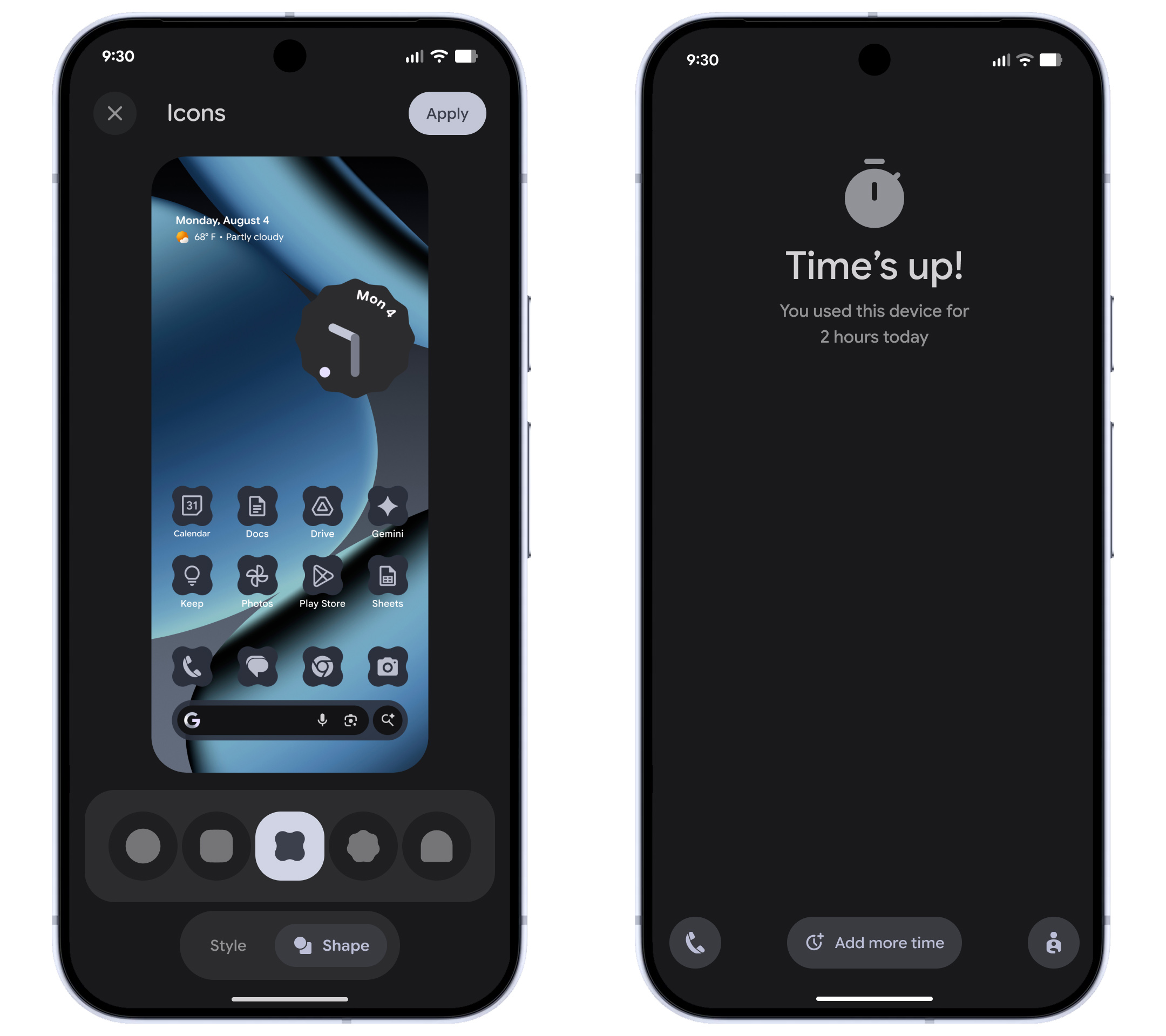
Material 3 Expressive came to Pixels earlier this year but not as part of the first Android 16 upgrade—Google’s relationship with Android versions is complicated these days. Regardless, Material 3 will get a bit more cohesive on Pixels following this update. Google will now apply Material theming to all icons on your device automatically, replacing legacy colored icons with theme-friendly versions. Similarly, dark mode will be supported across more apps, even if the devs haven’t added support. Google is also adding a few more icon shape options if you want to jazz up your home screen.
Credit: Google
By way of functional changes, Google has added a more intuitive way of managing parental controls—you can just use the managed device directly. Parents will be able to set a PIN code for accessing features like screen time, app usage, and so on without grabbing a different device. If you want more options or control, the new on-device settings will also help you configure Google Family Link.
Android for all
No Pixel? No problem. Google has also bundled up a collection of app and system updates that will begin rolling out today for all supported Android devices.
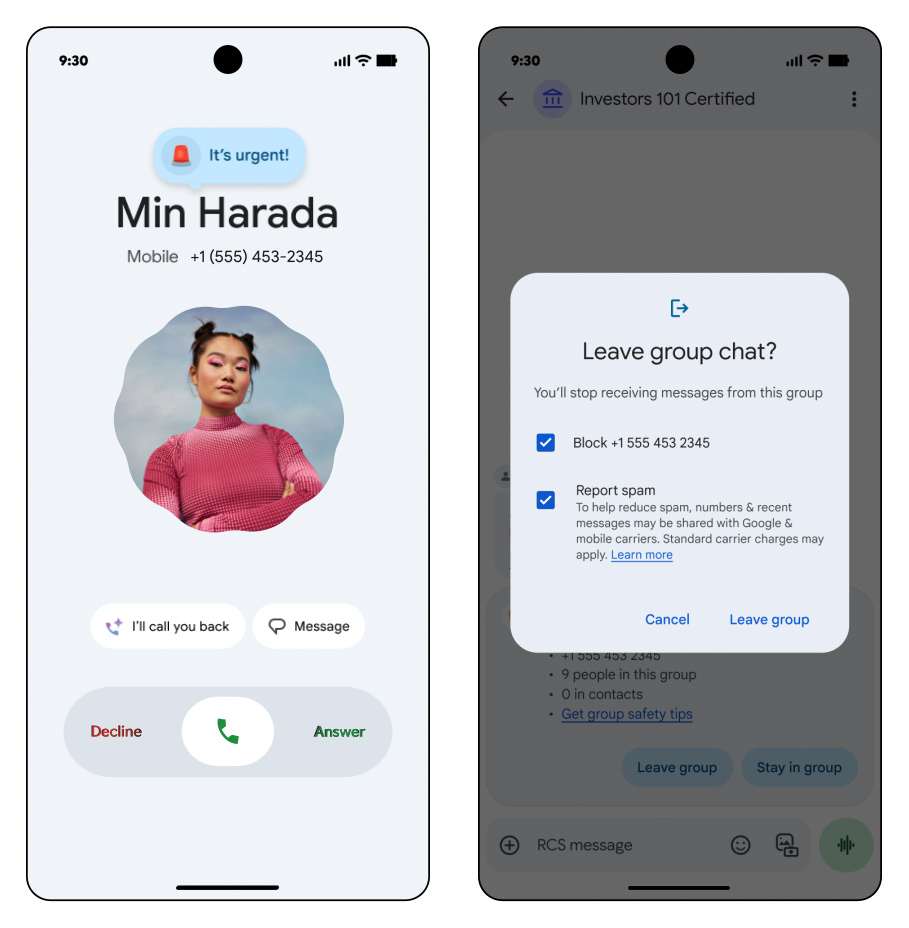
Chrome for Android is getting an update with tab pinning, mirroring a feature that has been in the desktop version since time immemorial. The Google Messages app is also taking care of some low-hanging fruit. When you’re invited to a group chat by a new number, the app will display group information and a one-tap option to leave and report the chat as spam.
Google’s official dialer app comes on Pixels, but it’s also in the Play Store for anyone to download. If you and your contacts use Google Dialer, you’ll soon be able to place calls with a “reason.” You can flag a call as “Urgent” to indicate to the recipient that they shouldn’t send you to voicemail. The urgent label will also remain in the call history if they miss the call.
Credit: Google
Google also says it’s adding yet another AI-powered feature to stop scams. Circle to Search, which is available on most modern Android phones, lets you highlight anything you come across to check for scams. It’s unclear how accurate it will be, though. This feature plugs into AI Overviews to assess the risk and provide suggestions.
Android devices are also getting a raft of new accessibility options. Those who use a mouse with AutoClick can now set custom hover times. You’ll also be able to launch TalkBack voice control in Gboard with a two-finger tap. Voice Access, which lets you control the phone UI by voice, is also getting easier to use. Rather than tapping things to launch it, you’ll be able to tell the phone’s Gemini assistant by voice to “start Voice Access.”
Gemini is also making an appearance in Google’s Guided Frame camera feature, but this one is only for Pixels. Guided Frame helps those with low or no vision take photos by offering voice descriptions of what’s in the frame. With the new update, Guided Frame will use Gemini to summarize the shot’s content. This should allow for more detailed descriptions and hopefully not too many hallucinations.
The widely available Android feature updates will roll out over the coming weeks. Pixel owners should begin getting update notifications for the new Android 16 build over a similar timeframe. There will also be manual update files on Google’s developer site. Non-Pixel phones will get the new Android 16 whenever OEMs get around to it, but there may not be much overlap with the features Google has announced for Pixels.

Ryan Whitwam is a senior technology reporter at Ars Technica, covering the ways Google, AI, and mobile technology continue to change the world. Over his 20-year career, he’s written for Android Police, ExtremeTech, Wirecutter, NY Times, and more. He has reviewed more phones than most people will ever own. You can follow him on Bluesky, where you will see photos of his dozens of mechanical keyboards.