Google’s June Android feature drop includes more scam detection, more AirDrop, and yes, more AI.
We’re expecting Android 17 to begin rolling out later this month, but first, Google has a batch of updates for the wider Android device ecosystem. As usual, some of the new features are limited to specific devices, and others require using Google’s apps. But if you don’t mind the latter, you can get automated protection from the growing threat of deepfake phone scams.
According to Google, “impersonation fraud” is one of the most common types of financial scams. The FTC tracked almost $3 billion in losses from such scams during 2024, and the improvements in AI voice cloning tools more recently are making the schemes easier to pull off. The voice models are becoming so capable that it can be difficult to identify a fake caller even when an AI is imitating someone you talk to every day.
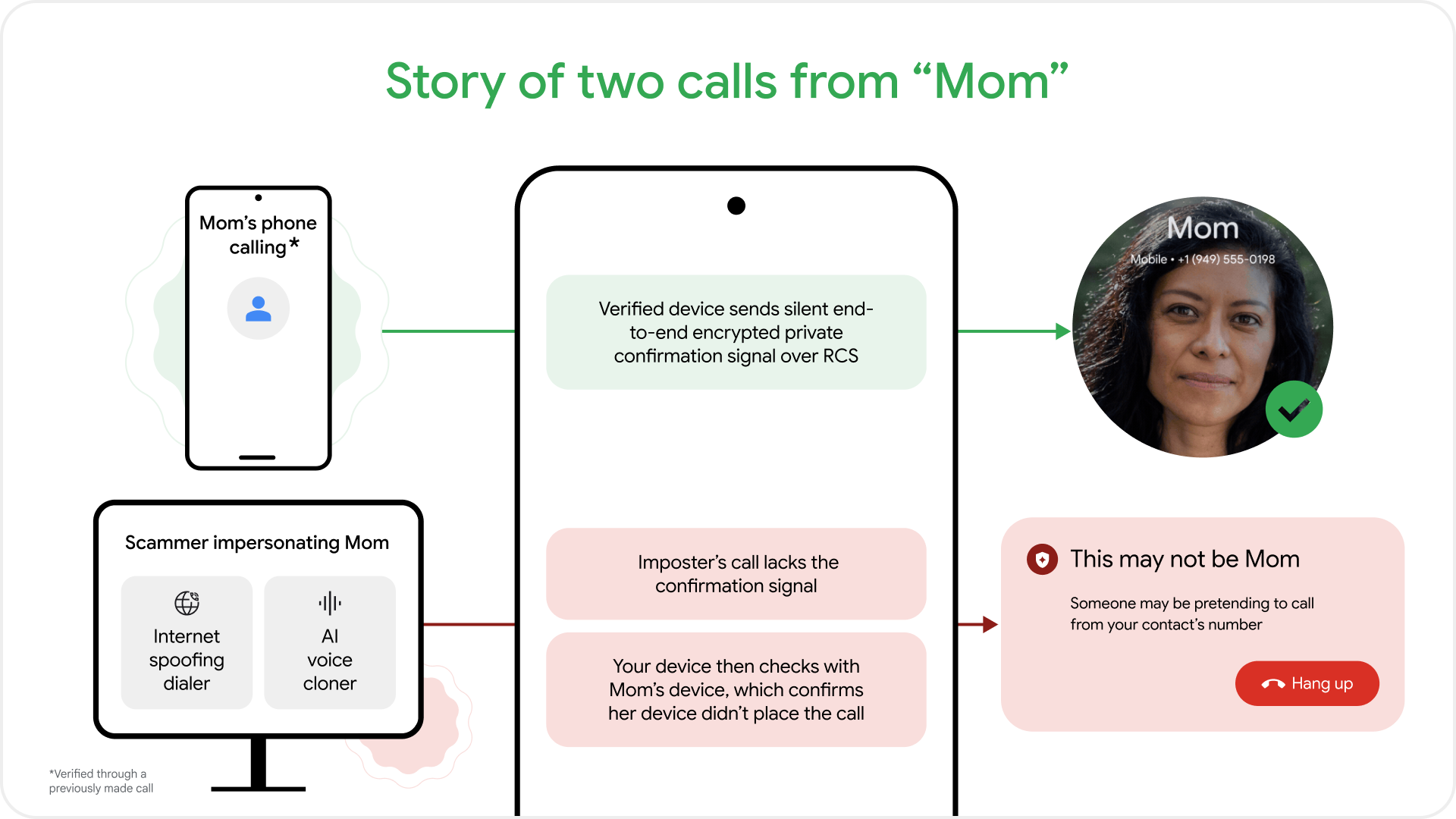
Google’s solution is an expansion of the system it debuted last month for verified financial calls. Now, a similar feature will work with anyone in your contacts. Many of the most effective deepfake scams involve spoofing a contact’s number, which makes the call look more legitimate when your phone lights up. Victims of these scams are then greeted by an accurate re-creation of the person’s voice spinning a yarn that involves an urgent need for cash.
Google’s scam call detection feature will be available on all phones running Android 12 or higher, but it does require you to have three Google apps installed: Phone by Google, Contacts, and Google Messages. Depending on your device, you may already have these. They’re the preloaded options on Pixel and Motorola phones, and Samsung has now switched over fully to Google Messages. Google claims that Phone by Google is the most widely used dialer, but that doesn’t seem right—Samsung has its own phone app, and it’s the largest Android OEM by far.
Regardless, once you have Google’s trio of communication apps, they will work together to verify phone calls that appear to come from a known contact. When scammers want to impersonate a contact, they use an online relay to spoof the number. When a call comes in, the caller’s Google dialer app sends a confirmation signal that is missing in spoofed relay calls. If that signal is absent, your phone uses the Messages app to send an authenticated RCS ping (hence the Google Messages requirement) to the supposed caller. If their phone reports it’s not placing the call, a pop-up will alert you that the person on the line may not be who you think they are.
Credit: Google
Credit: Google
There’s one more notable caveat you may have noticed. Because the system contacts the other party’s phone for verification, that person must also have the same three Google apps installed. If a caller is using the Samsung dialer or the OnePlus contacts app, Google’s scam detection won’t work.
As AI spoofing has made financial scams easier to pull off, regulators and public safety organizations in some countries have advised Android users to stop using their phones for important financial transactions. This is obviously bad for Android and, by extension, Google. This is just the latest anti-scam measure Google has deployed across the Android ecosystem. Pixel phones can detect likely scam calls and use on-device AI to identify suspicious caller behavior. The Google Messages app also has real-time scam identification.
More AirDrop, more AI
It wouldn’t be an Android update without more AI, so get ready to see some of Google’s AI clothing features in your phone. The “Find the Look” feature in Circle to Search that debuted on Pixel 10 and Galaxy S26 phones earlier this year is expanding to all devices running Android 14 and higher.
Circle to Search lets you search for images of anything that appears on your screen. The new capabilities are an additional layer in Circle to Search that analyzes everything in an image. Google mainly presents this as a way to determine what someone is wearing. After circling an image, you can tap the “Find the Look” button in the pop-up to identify all parts of an ensemble.
Find the Look in Circle to Search
Google also says Google Photos will soon get a new AI-assisted fashion engine. Google Photos will catalog the clothing you wear, creating a virtual wardrobe you can browse and organize from your phone. You can even create AI images of yourself wearing these outfits, but don’t let the robot flatter you—you should probably see how things look in real life before you run out the door.
There is also a bit of non-AI news in the Android world today. Google began supporting Apple AirDrop on select devices earlier this year, but support has been spotty. So far, only the last few generations of Pixel devices and Samsung’s latest flagship phones have supported AirDrop. Here are all the Android phones getting AirDrop support today.
- Samsung: Galaxy S25, S25+, S25 Ultra, S25 Edge, Galaxy Z Flip7, Z Fold7, Galaxy Z TriFold, Galaxy S24, Galaxy S24+, Galaxy S24 Ultra, Galaxy Z Flip6, Z Fold6
- OnePlus: OnePlus 15
- Xiaomi: Xiaomi 17T Pro (announced early)
- Vivo: Vivo X300 and X300 Pro
- HONOR: Magic V6
Nothing is changing about the iPhone side. Sending files from Android still requires the iPhone to be set to accept AirDrop requests from “anyone for 10 minutes.” Contact-based sharing is still not supported when sending from Android, but at least the feature is becoming more widespread.

Ryan Whitwam is a senior technology reporter at Ars Technica, covering the ways Google, AI, and mobile technology continue to change the world. Over his 20-year career, he’s written for Android Police, ExtremeTech, Wirecutter, NY Times, and more. He has reviewed more phones than most people will ever own. You can follow him on Bluesky, where you will see photos of his dozens of mechanical keyboards.