

Google says it respects user privacy in AI, but the reality is not so black and white.

Gemini’s privacy controls are multifaceted and often confusing. Credit: Aurich Lawson
Gemini’s privacy controls are multifaceted and often confusing. Credit: Aurich Lawson
Many people are hoping—nay, praying—that the potential AI bubble will burst soon.
But to hear Google tell it, generative AI is the future, and the company’s products have to change to keep up with the technical reality. As a result, Gemini is seeping into every nook and cranny of the Google ecosystem. Generative AI feeds on data, and Google has a lot of your data in products like Gmail and Drive. What does that mean for your privacy, and what happens if you don’t want Gemini peeking over your shoulder? Well, it’s kind of a mess.
The amount of data Gemini retains depends on how you access the AI, and opting out of data collection can mean running straight into so-called “dark patterns,” UI elements that work against the user’s interest.
This is the future?
Google doesn’t train AI with your data, except when it does
Concerns over how Google uses your private data stretch back long before the generative AI boom. When Google stepped up advertising in Gmail, the company clarified that it doesn’t use the content of your emails to serve ads. Instead, ad personalization (which you can disable) is a global feature that uses your web activity and vital statistics to target you. Most people have come to terms with that, but things get murkier in the realm of AI.
As Google rolls more Gemini features into iconic products like Gmail, it has again had to clarify when it does and doesn’t use your data. In a recent blog post (and associated YouTube Short), Google sought to clarify that your emails are not being piped directly into Gemini. Instead, Gemini gets access to your data for “isolated tasks.” When you interact with Gemini features in Workspace apps like Gmail or Drive, the AI processes your data but does not save it.
“Protecting users’ privacy and control over their data is fundamental to how we develop and deploy AI in Google Workspace,” a Google spokesperson said. “The content you put into Workspace—like your private Drive files—is yours, and when using Gemini in Workspace we do not use that personal content to train our foundational generative AI models.”
So Google doesn’t scan your inbox or documents to train Gemini. Great. But Gemini can use tools to connect to Workspace and other Google products when appropriate, based on your prompt. Google says its AI models can be trained on Gemini inputs and outputs. And guess what those outputs might include—yes, your data.
Gemini outputs can include summaries and snippets of email or files, and that data can then become fodder for AI training. Google says the goal is to train Gemini to be a better assistant, and the way people interact with the bot is a key element, but it tries to “filter and reduce” personal information going into AI training datasets. There’s no way for us to know how well this automated process works, though.
Google is quick to point out that users have control over these features. If you want to keep your private data truly private, you can avoid ever letting Gemini interact with your files or opt out of sharing any data for AI training. Unfortunately, Google doesn’t make it easy to leave Gemini behind.
In a chatbot, darkly
There are a few ways, some of which are more straightforward than others, to ensure that your personal data doesn’t end up in Google’s AI training set. The easiest way is to keep your interactions with Gemini light and impersonal: Don’t allow Gemini to access your other Google apps and stick to temporary chats for anything even remotely sensitive. That way, Gemini won’t have any personal data in outputs to mine. Of course, this makes Gemini much less useful, a familiar theme to those trying to preserve their privacy.
To fully block AI training on your data, you need to turn off a feature called Gemini Apps Activity. This esoteric settings page lets you turn off Gemini history or turn it off and delete your existing Gemini data. If you don’t save activity, Google doesn’t train on it. However, this also means you lose your chat history. So you have to choose between not having your AI chats for future reference or allowing the content of those chats to be used for AI training.
Companies generally won’t admit to designing an interface to manipulate users, but the intent doesn’t determine whether a UI design is a dark pattern. “It doesn’t matter whether it’s intentional or not,” said Marie Potel of Fair Patterns, a startup building AI models that detect dark patterns and predatory design. “What matters is whether the autonomy—the agency—of users is respected and whether the design goes against what users want to do.”
If the only way to opt out of AI training is to permanently disable your chat history, that arrangement doesn’t seem to respect the user’s agency—it’s a forced action. Even finding the right menu to opt out of training can be a chore. There’s a link hiding in the Gemini app settings, but it’s labeled only as “Activity,” and there are also direct links if you search through Google’s support articles.
Interestingly, the Gemini controls are absent from Google’s account privacy settings, where you’d expect to find them. A company representative said there should be a link in the Activity Controls, along with submenus for Android, Maps, Search, Assistant, and more. After checking multiple accounts, we have yet to see a link to the Gemini privacy menu.
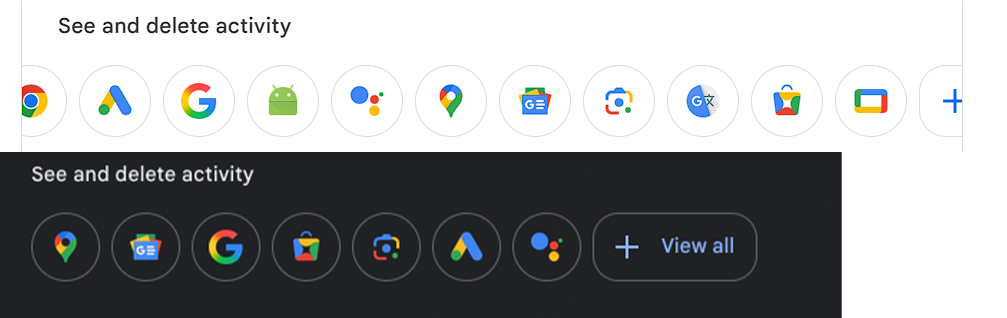
Two different Google accounts, no links to Gemini’s privacy menu.
Credit: Ryan Whitwam
Two different Google accounts, no links to Gemini’s privacy menu. Credit: Ryan Whitwam
A toggle that is so vital to user privacy, even one that substantially degrades the experience, should not be so hard to find. Unfortunately, this is not the first time Google has seemingly misplaced a privacy option. Marie Potel noted that hidden and dead links are a dark pattern almost as old as the Internet.
“Google has a history of hiding features, especially privacy settings, in a number of clicks that are absolutely made to deter people from using them,” said Potel.
AI is the new default experience
Accumulating training data is not Google’s only goal with Gemini—it also wants to make generative AI a part of your life. The more people using Gemini features, the easier it is for Google to justify the huge investment in the tech ($185 billion expected in 2026 alone). Naturally, Google’s core products use AI features more aggressively, and it’s assumed that you want them.
In Gmail, Gemini can craft and tweak emails, summarize email chains, organize your inbox, and create AI Overviews of your email. The amount of AI you get depends on whether you’re paying for higher AI limits, but everyone gets some, and these features are constantly expanding. But maybe you don’t want the AI generating hallucinatory summaries in your email. Turning that off is an exercise in frustration because there is no granularity—plenty of features have simple toggles in the Gmail settings but not Gemini.
To disable Gemini features in Gmail, you have to turn them all off through what Google calls “Smart Features,” and there are two ways to do that. One of them nukes a ton of Gmail functionality, and neither is explained very well.
In the Gmail settings, there’s a checkbox toggle for Smart Features that disables Gemini, but it also kills a number of popular features that predate the AI boom. Using this option means giving up inbox filtering (tabs for primary, social, promotions, etc.), Smart Compose, package tracking, and more. Maybe you thought you only had 20 unread emails, but now you have 500 because all those social updates you ignored are suddenly cluttering your main inbox. After disabling Gemini and losing all those features, Gmail offers you a second chance with a pop-up nag that reenables all those features, including Gemini.
The other Smart Features toggle, one click deeper in the settings, is the Workspace version. This one turns off Gemini in addition to personalized Drive search, copying loyalty cards to Wallet and Calendar event extraction from Gmail. This is supposed to remove Gemini from Drive as well, but you may not see any difference after flipping the switch because the Gemini UI elements don’t go away. Clicking on any of them will produce a prompt to turn Smart Features (and Gemini) back on.
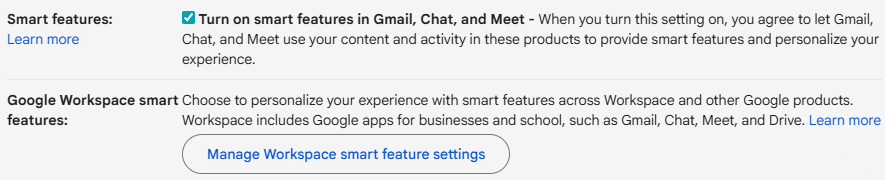
There are two ways to disable Gemini in Gmail, and neither is labeled as such.
Credit: Google
There are two ways to disable Gemini in Gmail, and neither is labeled as such. Credit: Google
So disabling Gemini features means contending with vaguely worded menus and the loss of unrelated features, which looks like a combination of “obstruction” and “forced action” dark patterns. “Clearly, that’s not acceptable,” Potel said. “The fact that it changes your usage parameters when you disable Gemini is obviously meant to prevent you from disabling it.”
Default settings are powerful even without predatory design, but the way defaults are managed can easily veer into a dark place. According to Dr. Harry Brignull, who coined the term “dark pattern” in 2010, companies have long relied on defaults to bring users along for the ride.
Speaking about the tech industry generally, Brignull said that companies are acutely aware of this effect and the advantages it can bestow. “We could talk about this as the pre-selection dark pattern,” he said. “If you want to get people to opt in to something, instead of asking them in a sign-up step explicitly with a link to learn more, you can take that and make it pre-selected. Put that in the settings three to four clicks deep, and that way you may feel you have the means to argue that users are given a choice when, in fact, you know from your own stats that by designing it this way, very few people are even getting to that page.”
Google has billions of users hooked on its products, and that gives it a lot of power to get new features in front of users, since people rarely change the defaults. Google has paid handsomely to set defaults on devices like the iPhone for this reason. The issue came up repeatedly in Google’s recent antitrust cases, and government lawyers used it to paint the company as anticompetitive.
What we’re seeing in both free and paid Google accounts is the power of defaults in the AI era. The default is sharing data for AI training. The default is AI summaries in your email. The default is AI-powered document creation. You can change these settings, but Google has to know most people won’t do that, because the options are hard to find and don’t work as they should.
Welcome to the future.

Ryan Whitwam is a senior technology reporter at Ars Technica, covering the ways Google, AI, and mobile technology continue to change the world. Over his 20-year career, he’s written for Android Police, ExtremeTech, Wirecutter, NY Times, and more. He has reviewed more phones than most people will ever own. You can follow him on Bluesky, where you will see photos of his dozens of mechanical keyboards.



