
- Microsoft’s new Windows 11 Start menu design is now in testing
- It allows for a surprising level of customization, including making the menu more compact
- On top of this, Microsoft has revealed it’s working to modernize some legacy parts of the interface that are jarring when they appear
Windows 11’s revamped Start menu that offers a full range of customization options is now officially in testing – and there’s another change to improve the interface of the OS in terms of eradicating old bits of legacy UI.
Windows Latest flagged the blog post from Microsoft about freshly released preview builds in the Beta and Experimental channels, and the latter packs the Start menu redesign for 2026.
A big change here is that you can now turn off any section you want, not just the Recommended panel (which has been renamed to Recent, incidentally). So, if you want to ditch that Recent panel, or the Pinned section, or the list of All apps, you can do as you wish. You can hide your name and profile picture in the Start menu, too.
The other major change is that you can now choose between the standard (larger) Start menu and a more compact version. Previously, the small layout was applied automatically for certain devices with smaller screen sizes, but you couldn’t actively select it — and some folks wanted to do that.
Now they can, and with the ability to switch off any section of the Start menu that you find superfluous, for the first time in Windows 11‘s history you have full control over the customization of this key piece of the desktop interface.
Analysis: Microsoft’s gone surprisingly far here
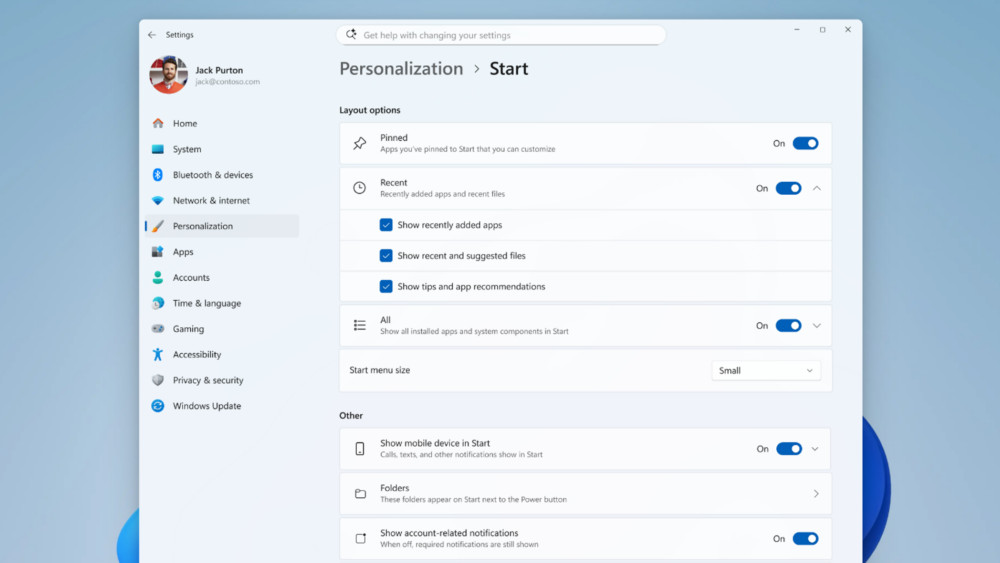
Arguably this should have been done a long time ago, but nonetheless, it’s great to see Microsoft finally implementing a complete range of customization options for Windows 11’s Start menu. This means you can now turn off everything you don’t want and make the menu highly compact and streamlined (addressing some of the bad feeling directed towards the last Start menu overhaul before this one, in terms of the menu being too hefty).
Indeed, you can turn off everything now and be left with a blank Start menu — which isn’t very useful, of course, but this is how far Microsoft has gone here, as Windows Latest makes clear.
It’s also worth noting that the new Recent panel isn’t just a renaming of the Recommended section, and it appears to drop Microsoft’s recommendations (promotional nonsense in some cases), highlighting recently used files rather than pushing ad-like suggestions. That’s great to see, although this is based on limited testing thus far – and remember, all this work is still in preview. Things could change by the time the revamped Start menu reaches all Windows 11 PCs.
All this is part of the promised work in the fix Windows 11 campaign, of course, and Windows Latest spotted a bonus extra here. Namely that Microsoft’s March Rogers, who is Partner Director of Design, confirmed on X that some rusty old parts of the Windows 11 interface are getting the operating system‘s new modern design.
These are legacy dialog boxes such as file copying (which has already been done), and the common file dialog (for when you’re browsing folders in Windows 11, say when you’re opening a file within an app) is apparently in line for a visual refresh.
I recently wrote about legacy parts of the interface badly needing to be addressed by Microsoft as part of my wish-list of vital things to fix in Windows 11, so I’m pleased to see this work going ahead (and the tweak to the Recommended panel in the Start menu, too). Now if only Microsoft would address my other key points, namely adverts more broadly, and also Windows 11’s telemetry and installation with a local account — we could really be in business.

Follow TechRadar on Google News and add us as a preferred source to get our expert news, reviews, and opinion in your feeds.