
TechRadar Verdict
The Keychron Q1 Ultra 8K is the fanciest version of Keychron’s 75%-scale keyboard, delivering a premium typing experience thanks to its high-end metal construction and Silk POM key switches. It’s compact enough to work great for users with limited desktop real estate, but the all-metal build means it’s not ideal for taking with you on the go despite its multiple connectivity options. It also offers an 8K polling rate for minimizing latency; a nice boost, but probably overkill for all but the most hardcore users.
Pros
- +
Fantastic build quality
- +
Satisfying typing feel
- +
Mac and Windows compatible
- +
Very long battery life in wireless mode
Cons
- –
8K polling is a gimmick
- –
No adjustable feet
- –
Total weight means it’s not remotely portable despite its compact size
Why you can trust TechRadar We spend hours testing every product or service we review, so you can be sure you’re buying the best. Find out more about how we test.
Keychron Q1 Ultra 8K: two-minute review
The premium keyboard space is weird, man. I’ve been reviewing PC hardware long enough to know that you can usually get a pretty darn good product without spending top dollar, but that’s arguably not always the case with keyboards. The bottom end of the market is awash with crappy membrane keys and cheap mechanical switches that fail at the drop of a hat, so I find myself frequently more likely to recommend more premium offerings like the Keychron Q1 Ultra 8K.
Priced at $229.99 (around £170/AU$320), it’s certainly aiming to be one of the best keyboards on the market, and it does a lot to justify that admittedly rather steep price of admission. Straight out of the box, this feels like a high-end keyboard: the chassis is crafted from CNC-machined aluminum, weighing almost two kilograms in total, with doubleshot PBT keycaps.

I would hazard that, despite featuring the obligatory RGB key backlighting, this likely won’t be the ideal option for gamers seeking the best gaming keyboard — at least, not with the Banana key switches in my review model. There is a linear red option available, which offers slightly greater key travel and significantly reduced actuation force, and high-intensity gamers will probably find that better.
While the Q1 Ultra 8K’s namesake 8,000Hz polling rate is ostensibly aimed squarely at PC gamers, offering ultra-fast responsiveness and near-zero input lag, it’s frankly a bit of a gimmick. All but the twitchiest pro gamers are unlikely to notice any real-world difference; in fact, I used the Q1 Ultra 8K for almost two days before realizing that the 8K polling mode was switched off by default, and I’d been playing Marathon with the regular 1,000Hz polling — and I didn’t notice the slightest bit of input latency, so this is a somewhat milquetoast complaint on my part.
Overall, this is a very good keyboard that doesn’t quite reach all-around perfection, but will still prove a worthy purchase for anyone who spends a lot of time typing at their PC. If you’re looking for something compact but still satisfying to type on, the Keychron Q1 Ultra 8K is a solid choice. If you want a compact keyboard to take on the go, though, look elsewhere — this one is far too heavy for that!
Keychron Q1 Ultra 8K review: Price & release date
- Costs $229.99 (around £170/AU$320)
- Available now in the US
- Sits at the upper end of the market price-wise
At the time of writing, it appears that the Keychron Q1 Ultra 8K isn’t available to shoppers in the UK and Australia — potential buyers in those regions will have to settle for the Q1 Max, which offers a similarly premium design but uses slightly cheaper key switches and lacks the 8K polling rate feature.
If you’re in the US (or willing to import), you can pick up the Q1 Ultra 8K for $229.99 (around £170/AU$320) – a fairly steep price, though one that puts it in the same bracket as the similarly great SteelSeries Apex Pro TKL Wireless Gen 3. Looking at the wider premium mechanical keyboard market, this pricing is reasonably competitive.
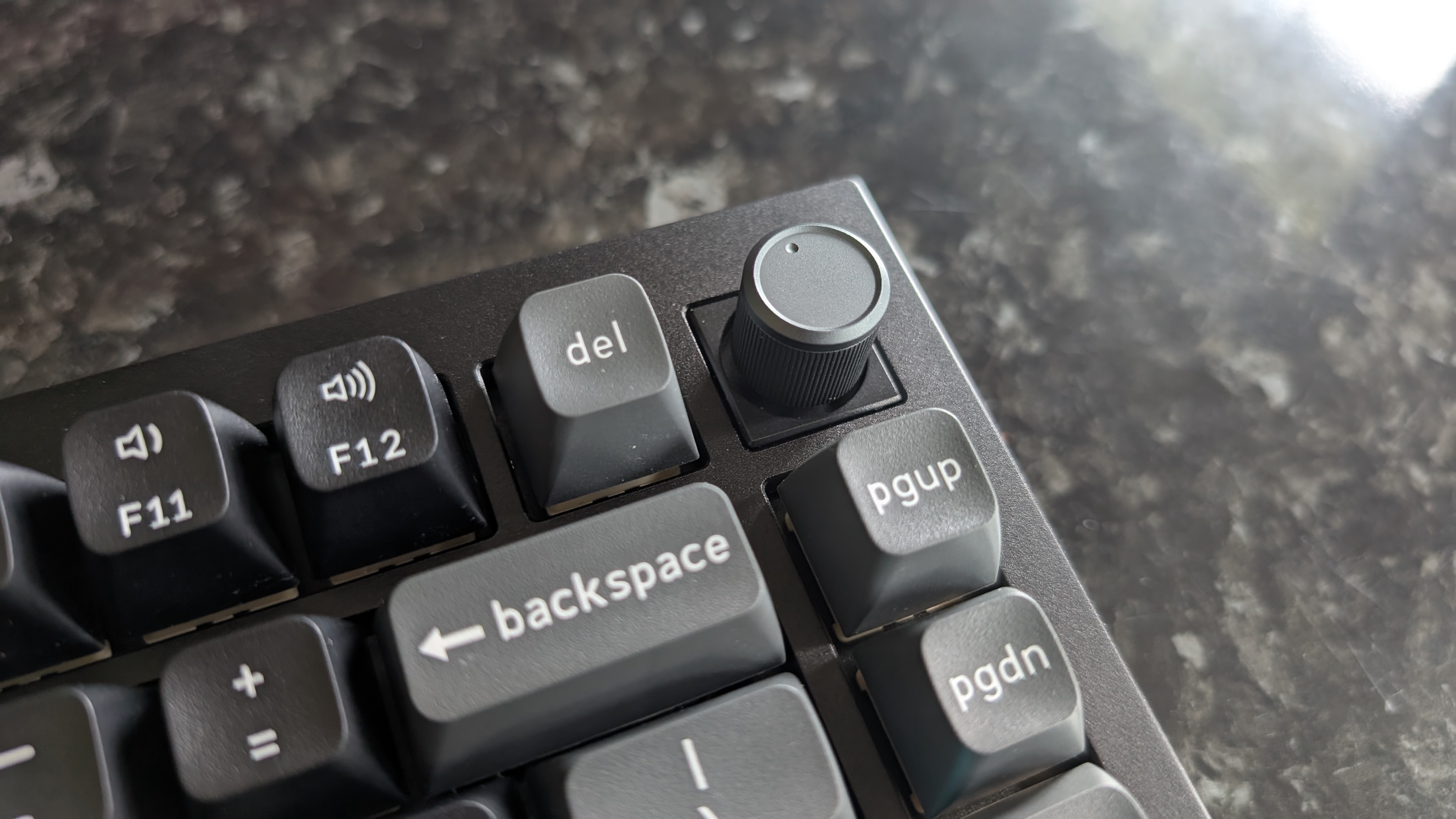
Inside the box, you get a set of alternate keycaps for switching between Windows and macOS compatibility, along with a USB-C to USB-C charging cable, USB-A adapter, and a small set of tools for hot-swapping both the keycaps and key switches.
- Price score: 3.5/5
Keychron Q1 Ultra 8K review: Specs
Swipe to scroll horizontally
|
Layout |
75% |
|
Switch |
Keychron Silk POM Banana (Linear Red and Tactile Brown also available) |
|
Programmable keys |
Yes |
|
Dimensions |
12.9 x 5.7 x 1.3 inches / 328 x 145 x 32mm |
|
RGB or backlighting |
Yes (customisable) |
Keychron Q1 Ultra 8K review: Design & features
- Robust machined aluminum chassis
- Comfortable concave PBT keycaps
- Great degree of customization
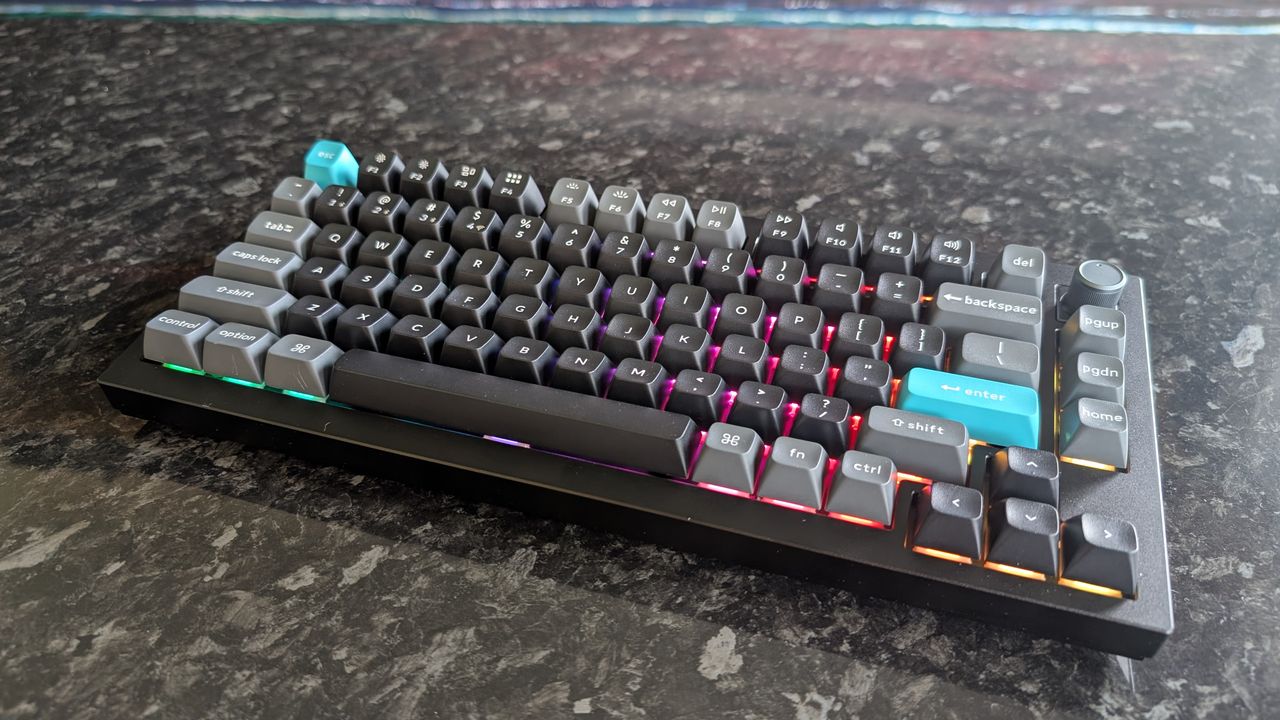
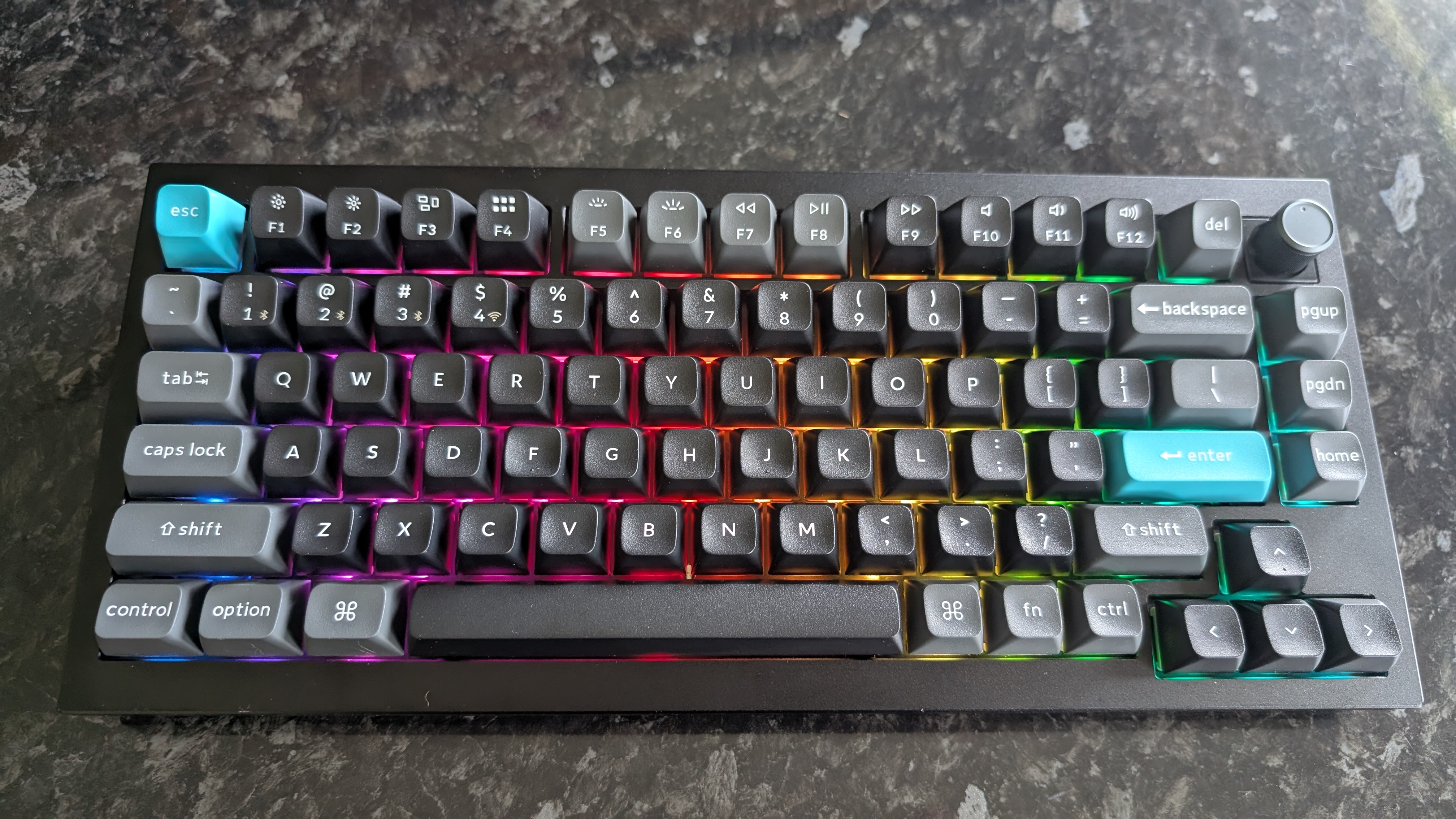
My review unit of the Keychron Q1 Ultra 8K uses the black colorway, and I really like it. Almost the entire unit has a matte black finish, with dark gray used for accenting for keys around the edge of the board and a bright cyan tone for the Esc and Enter keys.
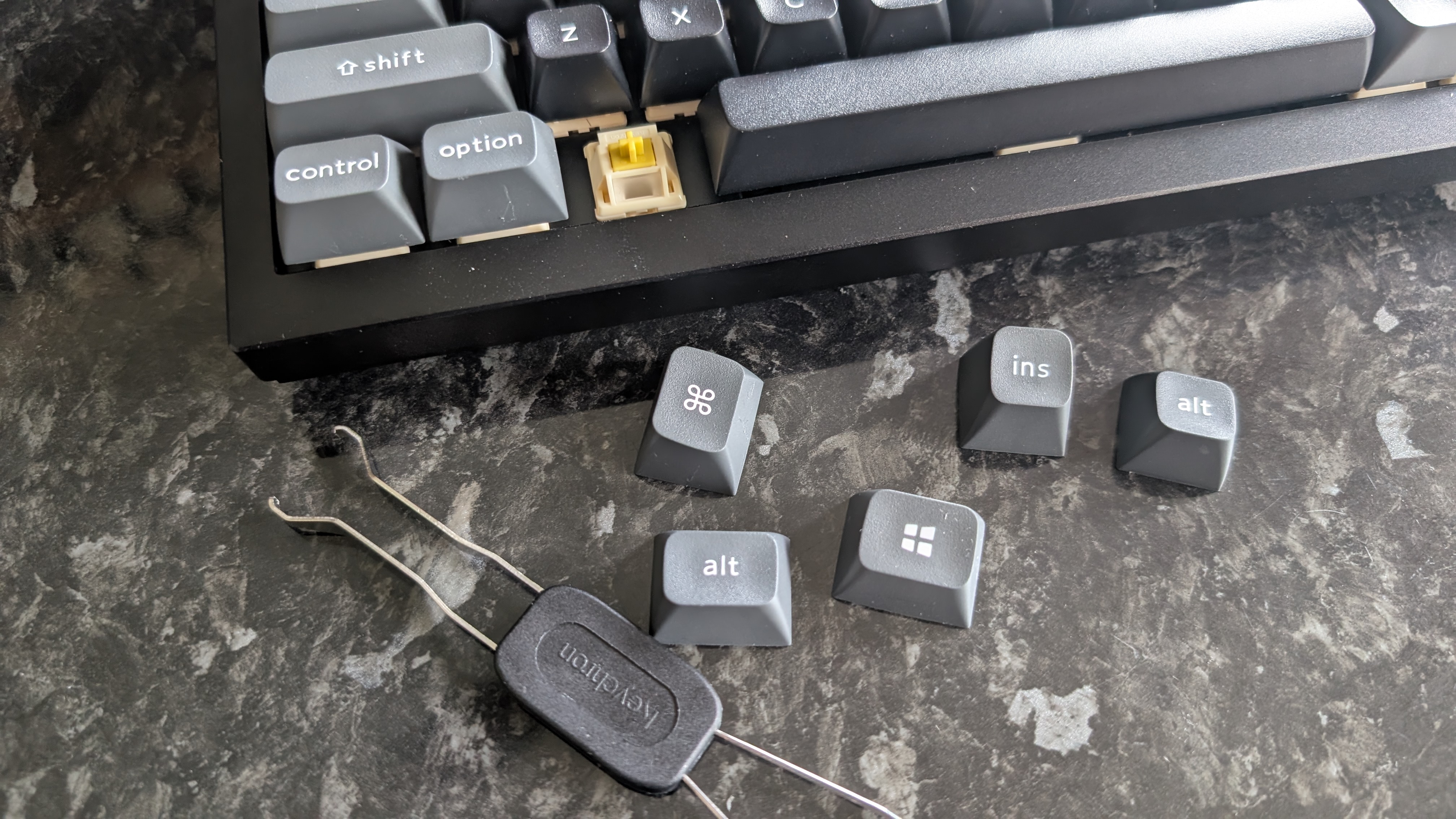
Combined with the tall, blocky keycaps, simple lettering, and the highly satisfying physical volume knob in the top-right corner, it’s all got a distinctly retrofuturist feel to it. The white colorway rocks a similar vibe with gray and red accent keys that would make it look right at home aboard the USCSS Nostromo.
Indeed, I was almost loath to turn on the RGB lighting, because it almost detracts from the clean, retro vibe this keyboard has going for it. Fortunately, those RGB LEDs are addressable on a per-key basis, and Keychron’s free software gives you a wide degree of customization. Personally, I was a lot happier with the aesthetic of the Q1 Ultra 8K after setting the backlighting to a cool blue that matched the accent keys.
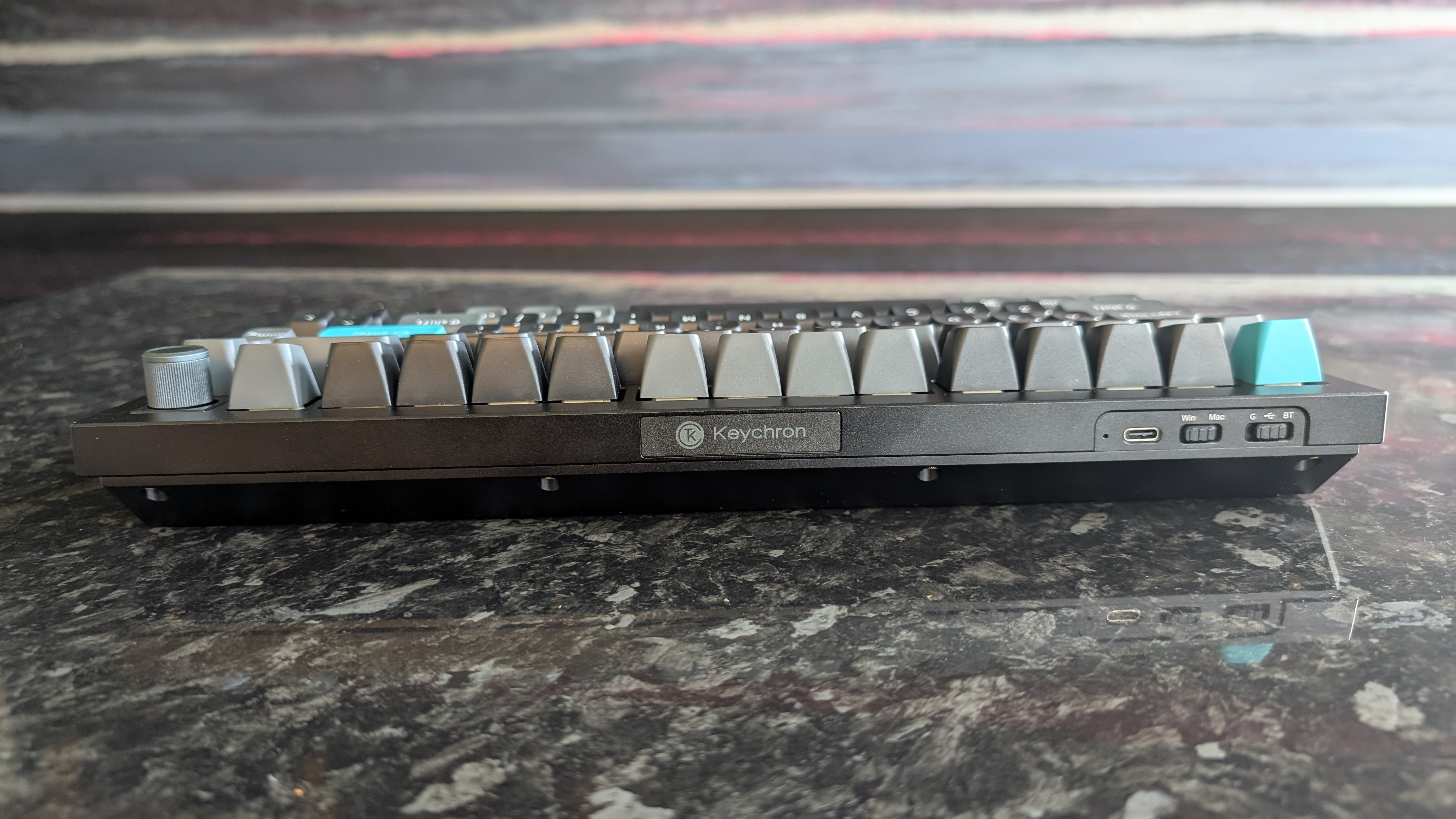
The all-metal construction means there’s virtually no flex or sponginess in the chassis whatsoever, with every keypress feeling very solid. However, it also means that this keyboard weighs a whopping 1.73kg – quite literally more than many of the laptops I’ve reviewed for TechRadar, and far too heavy to be practical as an on-the-go keyboard despite its compact design.
The Silk POM Banana switches require quite a bit of actuation force, which takes a bit of adjusting to if you’re coming from a non-tactile keyboard with either linear or membrane switches. They also have less travel distance, which might be an issue for some mech keyboard purists, but didn’t bother me in the slightest once I got used to typing on it.
Both the keycaps and the key switches themselves are hot-swappable, and the box includes a puller tool, a hex key, and a mini screwdriver for making your own adjustments should you want to do so. It also comes with a set of alternate keycaps to swap it over to Windows compatibility mode (the default keyboard layout is for macOS), and there are two switches on the rear edge for switching OS and connectivity modes along with a standard USB-C charging port, a cable for which is included in the box.
Given the degree of available customization and the robust, high-quality design of the surrounding board, the Q1 Ultra 8K could be a solid choice for mechanical keyboard enthusiasts who want to tweak their hardware. The larger keys also feature new screw-in PCB stabilizers, which help make the space bar in particular feel a lot less wobbly than it does on some mechanical keyboards, especially when hitting it at either end with your thumb. The double-gasket key switch design uses two separate silicone pads (as well as an acoustic pad on the bottom of the keyboard) to reach a deliberate and very satisfying typing sound that takes me right back to the early 2000s.
In terms of the aforementioned connectivity modes, you’ve got a few options. Wired will be the way to go for most gamers, as it ensures minimal input latency hand-in-hand with the 8K polling rate feature. This can be done directly via USB-C to USB-C using the included cable, but there’s also a USB-C to USB-A adapter in the box in case you don’t have any free USB-C ports.
If you prefer a wireless connection, the Keychron Q1 Ultra 8K supports both Bluetooth 5.3 and 2.4GHz connectivity, both of which I found to be highly effective in my tests. The 2.4GHz option is probably a little more reliable in terms of input latency, particularly in environments with heavy Bluetooth signal traffic (I was testing this keyboard in the privacy of my own very rural home, not a busy office!), but I didn’t experience any noticeable problems with the Bluetooth mode.
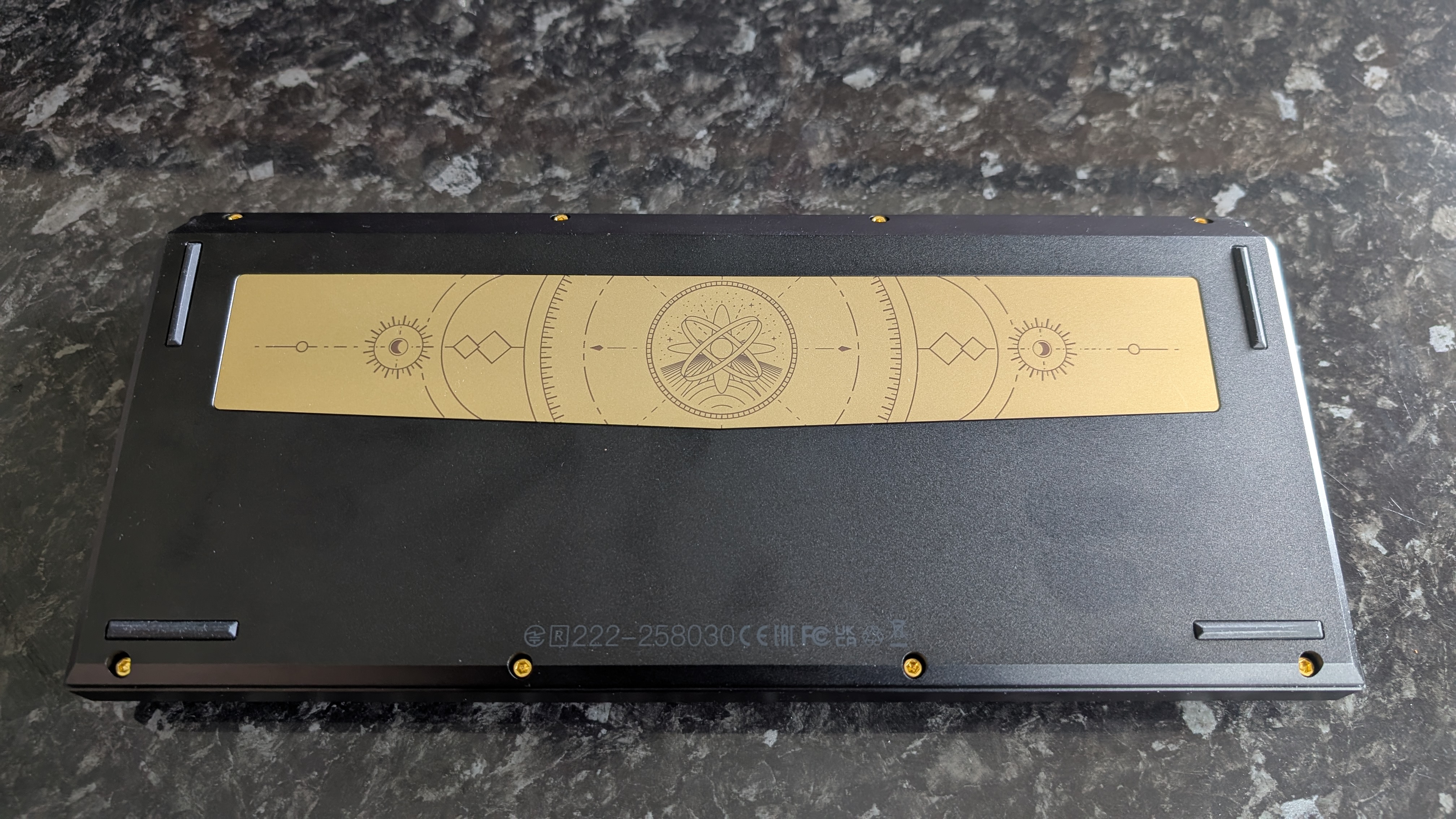
The last unique design feature I’ll touch on is hidden on the underside of the keyboard: a wide gold ‘art plate’ with a sort of astronomy-themed pattern engraved on it. What purpose does this serve? None, as far as I can tell, and you won’t even be able to see it when actually using the keyboard. It looks fairly nice, I guess, but it feels slightly like a pointless addition.
Completely absent from the base of this keyboard, however, are any sort of adjustable feet. For a $200+ keyboard, that’s simply unacceptable. It won’t bother some users, but as someone who prefers a steeper keyboard incline to use with my padded wrist rest, it might actually be a dealbreaker for me if I were opening my own wallet – so for that, I must dock a point from Keychron.
- Design and features: 4/5
Keychron Q1 Ultra 8K review: Performance
- Satisfying typing with sharp actuation
- 8,000Hz polling rate is nice, but sort of unnecessary
- Looooong battery life
I’m always a little dubious when keyboard companies start making their own key switches instead of using the ever-dependable Cherry and Gateron brands, but the Keychron Silk POM switches in this keyboard are really very nice to use.
As I mentioned further up, I think the Banana yellow switches in my review model are a bit better suited to typing than gaming, though they’re certainly not bad. I used the Keychron Q1 Ultra 8K to play several games, including Warframe, Marathon, and Remnant II, and didn’t have any significant issues with misinputs or keypresses not registering. The higher actuation force of the Banana switches compared to the mainstream linear red switches you’ll find in many gaming keyboards did take a little bit of getting used to, but I still found it to be perfectly acceptable.
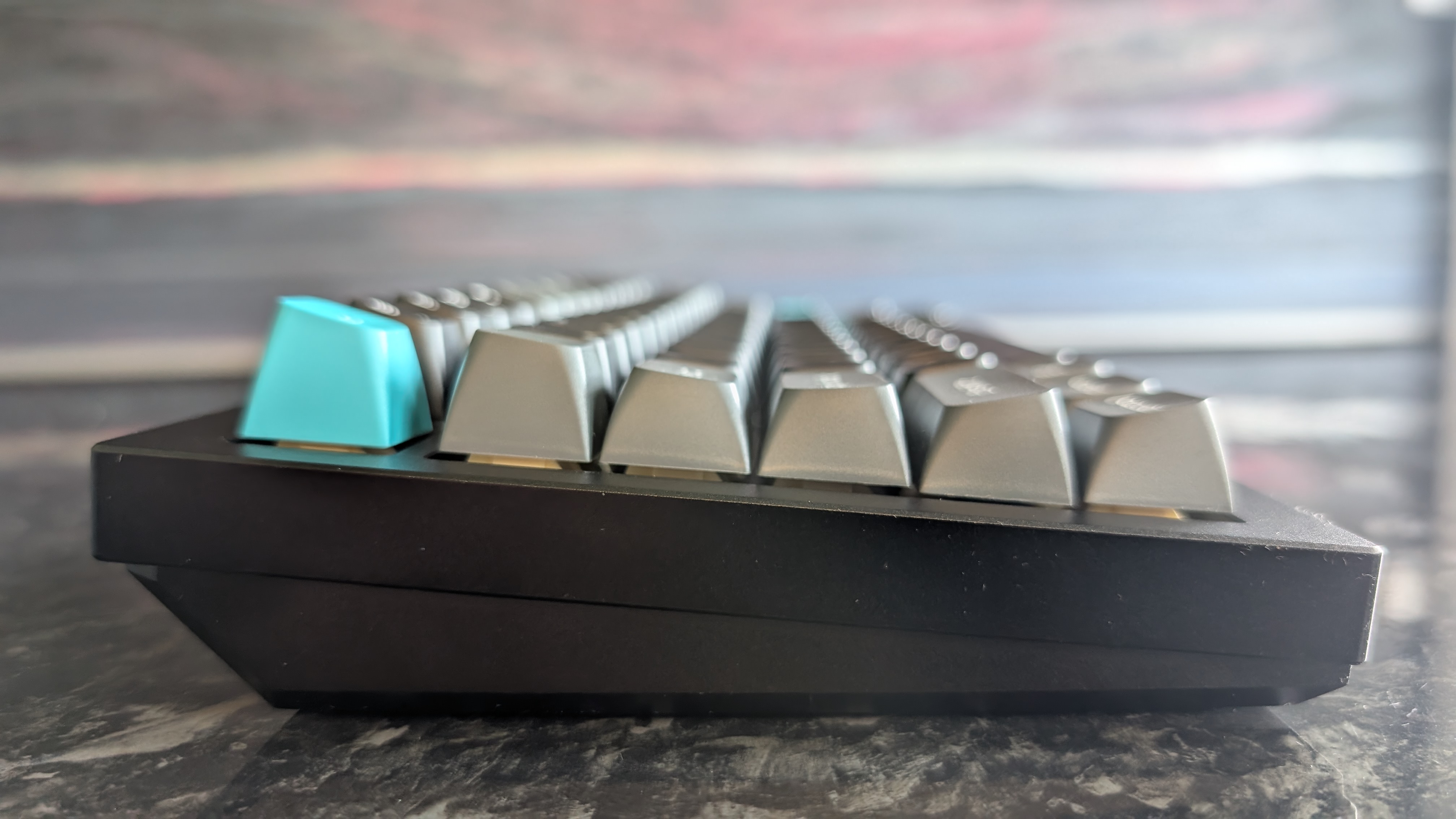
For typing, though? This keyboard is a dream. The concave keycap tops let your fingertips slide into the center of each key for confident inputs, even when touch-typing at speed, and the reduced travel and subtle bounce on the Banana switches compared to Keychron’s own red and brown switches mean that you don’t feel like you’re hammering the keys — even if you’re a somewhat forceful typist like me.
I know I’ve mentioned the acoustic experience of this board already in this review, but it really does bear repeating. This keyboard just sounds so damn good to type on. It’s like an old 90s Packard-Bell keyboard and a snare drum had a baby. There’s no audible click like you’ll see with blue switches, though, so typing gently will actually result in a fairly quiet experience — good for office environments where you don’t want the loudest keyboard in the building.
The 8K polling rate feature (which requires either a wired or 2.4GHz connection, as Bluetooth doesn’t support it) is switched off by default, since some older PCs don’t support it. It’s set to 1,000Hz as standard, though turning it on in the Keychron Launcher software is very straightforward — you can also use the software to adjust the default keybindings and set up macros, if you’re so inclined.
Still, I honestly didn’t register much, if any, difference when I turned on the 8K polling. Even in twitchy competitive games like Marathon and Valorant, I didn’t feel at any point that swapping over to the 8K polling mode made my inputs feel faster or more responsive.
I should be clear at this point that I am not a ‘pro gamer’ by any definition of the phrase. I was Diamond-ranked in Overwatch back in the day and have the (dubious) honor of being a Legend 2 veteran in Warframe, so I’d like to think I’m at least above average, but I accept that I’m not really the target audience for a feature like this. If you are a hardcore gamer and you’re primarily playing very twitchy, reaction-based games like Valorant or Counter-Strike, then the 8K polling rate may prove beneficial, but the simple fact is that most players aren’t going to suddenly find themselves playing better after turning it on.
My last note here will be on the battery life of the Q1 Ultra 8K in wireless mode, which is certainly up to spec. Keychron promises up to 660 hours of use on a single charge, and while I didn’t leave the keyboard running for a full 28 days (!) to test that, I will say that it didn’t need charging even once after my initial wired testing, and I used it in wireless mode with the RGB lighting on for a full week. As far as wireless keyboards go, the battery life on offer here is undeniably great.
- Performance: 4.5/5
Should I buy the Keychron Q1 Ultra 8K?
Swipe to scroll horizontally
|
Attribute |
Notes |
Score |
|
Value |
The Keychron Q1 Ultra 8K is undeniably pretty costly, but it delivers a decent feature set and premium build quality that helps justify the asking price. |
3.5/5 |
|
Design and features |
I’m a fan of the Q1 Ultra 8K’s minimalist aesthetic, and the multi-device connectivity is a solid addition. It’s shockingly heavy, though! |
4/5 |
|
Performance |
The keyboard is extremely satisfying to type on, even if the 8K polling rate mode isn’t going to make a difference to the vast majority of users. |
4.5/5 |
|
Overall rating |
Despite its fairly high asking price, the Keychron Q1 Ultra 8K is a good choice for mechanical keyboard enthusiasts who want a compact board that looks and feels like a premium piece of hardware. |
4/5 |
Buy it if…
” data-widget-type=”deal”>
Corsair K70 Pro TKL
This Corsair option is a little larger than the Keychron Q1 Ultra 8K’s 75% layout, and offers a similarly rich feature set with performance-focused HE switches, 8000Hz wired polling, and a wider range of physical controls. It has a wristrest, too! Read our Corsair K70 Pro TKL review.
” data-widget-type=”deal”>
Keychron V6 Max
If you want a full-scale keyboard instead, Keychron has you covered for that too: the V6 Max is one of the best keyboards on the market right now, essentially taking the Q1’s great build quality and performance and expanding it into a 100% layout keyboard. Read our full Keychron V6 Max review.
How I tested the Keychron Q1 Ultra 8K
- Replaced my usual keyboard for one week
- Used for daily work, personal projects, and gaming
- Close to a decade of experience testing PC hardware
As is my usual modus operandi for keyboard reviews, I swapped out my trusty Asus ROG Strix Scope RX in my home desktop setup for the Keychron Q1 Ultra 8K for one week. During that period, I used it for my daily work at TechRadar, as well as personal writing projects and some gaming during my off hours.
I mostly played Marathon and Warframe during my testing period (in addition to a lot of typing), but for variety’s sake, I also mixed in some Valorant, Remnant II, and Slay the Spire II – though the keyboard’s use was largely relegated to hitting ‘E’ to end my turn in that last one. I naturally also installed and tested out the free Keychron Launcher software.
I’ve been a tech journalist for more than eight years, and during that time I’ve reviewed dozens of keyboards, mice, headsets… you name it, I’ve probably had my mitts on it at some point. I’m also a long-time PC gamer and self-confessed keyboard freak, meaning I have a keen eye for what works (and what doesn’t) when it comes to PC peripherals.
- Read TechRadar’s reviews guarantee
- First reviewed: May 2026

Christian is TechRadar’s UK-based Computing Editor. He came to us from Maximum PC magazine, where he fell in love with computer hardware and building PCs. He was a regular fixture amongst our freelance review team before making the jump to TechRadar, and can usually be found drooling over the latest high-end graphics card or gaming laptop before looking at his bank account balance and crying.
Christian is a keen campaigner for LGBTQ+ rights and the owner of a charming rescue dog named Lucy, having adopted her after he beat cancer in 2021. She keeps him fit and healthy through a combination of face-licking and long walks, and only occasionally barks at him to demand treats when he’s trying to work from home.
” data-join-the-conversation-text=”Join the Conversation”>
You must confirm your public display name before commenting
Please logout and then login again, you will then be prompted to enter your display name.
Related Posts
I just bought this 8BitDo Ultimate 2 controller, and I adore it – it’s easily one of the best Amazon Prime Day deals
(Image credit: Future) We’re into day two of the Amazon Prime Day sale, and I’ve spent quite a bit of […]
I’ve been using this standing desk for two months, and I don’t know how I survived without it — and right now its $130-off
(Image credit: Future / Hamish Hector) Over the past couple of months, I’ve fallen in love with my new standing […]

Lenovo Legion Go vs Asus ROG Ally X: which PC gaming handheld is best?
(Image credit: Lenovo / Asus) CPU: AMD Ryzen Z1 ExtremeGraphics: AMD RDNA GraphicsRAM: 16GB LPDDR5X (7500Mhz)Screen: 8.8-inch QHD+, 144Hz, 500 […]