

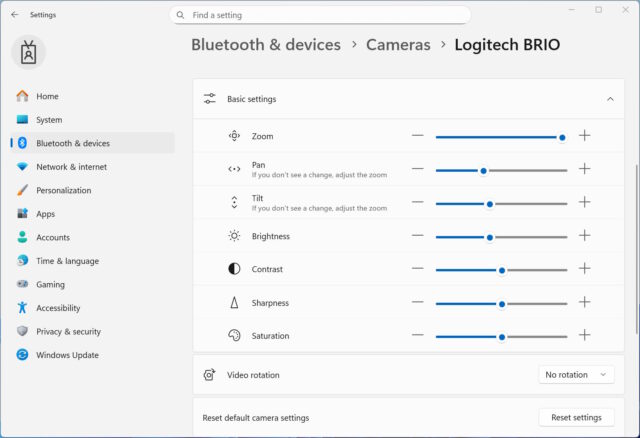
Microsoft has released new preview builds of Windows 11 to the Dev and Beta channels of the Insider Program. Key highlights to be found in both builds includes improvements to Camera Settings, as well as the addition of new emoji following the release of Emoji 16.0.
The updates to be emoji will be something that people either love or are indifferent to, but the improvements to webcam controls are likely to have wider appeal.
There are not many changes and additions to be found in these near-identical builds, but Microsoft has recently said that it will be focusing more on improving features and overall user experience.
The changes to Camera Settings will be of interest to anyone who has a slightly more advanced camera connected to their computer, Describing the new controls that can be found here, Microsoft says:
[Camera Settings]
We are adding the option to directly control pan and tilt for supported cameras in the Settings app. These new controls appear in the camera settings page (Settings > Devices & drivers > Cameras) under the “Basic settings” of your selected camera.
Writing about the emoji updates, Microsoft says:
[Emoji 16.0]
We’re starting to roll Emoji 16.0 back to Insiders.
The Emoji 16.0 release introduces a small but thoughtfully curated set of new emojis—one from each major category—designed to resonate across cultures and contexts. With this build, you will see these new emoji available in the emoji panel.
The only other notable change to be found in these builds is as follows:
Improved the visual experience and performance for several scenarios including at the bottom of the screen when the taskbar is set to autohide, desktop icons unexpected flashing (and decreased performance interacting with your PC), and Windows Security pop up for credentials.
Microsoft reminds users that:
For Windows Insiders who want to be the first to get features gradually rolled out to you, you can turn ON the toggle to get the latest updates as they are available via Settings > Windows Update*. Over time, we will increase the rollouts of features to everyone with the toggle turned on. Should you keep this toggle off, new features will gradually be rolled out to your PC over time once they are ready.
You can see full details of the Dev Channel’s Windows 11 Insider Preview Build 26300.7760 here, and the Beta Channel’s Windows 11 Insider Preview Build 26220.7755 here.


