


Microsoft officially ended support for Windows 10 last month, leaving most systems without regular updates. For users in the European Union, the European Economic Area, and Switzerland, the software giant offers free Windows 10 ESU (Extended Security Updates) patches to keep PCs protected. Unfortunately, for many who qualify, the ESU registration option doesn’t appear in Windows Update.
The missing registration prompt issue is typically the result of incomplete system updates, disabled Windows services, or files required for the registration process going AWOL. If your Windows 10 installation isn’t fully up to date or certain services aren’t running, the ESU registration won’t automatically appear.
Ashampoo Windows 10 ESU Login is a tiny tool that solves the problem automatically. It checks whether the system contains all necessary components, including the sc.exe file that some Windows services depend on. If that file is missing — or blocked — Ashampoo’s program will repair it, activates the required services, adds the registry values, and starts the ESU registration.
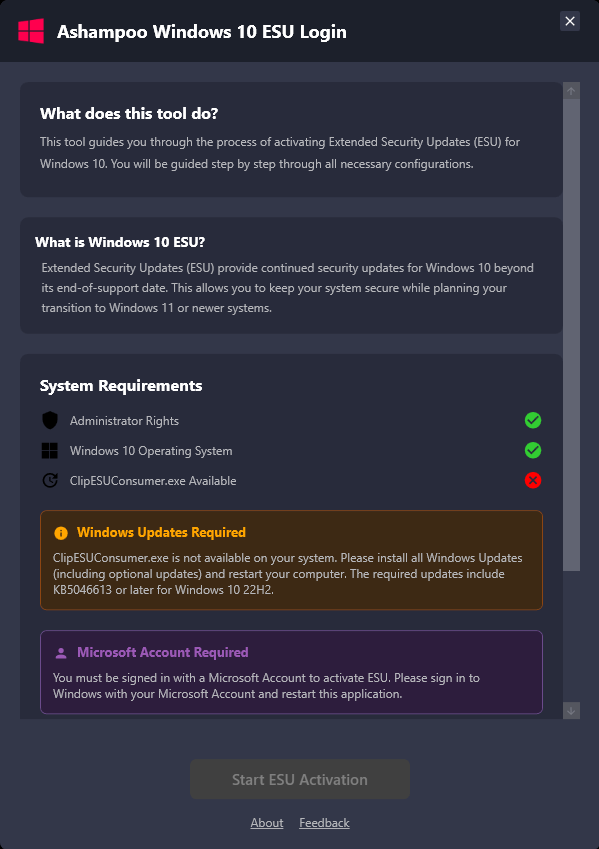
Restore Windows 10 ESU
If you prefer the hands on approach, there’s also a manual method to activate the registration.
Check that all Windows 10 updates are installed, including the final cumulative update for version 22H2, then open the Windows search bar, type cmd, and run Command Prompt as administrator.
Enter the command:sc.exe config DiagTrack start= auto
followed bysc.exe start DiagTrack.
Next, copy and pastereg.exe add "HKLMSYSTEMCurrentControlSetPoliciesMicrosoftFeatureManagementOverrides" /v 4011992206 /t REG_DWORD /d 2 /f
and press Enter.
Restart your PC, open Command Prompt again as administrator, then typecmd /c ClipESUConsumer.exe -evaluateEligibility.
After a second restart, open Windows Update and (provided you did everything right) the ESU registration should appear.
Common causes for the missing registration include an outdated system, a disabled or corrupted DiagTrack service, a missing or malfunctioning sc.exe file, incorrect registry entries, security software blocking the process, or a faulty ESU component.
Frequent error codes include 0x80070643 for installation issues, 0x800f081f for missing system files, and 0x80070005 for insufficient administrator rights.
Microsoft plans to maintain ESU support for at least one additional year, giving users time to decide if they want to move to Windows 11, switch to Linux or buy a Mac.
Ashampoo Windows 10 ESU Login, developed under Ashampoo Labs, can be downloaded here.
What do you think about this solution for Windows 10 ESU registration problems? Let us know in the comments.
Image credit: Monticelllo / Dreamstime.com


