
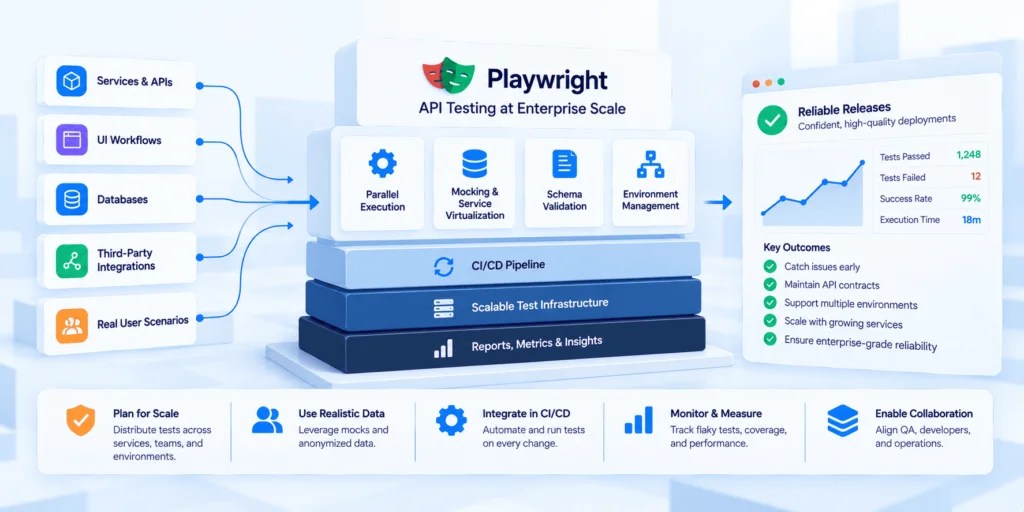
It always starts small, doesn’t it? One team picks up Playwright for UI tests. Somebody notices it does API testing too. A few months later they’ve got this quick little API suite everyone likes. Then a second team hears about it. Then five more. And one day a QA leader looks up and sees dozens of repos, all set up slightly differently, plus a CI bill that just keeps creeping.
That’s roughly when it stops being a tooling question and turns into a planning one. Playwright itself scales fine, honestly. What doesn’t scale by itself is all the stuff around it. Conventions. Environments. Data. Dependencies. Who owns what. Sort those out early and API testing ends up being one of the steadiest parts of your delivery pipeline. Leave them to chance and, well, you get a hundred flaky suites nobody believes. So here’s what I’d plan for.
Also Read: Why API-First Architecture is the Backbone of Modern Digital Platforms
What Changes When Playwright API Tests Leave the First Team
Inside one team, API testing with Playwright is pretty forgiving. Everybody knows the backend. Everybody knows the test environment. Something flakes? The person who wrote the test is sitting two desks away.
Scale it across an enterprise and almost none of that holds anymore. People write tests against services they don’t own. Environments get shared between teams. A red test might mean a bug in somebody else’s service, or honestly, it might just be noise. The tool hasn’t changed one bit. What’s changed is that you can’t take for granted that everyone’s doing things the same way, or that a failure actually means something.
Settle on Shared Conventions Early
The cheapest time to standardize is before every team invents its own way of doing things. A handful of shared decisions buys you a lot.
Where do base URLs and environment settings live? In config, please, never hardcoded, so one suite can run anywhere. Then there’s login. If every team writes its own auth setup, you’ll end up with twenty slightly different versions, and the day the login flow changes, all twenty break. One shared helper that signs in once and lets every test reuse that session is so much less painful. Naming’s sneakier than it looks, too. Picture someone from a team you’ve never met staring at a red build. Can they tell what the test was checking just from its name? If not, rename it.
A lot of companies end up putting all of that in one internal package, or a starter repo new teams copy from. Nobody has to memorize the rules, because they come baked in.
Plan Your Environment Strategy
Shared test environments are where enterprise API testing usually starts to wobble. Dozens of suites hammering the same staging setup? Constant interference. One team’s data stomps on another’s. A deploy to one service breaks tests in five others. Before long people are scheduling test runs around each other, which is a pretty clear sign the setup’s outgrown itself.
The mature organizations I’ve seen are heading toward isolation. Every pipeline run, or every pull request, gets its own environment, or at least its own walled-off slice. Yes, it’s more infrastructure to look after. But it turns failures back into useful signals instead of a group guessing game.
Treat Test Data as a First-class Concern
If I had to name the single biggest source of enterprise testing headaches, it might be test data. Tests that lean on specific records break the moment someone tidies up the database. Parallel runs fight over the same accounts. And in regulated industries, testing with copies of real customer data raises the kind of privacy questions nobody enjoys answering mid-audit.
The fix isn’t glamorous. Tests should bring their own data rather than hoping some particular record happens to still be sitting in the database. When suites run in parallel, tack a run-specific ID onto emails and usernames, and the collisions mostly disappear. And if a test really needs data that looks real? Use anonymized or generated records, and write down where that data’s allowed to go, before someone has to ask.
Keep Backend Dependencies Stable
Okay, this is the one that catches a lot of enterprise teams off guard. The tests are well written. The environments are isolated. And the suite’s still flaky. What gives?
Usually it’s what sits behind the service under test. Databases. Message queues. Third-party APIs. Services owned by other teams. When any of those are slow, mid-change or just down, tests fail, even though the code being tested is perfectly fine. At small scale you shrug it off. At enterprise scale it slowly eats away at everyone’s trust in testing.
What fixes it is making those downstream dependencies predictable during test runs. More and more organizations do this by recording how dependencies really behave, straight from real traffic, and replaying that behavior every time tests run. If the recording happens at the network level, application code doesn’t need to change, and databases and queues get covered right alongside HTTP APIs. Now tests are deterministic. Same request, same downstream behavior, every run. So when something fails, it’s pointing at a real change, not at somebody else’s outage.
There’s a nice side effect for cross-team work, too. Teams can test against realistic versions of each other’s services without waiting for those services to be up and stable in some shared environment.
Budget for CI Capacity and Speed
One API test is fast. Hundreds of suites on every pull request? That adds up quickly. Plan for capacity early and you dodge a lot of awkward budget conversations later.
A couple of levers really help. API-only jobs don’t need browsers, so dropping that install step trims time off every run. Got a suite that’s grown huge? Playwright’s happy to chop it up across a few CI machines and glue the results back into a single report at the end. Order helps as well. I’d let the API tests go first, honestly. If the API’s broken, why should anyone wait through a slow browser run just to find out?
Decide Who Owns What
Sounds like an org chart thing, and it kind of is. It’s also where a lot of scaled testing efforts quietly fall apart.
Test flakes. Who fixes it? A test fails because another team changed their service. Who gets told? You want crisp answers to both. A simple quarantine policy works well for a lot of places: flaky tests get pulled out of the blocking path, flagged to the team that owns them, and given a deadline to fix or delete. Pipelines stay trustworthy, and flaky tests don’t pile up forever.
Visibility helps a ton too. Put up a shared dashboard with pass rates and flakiness per suite, and problems become hard to ignore. Teams get a gentle nudge to keep their suites healthy.
Also Read: How AI Test Generation Is Changing CI/CD Pipelines in 2026
Measure Whether it’s Working
Sooner or later someone upstairs asks whether all this is paying off. So pick a few measures early. Flake rate tells you how far people can trust the results. Time from commit to test feedback tells you whether the suite helps teams move or slows them down. And bugs that still reach production show you where coverage is thin.
They don’t have to be perfect. They just need to be tracked the same way every time, so trends actually show up.
Conclusion
Here’s my honest view. Playwright is hardly ever what holds API testing back once it spreads across an enterprise. What holds it back is the stuff around it, and every bit of that is something a QA leader can plan for. The organizations that pull this off treat API testing like shared infrastructure, not a scattering of team-level experiments.
If a bunch of your teams have already picked up Playwright, this is a really good moment to pause and set some direction. Choose one convention to standardize. Find the single biggest source of flakiness and kill it. Start tracking one metric. None of that’s a big project, and future-you, staring at fifty repos, will be very glad you did it now.