ZSvirt is a KVM-based virtualization platform that ZStack open-sourced under GPLv3 in August 2026. It reached v1.0.0 in October, its first tagged release, shipping with a signed ISO, published checksums, and full source code on GitHub.
ZStack isn’t a newcomer building hype around an unproven idea. The company has sold virtualization and private cloud products commercially for years through ZSphere, its enterprise engine. ZSvirt is that same engine, opened up for anyone to run without a license fee.
This review focuses on the product itself: what it does well, where it falls short, and who should actually consider it.
A note on how we tested this: We’ve accessed it using a hosted demo environment rather than a dedicated test server. That shapes what we can and can’t verify firsthand, and we’ve flagged those limits throughout rather than blur the line between what we tested and what ZStack claims.
Also Read: Top 26 Zero Trust Security Tools for Hybrid Cloud
Why ZSvirt Matters Right Now
Broadcom’s acquisition of VMware reshaped VMware’s licensing model, replacing perpetual licenses with per-core subscriptions and mandatory solution bundles. That shift has pushed infrastructure teams across every sector to re-evaluate their virtualization strategy, whether they run vSphere, Hyper-V, or something else entirely.
Here’s what makes ZSvirt different from the usual wave of “VMware alternative” launches:
- It’s not asking you to bet on unproven software. The engine behind it has an existing production track record.
- It ships with purpose-built VMware migration tooling, not a bolt-on script.
- It’s built for a broad range of users, from enterprise IT and cloud administrators to homelab builders, and treats VMware migration as a core feature from day one.
Whether that production track record transfers cleanly to the newly public community edition is a separate question, and one your own testing should answer before you commit workloads to it.
How ZSvirt Works
ZSvirt organizes infrastructure through a Zone, Cluster, and Host hierarchy, managed by a Java-based control plane sitting on top of KVM. More than 2,000 REST and OpenAPI endpoints, plus SDKs for Go, Python, and Java, expose that control plane for automation. We go deeper on this in our architecture post; here’s what matters practically.
Installation packages run x86_64 only, no aarch64 support yet. The ISO is 5.41 GB, the OVA 17.02 GB, and the QCOW2 image 24.02 GB.
For a minimal All-in-One deployment, ZStack’s official minimum is 8 CPU cores with Intel VT or AMD-V support, 8 GB of RAM, a 100 GB system disk, and at least one management NIC with a static IP address. For production, or when the management node also runs workloads, ZStack recommends 24 or more CPU cores, 24 GB or more of RAM, and a 200 GB or larger system disk (ZSvirt Quick Start). One independent hands-on reviewer reported about an hour from boot to a usable web UI on homelab hardware, including post-install checks. We didn’t verify this ourselves, since we worked from ZStack’s hosted demo rather than a fresh install.
Exploring the Demo Environment
This section describes a guided walkthrough through a hosted demo provided by ZStack.
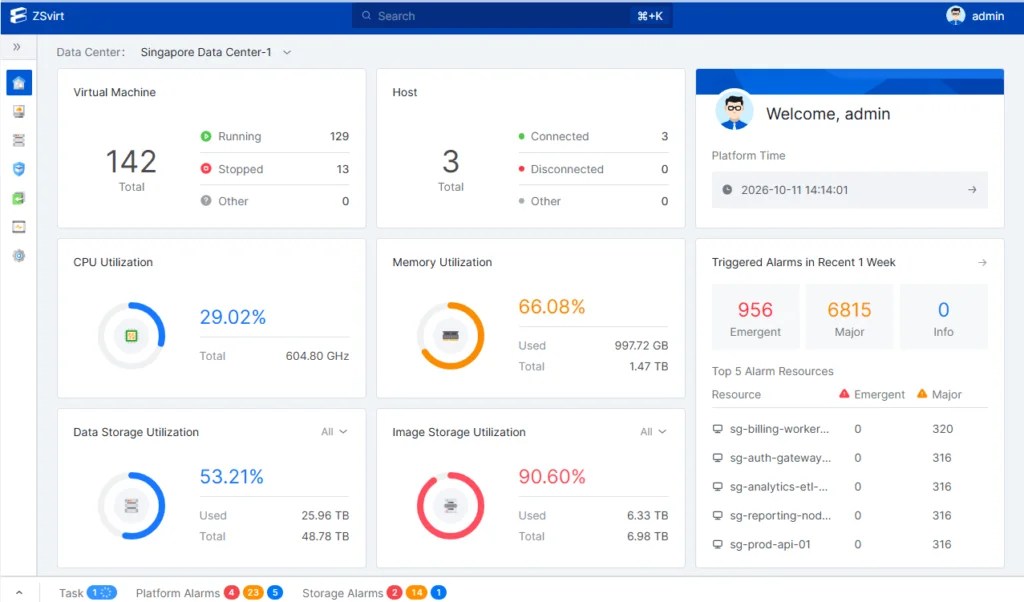
The dashboard itself is clean and does what you’d expect: VM and host counts at a glance (5 VMs, 3 hosts in the sample data), CPU and memory utilization as circular gauges, storage utilization split between data storage and image storage, and a triggered-alarms panel showing severity counts with the specific resources involved.

Drilling into a single host (Inventory → VM and Host) brings up a tabbed view: Overview, Monitoring, Hardware Device, Kernel Adapter, Virtual Machine, Alarm, and Event, plus a one-click web terminal into the host itself.
The capacity breakdown on that page (physical CPU, memory, and storage used versus available) is genuinely useful for day-to-day capacity planning, assuming the real numbers behave as the mock ones do.

The Reliability section is where ZSvirt’s HA design for its own control plane becomes visible. The MN (management node) Monitoring page shows an active and standby management node pair, each reporting node status, gateway reachability, peer reachability, VIP reachability, database status, and Keepalived status independently. It’s a straightforward active/standby failover model, nothing exotic, but it’s reassuring to see it exposed directly in the UI rather than buried in a config file.

Data Protection shows configured backup storage targets, remote and local, each with its own capacity and connection status. Nothing unusual here relative to other platforms, but it confirms backup storage isn’t a single-backend afterthought.

The migration tooling is where we spent the most time, and where the demo gave us real detail to work with. Under O&M Management → Migration Service, the demo shows the migration appliance itself: a deployed gateway running 4 vCPUs, 8 GB of RAM, and 80 GB of storage, which is a concrete number ZStack’s own documentation doesn’t spell out as clearly.

The Migration Resource screen shows a configured VMware source platform, connected to a vCenter Server, with its own data gateway IP.

The Migration Task screen is the most informative part of the demo. It shows five sample tasks sitting at different points in ZMigrate’s actual lifecycle: pending sync, actively syncing (with live-looking read/write throughput and sync-rate percentages), ready for cutover, cutover success, and test completed.
That’s a genuinely useful look at the full migration workflow end-to-end, even without running a job ourselves. During our walkthrough, a few task log messages displayed in Chinese. ZStack confirmed the issue was limited to the demo environment and has since fixed it.

System Management rounds out the tour with basic IAM: the demo includes an admin user and a regular user, both local accounts, with role separation visible in the user list.

What We Like
- No license fee for production use. GPLv3 means no per-core subscription math pushing you to look elsewhere.
- Migration tooling is actually built in. Most open-source alternatives leave VMware migration to third-party tools or manual scripting.
- Terraform support without a plugin. Confirmed independently, and useful if your team already runs infrastructure as code.
- A real first release. v1.0.0 shipping with a signed ISO and checksums signals release discipline for a project this young.
- Growing community. GitHub stars climbed from roughly 1.4k in early September to close to 1.9k by October.
- HA baked into the control plane itself. The active/standby management node setup, visible directly in the UI, isn’t something every open-source platform exposes this clearly.
- GPU passthrough and vGPU support. ZSvirt v1.0.0 supports physical GPU passthrough and vGPU assignment, which matters if you plan to run AI, VDI, or graphics-heavy workloads. You’ll need Intel VT-d or AMD IOMMU enabled in the server BIOS and IOMMU enabled in the host kernel first (GPU Devices documentation).
Limitations and What Could Be Better
- Higher resource footprint than Proxmox. A minimal ZSvirt deployment requires 8 CPU cores, 8 GB of RAM, and a 100 GB system disk; ZStack recommends 24 cores and 24 GB of RAM for production. Proxmox VE’s minimum RAM requirement is 1 GB. Factor this in if you plan to run ZSvirt on older or smaller hardware.
- No native container support. ZSvirt is KVM-only; lightweight containerized workloads run as full VMs instead, unlike Proxmox’s LXC.
- Full VM disk encryption and encrypted migration aren’t available yet. ZSvirt v1.0.0 includes Secure Boot, vTPM 2.0, and Native and Standard Key Providers for key management. ZStack confirmed that full VM disk encryption and migration encryption are planned for its 2026 H2 roadmap, and that it’ll update its website, which currently describes these features more broadly. If your compliance requirements depend on encryption at rest or in transit, check the v1.0.0 feature documentation and the official roadmap before you commit.
- No independent migration test performed. We toured the migration workflow in ZStack’s demo, which included five sample tasks across different stages, but the source platform was connected to a mock vCenter rather than a real environment. Sync-rate and timing figures here come from ZStack’s documentation and sample data, not a migration we ran ourselves.
- Demo data is entirely mock. Hostnames, serial numbers, and even the CPU model name in the demo account are explicitly labeled as sample data, so none of the visible utilization figures reflect real-world load.
- Thin independent review coverage. PeerSpot shows zero user reviews for ZSvirt, compared to 62 for Proxmox VE, as of this writing.
- Customer references come from the commercial product. ZSvirt is built on the same engine as ZStack’s commercial ZSphere platform, so the enterprise logos on its site reflect deployments of that engine. Those customers ran a commercial product with vendor support, though. They don’t yet show how the open-source edition performs with community support alone, and it has only been public since August 2026.
- Legacy naming in places. ZStack’s own FAQ confirms some configuration paths and documentation still carry ZStack/ZSphere naming from before the open-source release. It doesn’t affect functionality, but expect to see both names while the rebranding is underway.
- No aarch64 support yet. Installation packages are x86_64 only.
Pricing
ZSvirt Community Edition is free to use in production under GPLv3, with no license cost and no artificial feature restrictions compared to the commercial engine it’s built from.
ZStack doesn’t publish pricing for ZSvirt Enterprise. Built on the same technology foundation as the open-source edition, it adds LTS releases, SLA-backed vendor support, and advanced multi-cluster and compliance capabilities (ZSvirt VMware Alternative). If your organization needs that tier, contact ZStack directly for a quote.
Who Should Use ZSvirt?
Good fit:
- SMBs or MSPs evaluating a VMware exit who want built-in migration tooling rather than piecing one together
- DevOps teams that want Terraform-native provisioning without extra plugins
- IT teams willing to accept a young open-source community in exchange for an engine with a real commercial track record
Weaker fit:
- Lightweight homelabs on older or resource-constrained hardware, where the 8-core, 8 GB minimum and lack of container support work against you
- IT teams that depend on a large, mature community for troubleshooting, which Proxmox still offers at a different scale
Alternatives to Consider
Proxmox VE has a decade-plus track record, hybrid KVM-plus-LXC support, and a much lower hardware floor, but no built-in VMware migration tooling.
VMware vSphere still leads in ecosystem maturity, with licensing costs driving this entire conversation.
XCP-ng, built on Xen rather than KVM, is another free option worth a look if you want a different hypervisor foundation.
Also Read: AI in IT Operations (AIOps) 2026: 12 Best Tools to Automate Your NOC
Verdict
ZSvirt brings a production-tested engine into the open-source world, with migration tooling and automation support most free alternatives don’t offer out of the box. But the community edition is new, requires more hardware than Proxmox, and still shows a few rough edges from its transition from a commercial product.
Treat it as a serious evaluation candidate for a VMware exit, not yet a default recommendation over Proxmox for general-purpose use.
Best for: Cost-conscious enterprises and DevOps teams piloting a VMware exit who can tolerate a young open-source ecosystem and have the hardware headroom to run it comfortably.