
8GB of RAM is a bummer, but this $599 laptop cuts most of the right corners.

I suspect the MacBook Neo will become a common coffee shop companion. Credit: Andrew Cunningham
I suspect the MacBook Neo will become a common coffee shop companion. Credit: Andrew Cunningham
Buying a cheap laptop is easy. You just go to Best Buy or Newegg or Amazon or Walmart or somewhere, you pick the cheapest one (or the most expensive one that fits whatever your budget is), and you buy it. For as little as $200 or $300, you can bring home something new (as in, “new-in-box” not as in, “was released recently”) that will power up and boot Windows or ChromeOS.
Buying a decent cheap laptop, or recommending one to someone else who’s trying to buy one? That’s hard.
For several years I helped maintain Wirecutter’s guide to sub-$500 laptops, and keeping that guide useful and up to date was a nightmare. It’s not that decent options with good-enough specs, keyboards, and screens didn’t exist. But the category is a maze of barely differentiated models, some of them retailer-exclusive. You’d regularly run into laptops that were fine except for a bad screen or a terrible keyboard or miserable battery life—some fatal flaw that couldn’t be overlooked.
When you did find a good one, the irregular patterns of the PC industry meant you could never be sure how quickly it would disappear, or whether it would be replaced with something of equivalent value. More than once, a new pick for that guide vanished in the short interval between when it was tested and selected and when the update to the guide could be published.
When recommending cheap laptops for the people in my own life, I normally ask them when they want it and how much they’d like to spend, and then stay on top of sales, refurbished sites, and eBay until I find the one fleeting deal on a laptop that meets their needs at their price point. This approach does not scale.
One reason why I’ve been so curious about Apple’s long-rumored budget MacBook was because it would be really, really nice to have something close to $500 that a person could just go out and buy without having to worry about whether they were getting the right thing (you wouldn’t want to mistake the Acer Aspire Go 15 AG15-32P-C0Z2 for the Acer Aspire Go 15 AG15-71P-59PZ, would you??), or whether it would be available at all. Something with Apple’s typical warranty support and network of retail stores behind it. And something that would integrate better with an iPhone than Microsoft and Google’s platforms are able to.
The MacBook Neo definitely has flaws. It’s missing a few things that have been standard on MacBook Airs and Pros for a very long time. Performance is decent, but in many of our tests, it’s the slowest Mac Apple has shipped since the Apple Silicon Mac era began, including the original M1. And a laptop, any laptop, with 8GB of memory in 2026 is eventually going to cause problems for you—it’s a question of when, not if.
But it starts at $599 (or $499, with Apple’s educational discount). That brings it in way under the $1,100 asking price for the latest MacBook Airs, even if you spring for the $699 version with 512GB of storage and Touch ID. I still think anyone who can afford an Air, even an older refurbished model, will be happier in the long term if they buy the Air instead. But like the $349 iPad before it, I don’t think spec sheet deficiencies will be enough to keep the MacBook Neo from being popular with kids, first-time laptop buyers, or anyone with a modest budget and basic needs.
Table of Contents
A brand-new design
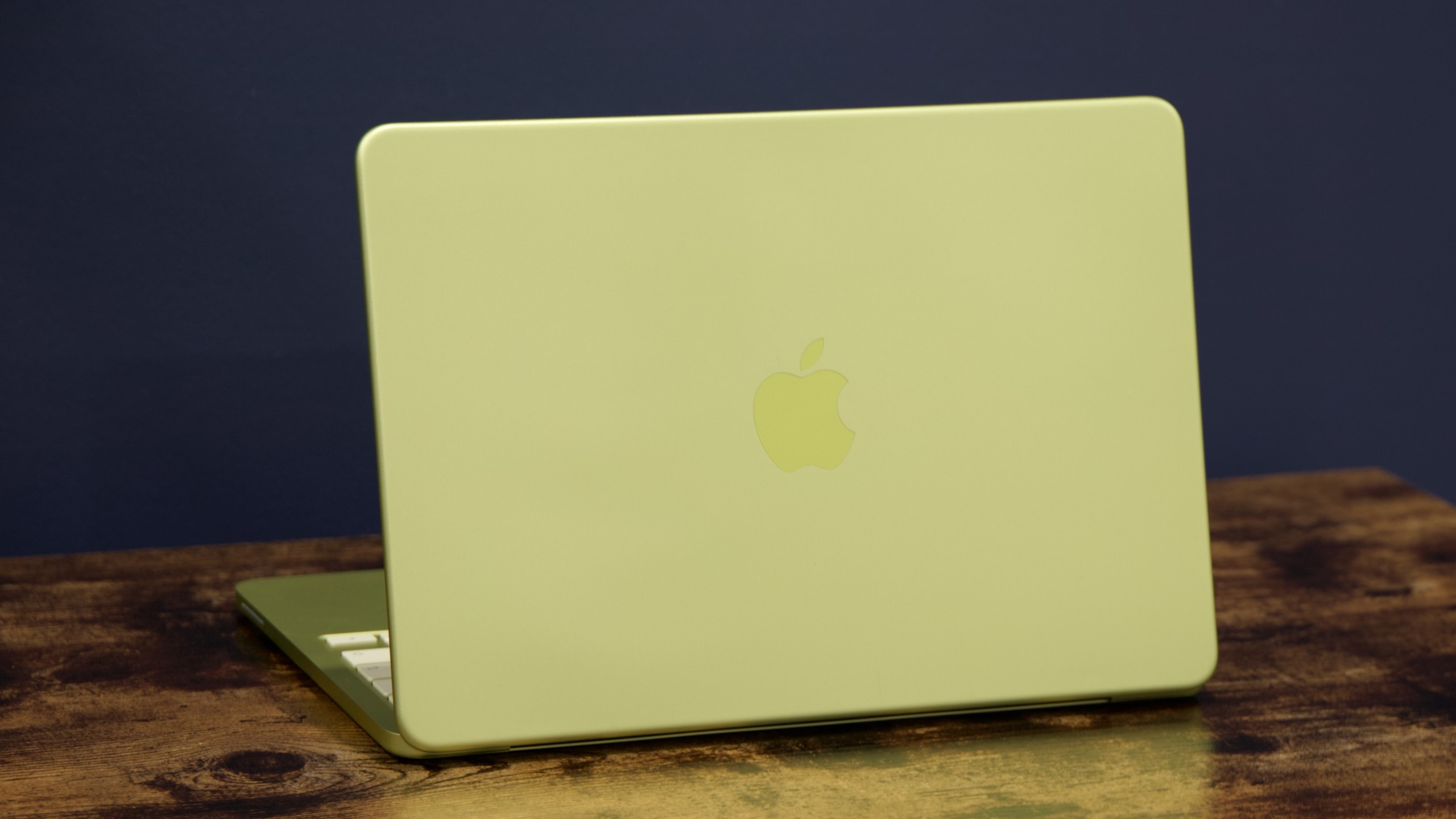
The MacBook Neo’s lid. The Apple logo is embossed, without the mirror finish of the Air or Pro.
The MacBook Neo’s lid. The Apple logo is embossed, without the mirror finish of the Air or Pro.
For past budget products, Apple has leaned extensively on updating old designs rather than building all-new ones. For many years, the cheapest iPad was an updated version of the 2013 iPad Air; over three generations of the iPhone SE, Apple recycled the designs of both 2013’s iPhone 5S and 2017’s iPhone 8.
I thought it very likely that Apple would reuse the design from its 2018–2020 MacBook Air refresh, which it had already been selling through Walmart for $599. But Apple decided to build an all-new MacBook Neo design instead, one that makes it more consistent with the modern Airs and Pros.
Instead of being wedge-shaped, the Neo is a flat, rounded aluminum rectangle when it’s closed, and it has a slightly smaller footprint than the old 13-inch Air. Four color-matched feet keep the bottom of the laptop up off your table or desk. Its 13-inch screen doesn’t have a notch, but it does have rounded corners at the top and square ones at the bottom, mirroring the design of modern MacBook Airs and Pros. Its resolution and pixel density are very close to the old M1 Air (2408×1506 for the Neo, 2560×1600 for the old Air), but it gets slightly brighter. We measured 506 nits at maximum brightness, in line with Apple’s 500 nits estimate, and higher than the M1 Air’s 400 nits.
The Neo comes in four colors that are a bit more noticeable and eye-catching than the ones Apple uses for the MacBook Air. We were sent a yellow (“Citrus”) review unit, though if I were buying one for myself, I’d probably prefer the dark-blue Indigo. Classic MacBook silver and a pale pastel pink (“blush”) are also available. As it does with the iMacs, Apple ships the MacBook Neo with color-matched wallpapers and a special color-matched theme and text highlight color in the Appearance settings, along with the standard nine options that all Macs have.
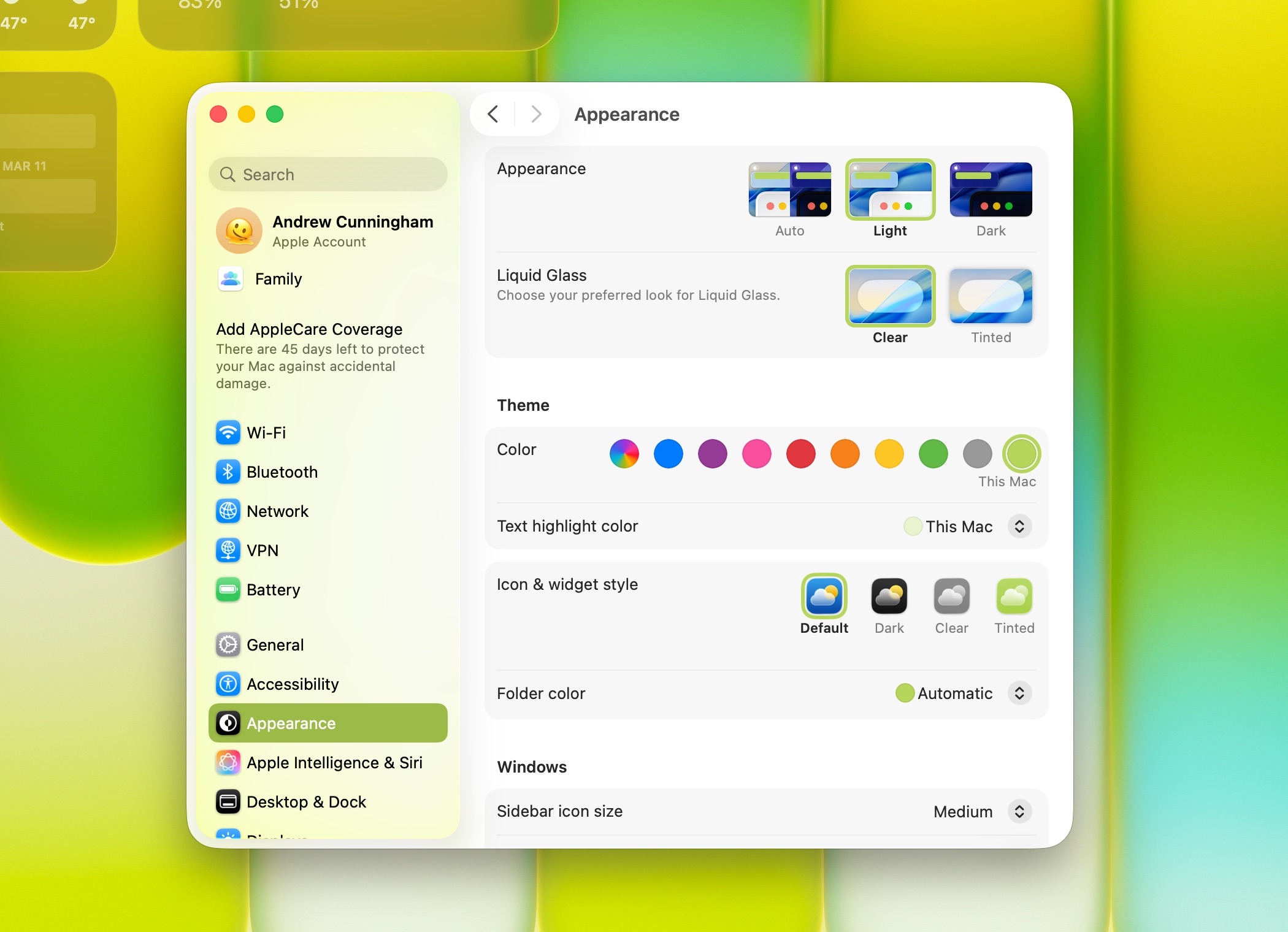
The Neo comes with custom color-matched highlight colors.
Credit: Andrew Cunningham
The Neo comes with custom color-matched highlight colors. Credit: Andrew Cunningham
The MacBook Neo’s keyboard uses the same layout as Apple’s other laptops, including the full-height function keys, and has a very similar feel to the Air’s keyboard overall. Apple is using the same scissor-switch mechanism as in the Air here, though the color-matched finish on the keycaps does feel a little different from the typical black keys. If the typing feel is any different from the MacBook Air’s, it’s so minor that I stopped noticing it almost instantly.
The trackpad is a different story. As we covered in our hands-on piece, this is the first time in a while that Apple has shipped a trackpad with a physical clicking mechanism, rather than using a Force Touch trackpad that uses haptic feedback to simulate clicking. It took a little getting used to the Force Touch trackpad at first, but Apple has been using it in laptops for more than a decade, so now it’s that trackpad that feels normal to me and a physical clicking mechanism that feels strange.
Apple has engineered this trackpad so that you can click anywhere on its surface and it will feel about the same—there’s no stiff hinge at the top as there is in many trackpads. It uses a pair of flexures that both move in unison to provide a uniform clicky feeling over its entire surface.
The Neo’s color-matched keyboard has the same layout and key feel as the Air, but without a backlight. Andrew Cunningham
Using it feels fine, and it’s just as accurate as other Apple trackpads, though it’s a bit smaller than even the M1 MacBook Air’s trackpad. But I miss the way you can adjust the feel of clicking on a Force Touch trackpad, and (on some models) the amount of noise it makes. I also hadn’t realized that I’d worked Force Touch into my macOS muscle memory until I used a Mac without it for the first time in a while—using it to quickly rename files and folders in the Finder was the big one for me, but you may have others.
That’s a common theme for the MacBook Neo, actually. Apple hasn’t cut anything that feels absolutely essential to the MacBook and macOS experience, but it has scaled back on a whole lot of small frills that had become standard-issue on all other Macs released this decade.
In addition to the physical-click trackpad, the MacBook Neo comes with a non-backlit keyboard, a 1080p webcam without Center Stage support, no Touch ID button on the base model, and no MagSafe charging connector. Its screen doesn’t support the DCI-P3 wide color gamut (though we measure it at about 91 percent of the sRGB gamut, which is pretty good for this price category), or the True Tone feature that adjusts the display’s color temperature to match ambient lighting. There’s no Thunderbolt connectivity.
Apple has shipped MacBooks missing all of these features before. But it’s been a very long time for some of them—I’m fairly sure a backlit keyboard has been a feature in every single MacBook sold in the last 15 years.
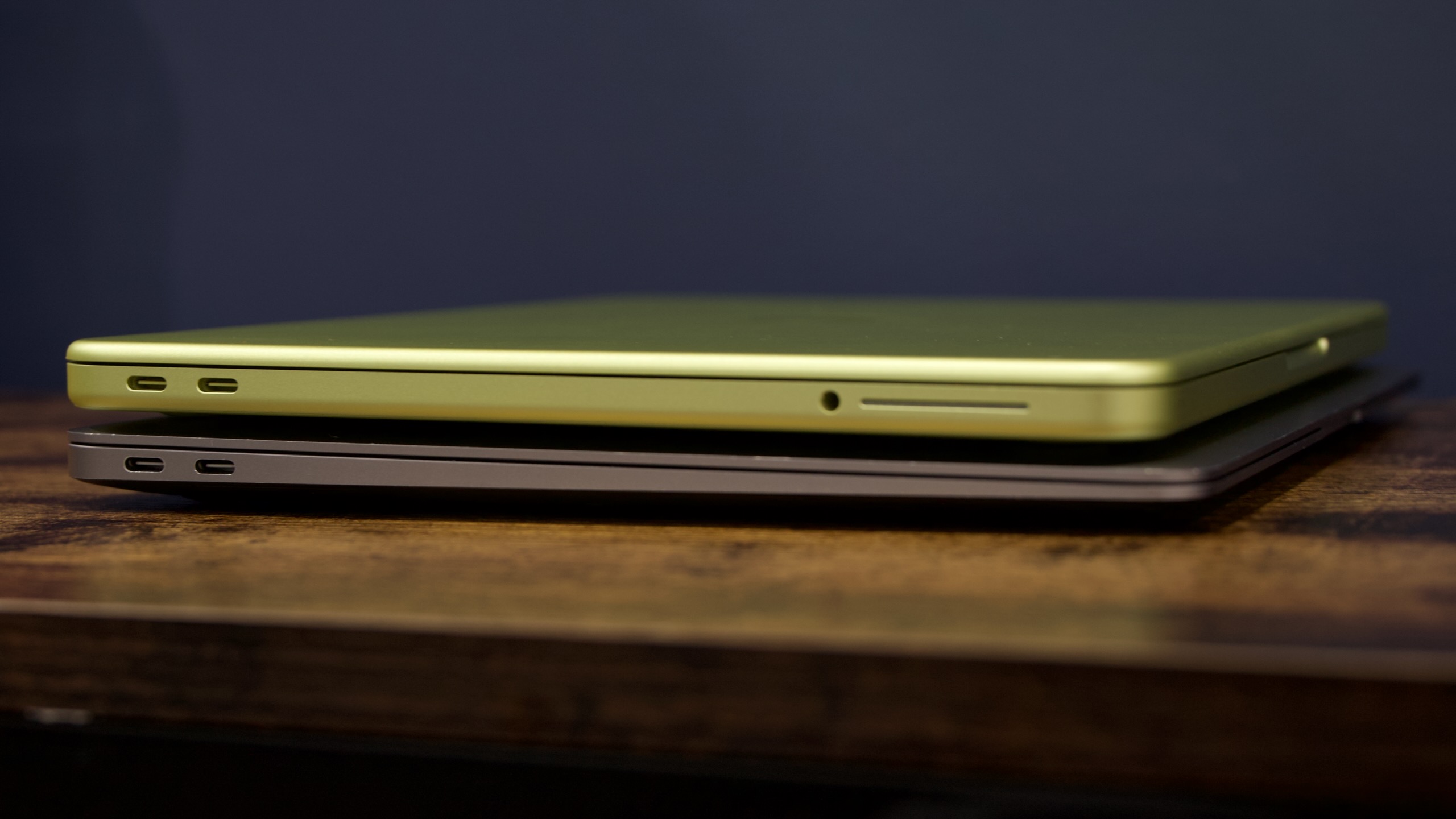
The Neo on top of the 13-inch M1 MacBook Air.
Credit: Andrew Cunningham
The Neo on top of the 13-inch M1 MacBook Air. Credit: Andrew Cunningham
The 1080p webcam and the laptop’s side-firing stereo speakers are unexceptional but functional, though generally I’d say they’re a notch or two better than what you’d get in a PC for this price. The webcam is missing the Center Stage feature that tracks you as you move, though I generally find myself turning this off because I find it distracting. The webcam image itself looks a bit smoothed-out and overly processed, but white balance, auto-exposure, and auto-focus are all decent. It’s more than adequate for Zoom or FaceTime.
In PCs around this price, “making noise” is usually the only requirement for the speakers, and the quality of that noise is mostly an afterthought. The Neo’s speakers don’t reach nearly the “that sounds pretty good, actually” threshold of the MacBook Pro or even the 15-inch MacBook Air, but they do a decent job overall, playing vocals and other treble-y tones with good clarity and volume. But the overall effect is still a bit tinny, and there’s not much bass to speak of.
Ports in a storm
The MacBook Neo’s port situation may be its most confusing change from older MacBooks.
MacBooks sold in the last decade have generally had between two and four Thunderbolt ports, all of which have been (mostly) functionally equivalent. You can plug whatever you want into any of them, whether that’s a charger or a monitor or external storage or some kind of dongle, and they’ll all work the same way.
The MacBook Neo has two ports, and they look the same as any ports on any other MacBook. But they’re just regular USB-C ports rather than Thunderbolt ports, and they both do slightly different things. The leftmost port, if you’re looking at the laptop from the side, supports 10 Gbps USB 3 connections and can also drive a single external 4K 60 Hz display. The rightmost post is limited to 480 Mbps USB 2.0 speeds and doesn’t support external display output.
Both ports can charge the laptop. But for high-speed external storage, external displays, gigabit Ethernet dongles, USB-C docks and hubs, and any other accessories you might want to use with the Neo, the leftmost port is the most capable one.
To make up for the fact that these ports are totally unmarked and that no other MacBook asks you to keep this stuff straight, Apple has built some notifications into macOS to steer users in the right direction. Based on our testing, whenever you plug a USB 3-or-higher accessory into the USB 2 port, you’ll see a notification about how higher speeds are possible with the other port. These accessories still work in the USB 2 port, just with reduced performance.

The left port on the side of the Neo is a USB 3 port that supports display output and 10 Gbps data transfer speeds. The right port is a USB 2 port. Either can charge the laptop. There’s also a headphone jack.
Credit: Andrew Cunningham
The left port on the side of the Neo is a USB 3 port that supports display output and 10 Gbps data transfer speeds. The right port is a USB 2 port. Either can charge the laptop. There’s also a headphone jack. Credit: Andrew Cunningham
Plugging a monitor or a display dongle into the USB 2.0 port will generate a slightly different notification telling you to use the other port for display output. If you’re trying to plug in a USB-C monitor with a USB hub and USB-PD charging, those features will still work through the USB 2.0 port, but display output won’t.
All of this port stuff is downstream of Apple’s decision to use an A18 Pro processor in this Mac instead of an M-series processor—a chip designed for the iPhone 16 Pro, not a laptop with a bunch of I/O. Its USB controller supports a single 10Gbps USB-C port, because the iPhone only has one port; supporting a second 10Gbps USB-C port would have been a waste of silicon.
We might see this change over time. If Apple plans to keep putting iPhone chips in future MacBook Neos, those could be designed with more than one USB 3 port, in the interest of streamlining what is currently a non-deal-breaking but slightly annoying limitation of the MacBook Neo. It is a reminder that the decision to use a smartphone processor can affect functionality in ways beyond CPU and GPU core count. Bear this in mind as we talk about performance.
Notes on external display support
Apple says that the MacBook Neo supports a single external display, with a resolution and refresh rate of up to 4K at 60 Hz. This is also something that stems from the re-use of a smartphone chip—no one is attaching their iPhone to multiple external screens. But even the M1 Air supports a 6K display at up to 60 Hz, so it’s another place where the Neo is a small downgrade compared to every other Apple Silicon Mac.
I can confirm that a 1440p display works at 75 Hz, but I don’t have a comprehensive list of the refresh rates supported at lower resolutions. The Neo isn’t capable of driving the Studio Display or Studio Display XDR at their native 5K resolutions.
When connected to a 4K external display, all other MacBooks will offer a “more space” display mode with the same amount of usable desktop space as a non-Retina 2560×1440 screen. The MacBook Neo doesn’t offer this display mode. The default view gives you the usable space of a 1080p monitor with Retina-resolution applications, or a native 4K resolution with apps that are mostly too tiny to see and use comfortably. Putting the display in any other mode means putting up with non-native resolutions and the resulting blurriness.
You may or may not notice this if you use a 4K screen with your MacBook Neo. I used 27-inch 5K iMacs for years, so the “more space” 1440p view is what my eyes perceive as “normal.” This just isn’t possible with the Neo.
Notes on charging and battery life
Apple ships the Neo with a 20 W wall-wart charger identical to the one that comes with iPads, along with a 5-foot USB-C cable (unlike the Airs, this is just a white cable, not color-matched to the system). All other USB-C chargers I tested worked fine with the Neo. According to the System Information app, it’s incapable of recognizing charger wattages higher than 45 W. Higher-wattage chargers will refill the Neo’s battery slightly faster than the 20 W charger—with a 45 W charger the laptop had charged from 0 to 66 percent in an hour. It went from 0 to just 43 percent in an hour with its 20 W charger.
Apple’s numbers indicate that the MacBook Neo is a step down in battery life from the MacBook Airs; Apple says the Neo can last for about 11 hours of wireless web browsing, down from 15 hours for the M1 Air and the 13-inch M5 Air. The Neo’s smaller 36.5 WHr battery may be partially responsible for this.
Our normal PCMark battery life test doesn’t work on Macs, but anecdotally after a few days of use I can say that I do notice the battery draining a bit faster than it does in a MacBook Air. I don’t think anyone will have any trouble getting a full workday out of the Neo with plenty of battery to spare, but the battery does feel easier to drain than other Apple Silicon Macs I’ve used.
Quantitative performance: A Mac with an iPhone inside
The main MacBook Neo tech spec you’ll read the most about is its 8GB of RAM, and there’s plenty to say about it, and we’ll get to it in a minute. But there’s a reason we test things in real life, and it’s because the spec sheet doesn’t always give you the full picture.
Apple’s A- and M-series chips have always shared a lot of technology, but the MacBook Neo is the first time Apple has shipped a Mac that is literally using an iPhone processor in it. The Apple A18 Pro, originally shipped in the iPhone 16 Pro in late 2024, includes two high-performance CPU cores, four high-efficiency CPU cores, and five GPU cores (the chip can have a maximum of six, but one is disabled in the Neo’s iteration).
Though we’re also comparing it to the M5 MacBook Air and a few other laptops, we’ve focused on comparing the MacBook Neo to the old M1 MacBook Air, the closest thing the Neo has to a true predecessor. Our M1 Air is the high-end configuration with four high-performance CPU cores, four high-efficiency CPU cores, eight GPU cores, and 16GB of unified memory. Based on iPhone 16 Pro benchmarks, conventional wisdom held that the A18 Pro would mostly outperform or match the old M1, thanks to its newer CPU and GPU architectures.
And in the Geekbench 6 benchmark, that’s true. Newer, faster performance cores allow the Neo to trounce the old M1 in Geekbench’s single-core performance tests, running around 42 percent faster than the M1. In the multi-core test, the M1 and the A18 Pro are roughly tied, with the M1 edging out the A18 Pro by just a couple percentage points. The Geekbench Compute test, which runs a few non-gaming GPU-accelerated workloads, also shows the M1 beating the A18 Pro by around 10 percent. Not nothing, but close to a wash, right?
I like Geekbench. I think it does a good job of measuring what normal everyday computer performance feels like—mostly people need small bursts of fast performance, like when they open a file or launch an app or load a new browser tab, and then a bunch of low-power CPU cores that can juggle background tasks without killing the battery. Geekbench is good at measuring that. On balance, it’s fine that this is The One Benchmark Everyone Runs On Everything.
But what Geekbench isn’t is a test of sustained CPU or GPU performance over time. It’s not a good metric for how games will run, or how quickly your system will run some kind of app or media export that hammers one or more CPU cores for many minutes at a time.
And it’s these kinds of tests where the A18 Pro becomes less consistent. In heavy multi-core tests, the A18 Pro is actually quite a bit slower than the M1, and it’s the same when playing games. In a lot of measures, this is the slowest processor Apple has shipped in a Mac in six years, including the M1.
The various Cinebench tests have both single- and multi-core runs, each of which lasts for multiple minutes. Over many years of processor testing, I’ve found that most CPUs can deliver peak single-core CPU performance more or less indefinitely. It’s activating a bunch of cores at once that really amps up the power usage and the heat, which is normally why processors (especially in fanless laptops like the Neo and MacBook Air) have to ramp performance down a bit over time.
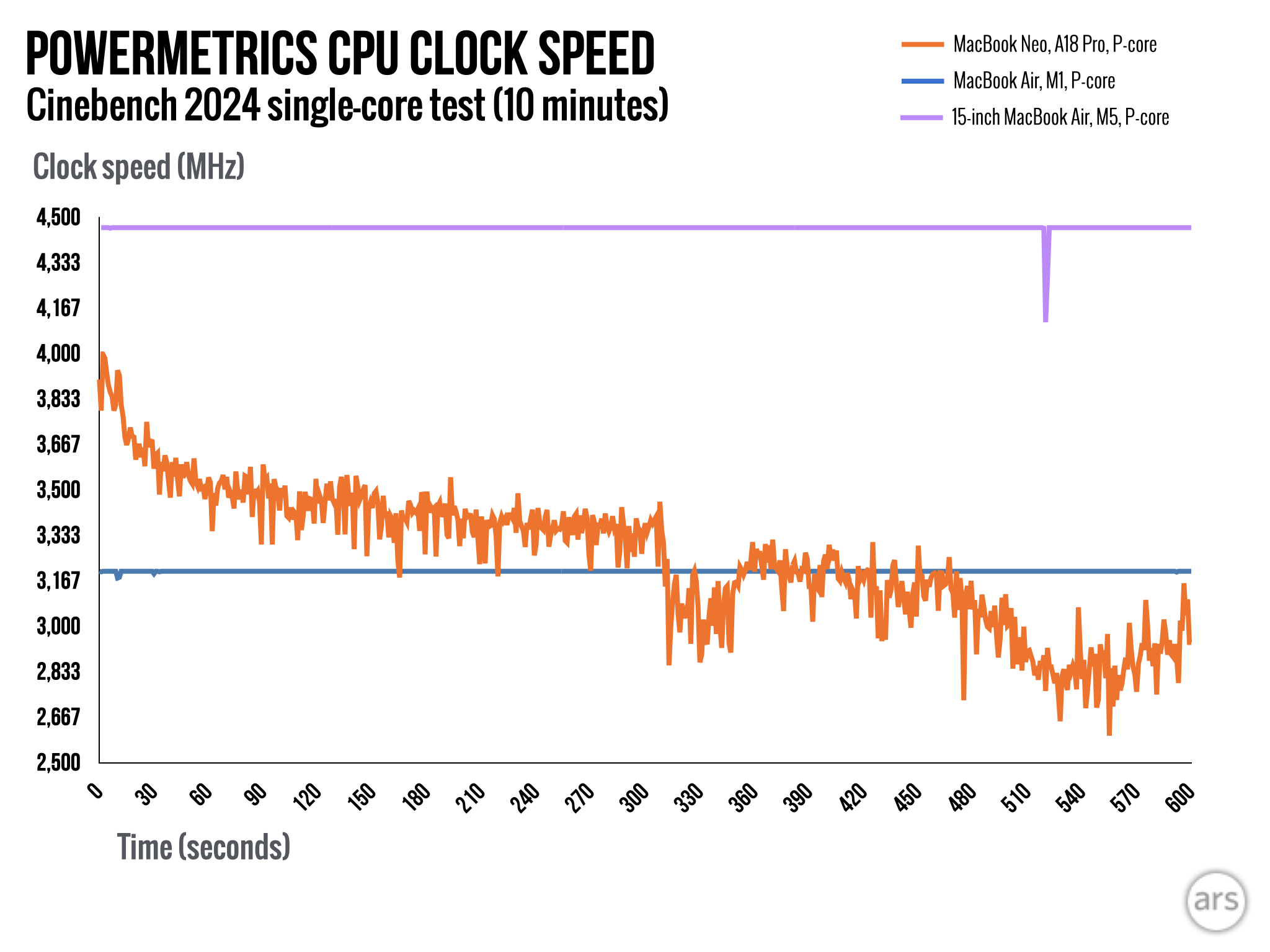
The A18 Pro isn’t like that. In a 10-minute single-core Cinebench 2024 run, a single A18 Pro P-core maintains its peak clock speed (around 4 GHz) for just a couple of seconds. It spends a few minutes hovering in the mid-3 GHz range, before falling below 3 GHz for most of the rest of the test.
The M1 Air’s peak clock speed is a much lower 3.2 GHz. But it runs at that same, steady 3.2 GHz through the entire benchmark run. Overall, the MacBook Neo runs the Cinebench 2024 single-core test around 20 percent faster than the M1, substantially smaller than the 40-ish percent boost we saw in Geekbench.
That aggressive throttling behavior in single-core CPU benchmark bodes poorly for tasks where the A18 Pro is being asked to sustain performance over time—both for multi-core-heavy CPU-based workloads, and things like games that put demands on the CPU and GPU at the same time.
In everything from the Cinebench multi-core test, to our Handbrake CPU-based video encoding test, to our 3D gaming benchmarks, the A18 Pro is consistently quite a bit slower than the M1. Generally, we found that the Neo is about 70 percent as fast as the M1 MacBook Air in the tests we could run. The Cinebench GPU tests won’t run on the Neo because it doesn’t have enough RAM.
To dig into what’s going on here, we turned to the Mac’s built-in powermetrics command-line tool. Like Activity Monitor, it can measure a whole lot of information about what your Mac’s CPU and GPU are doing, including clock speed for individual CPU cores and clusters of CPU cores, and power use for the CPU, the GPU, and the entire SoC as a whole.
I used its logging function (plus a bit of custom PHP from Ars Technical Director Jason Marlin for taking that unwieldy log output and making it into a more manageable CSV file) to take a look at what the A18 Pro was doing over a few test runs and compared it to how the M1 MacBook Air behaved in the same tests. What we observed was that the A18 Pro still throttles its speed like it’s in a space-constrained smartphone, despite the Neo being a laptop that could theoretically make room for a larger passive heatsink.
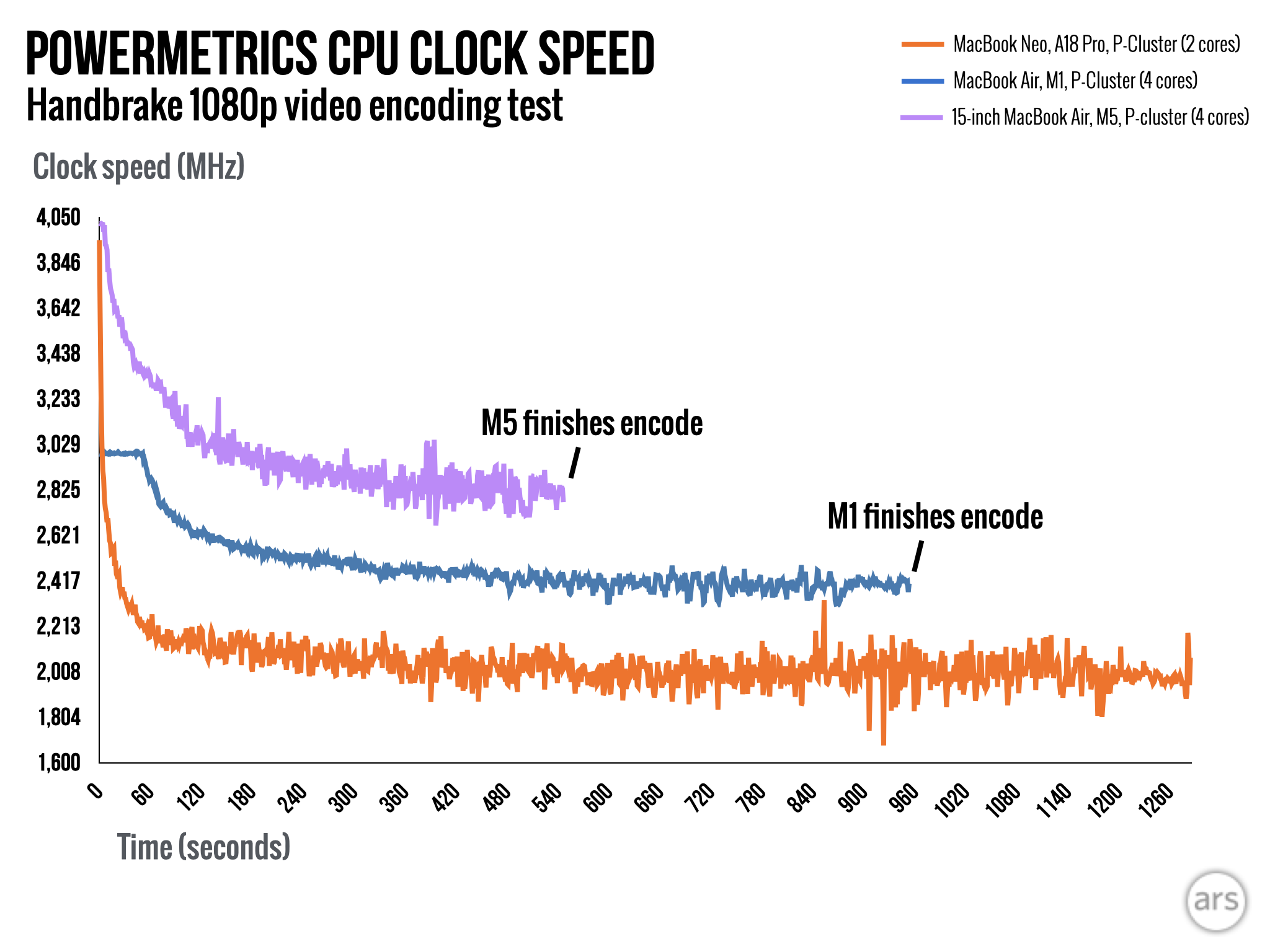
The A18 Pro’s P-cores can run at maximum clock speeds of up to around 4 GHz, substantially faster than the M1’s maximum of 3.2 GHz. But it can’t sustain that kind of clock speed for long. In extended single-core benchmarks, performance drops to the 3.7-to-3.5 GHz range within a minute or so, and they drop to the 2.9-to-3.2 GHz range after about five minutes. Both the M1 Air and the new M5 Air (4.46 GHz) are able to sustain their peak clock speeds indefinitely in single-core mode.
The chip’s clock speeds fall even faster during sustained multi-core performance tests, where the A18’s two P-cores fall well below the M5 and M1’s clock speeds within seconds—that the M1 has twice as many P-cores running at higher clock speeds helps explain why it beats the Neo in these kinds of tests.
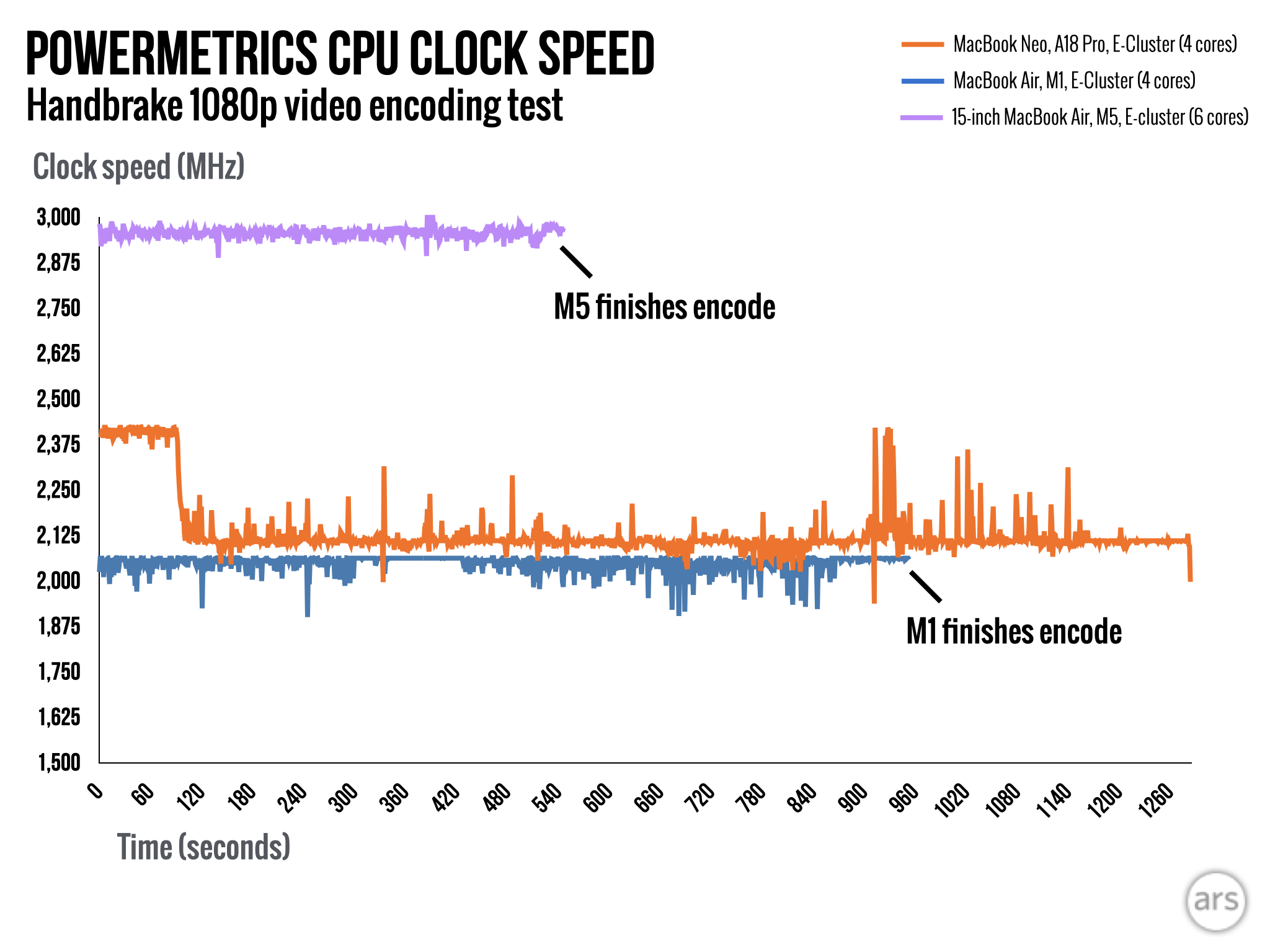
Even the A18 Pro’s E-cores act differently than they do in other passively cooled Apple laptops. The E-cores in both the M1 and M5 Airs are both capable of maintaining a pretty consistent clock speed from the start of the Handbrake encoding test to the end—both have more peaks and valleys than the single-core test, but neither exhibits any kind of sustained downshift in clock speed. The A18 Pro’s E-cores do maintain a clock speed of around 2.4 GHz for a couple of minutes when they’re all engaged simultaneously, before dropping into the 2.0-to-2.1 GHz range for the remainder of the test.
I don’t think this is thermal throttling, where the CPU is running too hot and needs to rein in speeds to cool itself down—Apple’s software tools don’t measure the temperature of any system components, but the only time the Neo gets even remotely warm is when you’re charging it. It seems more like the chip just wants to operate inside of a ~4 Watt power envelope when all of its CPU cores are engaged—for all the spikiness of the P- and E-core clock speeds in our various tests, you’ll note that the A18 Pro’s power consumption is very consistent after a minute or two.
That the MacBook Neo is using a smartphone chip was not a surprise. What surprised me a little was that it’s still acting like it’s in a smartphone, with short bursts of peak performance in both single- and multi-core tests that fall off sharply to keep the chip inside a tiny power envelope.
This makes the A18 Pro incredibly efficient. While it takes longer than any other chip to encode the video, that 4 W average power consumption (compared to 11.5 W for the M1 Air and 16.1 W for the M5 Air) means that it uses a little less power in total than the likes of the M1 and M5 to do the same amount of work.
It seems as though Apple has left some performance on the table here—based on our testing, even a 7 W or 8 W power envelope would have been enough to improve its sustained clock speeds, while still keeping overall power consumption reasonably low. It’s possible that Apple keeps the power envelope low to help extend the battery life, since the Neo’s 36.5 WHr battery is only 73 percent as big as the M1 Air’s 49.9 WHr battery, and it comes with a similar screen, but it’s hard to say for sure.
When contacted for comment, Apple declined to answer our questions about the Neo’s performance, power consumption, or cooling solution.
Qualitative performance: A18 Pro mostly holds up
I have dug into throttling behavior, run a bunch of benchmarks, and made a bunch of charts because I think the data helps demonstrate who the MacBook Neo isn’t for. But even though they show many heavier workloads where the A18 is substantially weaker than the old M1, they also help illustrate why day-to-day performance feels fine.
As Howard Oakley at the Eclectic Light Company outlines here, macOS attempts to keep low-priority and background tasks running on the E-cores whenever possible, and our data suggests that the A18 Pro’s E-cores are less throttling-prone than its P-cores are. And while its P-cores can only maintain their peak clock speeds for a minute or so in single-core tasks, “a minute or so” is more than sufficient for opening a browser tab or launching an app.
I mostly tried to use the MacBook Neo the way I’d use my current daily driver, a 15-inch M3 MacBook Air with 512GB of storage and 24GB of RAM:
- I opened a bunch of Microsoft Edge tabs for writing and researching articles;
- I played YouTube videos while also hopping between other browser tabs and apps;
- I used the Photos app to import, adjust, and export high-resolution RAW images;
- I ran PHP scripts to convert log files into large CSV files and then worked with those CSV files in Numbers and Excel, pasting the data into Keynote to make charts;
- I opened multiple hour-long audio projects in Audacity for editing and exporting;
- I edited a high-resolution graphic in the new unified Affinity app;
- I used the Bambu Studio app to open 3D print files and preview, slice, and print them, and monitor the progress of the prints;
- While using an external 4K display, I recorded a podcast in Audacity while simultaneously video chatting over Zoom and jumping between different browser tabs and Notes app research notes;
- I left Slack and Discord and Spotify and the Dropbox agent and the WireGuard VPN software active in the background basically constantly, while playing music to a HomePod via Airplay.
And the MacBook Neo mostly held up! Editing the RAW photos, exporting MP3s, and slicing 3D print files all took a few beats longer than I was used to. The Zoom-with-external-monitor-connected scenario made for a video call that hiccuped a few times. I definitely noticed I was using a cheaper, slower computer.
But the things I wanted to do, I could mostly do. I wasn’t editing huge Final Cut projects (I opened Final Cut Pro to see if it would open; it did) or complex multi-track Logic soundscapes, or compiling apps in Xcode. I didn’t try much gaming. I did not attempt to create a virtual machine. If I were editing more than a handful of RAW photos at a time, I would probably have found the laptop’s performance frustrating. If you think there’s even a remote chance you might want to do those things, don’t even try to get the Neo. It won’t be enough computer for you.
Because where the processor doesn’t hold you back, the 8GB RAM limit certainly will.
The 8GB memory problem: Under pressure
As far as I’m concerned, the best change Apple has made to its entire Mac lineup in the years since launching the Apple M1 came in October of 2024, when it increased the baseline amount of memory in almost every Mac it sold from 8GB to 16GB without raising prices. It was effectively a price cut, making a nearly universally recommended upgrade “free” and knocking $200 off the price of the higher-end memory configurations.
The MacBook Neo’s single largest functional compromise is that it’s stuck with a non-upgradeable 8GB of RAM, another compromise imposed by its use of the A18 Pro (Apple only makes it with 8GB of RAM, and either using the cutting-edge A19 Pro with 12GB of RAM or spending the money making a special A18 Pro with more RAM just for the MacBook Neo would defeat the purpose).
There’s nothing magical about 16GB of memory. Many people can get by with less; a few people genuinely need a lot more. Right now, it’s the amount of memory you need when you want to never ever think about your computer’s memory.
In the years I’ve been selling, servicing, and writing about computers, I’ve lived through eras where that amount of memory has been 512MB, and 1GB, and 2GB, and 4GB, and 8GB. Right now, 4GB is the “will boot you to a desktop and run an app” amount, and 16GB is the “most people won’t need to think about it” amount.
Having a computer with 8GB of RAM in 2026 puts you in a weird zone where you can mostly use your computer to do most things, and you’ll only occasionally run into an app that will refuse to run at all (right now, usually but not exclusively games like Cyberpunk 2077). But sometimes you’ll open one browser tab or app window too many, and you’ll need to think about quitting or closing some things you aren’t actively using.
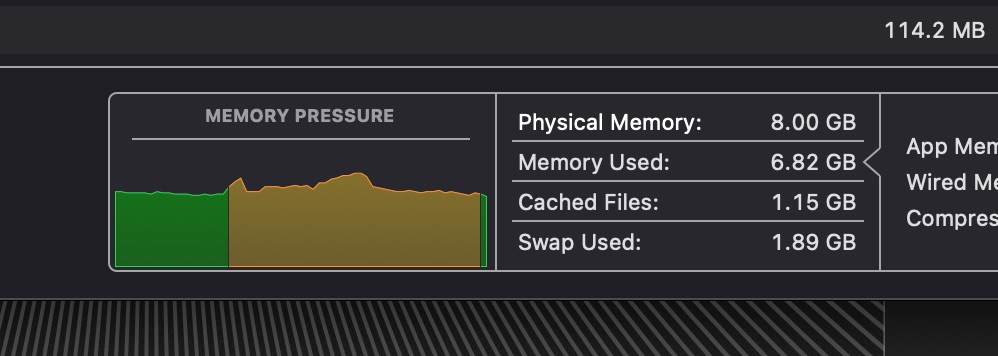
With just 8GB of RAM, the MacBook Neo is regularly under memory pressure.
Credit: Andrew Cunningham
With just 8GB of RAM, the MacBook Neo is regularly under memory pressure. Credit: Andrew Cunningham
The macOS Activity Monitor’s Memory tab calls this “memory pressure.” When you’ve got enough memory to do whatever it is that you’re doing, the timeline is green, everything is fine. When you’re running up against the confines of your physical memory, the timeline turns yellow, and you’ve got memory pressure.
Memory pressure doesn’t mean your system starts collapsing, or that it becomes a totally unresponsive flipbook. It just means pressure. You are trying to use more memory than your system has, and it’s working in the background to move things to your disk so that the computer can keep working.
Without Activity Monitor open, you can tell you’re experiencing memory pressure when an app takes a beat or two longer to load than you expected, or when a browser tab you had open recently had to reload when you switched back to it, or when your video call starts dropping frames.
I’ve been able to use the MacBook Neo mostly as I would use my regular MacBook Air, but it’s also experiencing memory pressure pretty much constantly. It subtly degrades the experience in ways that didn’t make the Neo miserable to use, but which did make switching back to my 24GB M3 Air or even my 16GB M1 Air a bit of a relief.
Beyond the weaker processor and GPU, the thing that gives me pause about this particular version of the MacBook Neo is that the memory pressure problem is not going to get better over time. The Neo is usable enough right now; going forward, you’re trusting Apple and every app developer to keep 8GB users in mind while maintaining their software. Hopefully it will stay on the right side of “usable” for another two or three years at least, but you’re rolling the dice.
If there’s good news, it’s that virtually any future upgrade for the Neo would have to come with more memory than this. The A19 Pro in this year’s iPhone 17 Pro includes 12GB of RAM, which obviously is not as much as 16GB but would definitely be enough that most people wouldn’t need to worry about it. The new iPad Air’s cut-down M4 is another possible direction, with fewer CPU and GPU cores than the typical M4 but 12GB of RAM instead of 8 or 16GB.
A good value, but with hard limits

The MacBook Neo.
Credit: Andrew Cunningham
The MacBook Neo. Credit: Andrew Cunningham
Here is what the MacBook Neo is not: It is not a replacement for a MacBook Air. Even compared to the old M1 version, the Neo makes several compromises in ports, keyboard and trackpad features, screen quality, and performance that collectively mean that the number of people with an Apple Silicon MacBook who should “upgrade” to a new Neo is effectively zero.
The MacBook Air is far from Apple’s fastest laptop, but the thing that has always felt good about the M1, M2, M3, M4, and M5 is that—especially when paired with 16GB or more of RAM—there’s very little that won’t run on one of those chips. The extra speed of a Pro or Max chip is absolutely useful for heavy multi-taskers, professional photographers and videographers, people running AI or machine-learning workloads, people who are still trying to make Mac gaming happen, and app developers running Xcode and spinning up the odd virtual machine for some testing. But you can generally use a baseline MacBook Air or Mac mini for that kind of work without wanting to throw your computer in a lake.
The MacBook Neo will sometimes fail to clear that bar, given its weaker smartphone chip (with its smartphone-style power envelope) and its 8GB RAM limit. There are already apps and games that won’t even run without at least 16GB of memory; others may run but do so poorly or inconsistently, especially for larger or more complex projects. I don’t think the MacBook Neo needs to be able to do all of this stuff, the same way the $349 A16 iPad doesn’t need to be able to do everything an iPad Pro can. But as a more powerful, versatile, tinkerer-friendly operating system, macOS gives adventurous users more opportunities to bump up against the limits of the hardware than iOS or iPadOS do.
All of that said, I really like the MacBook Neo for its target audience. It could be a good first Mac for people who have only owned an iPhone and/or iPad; it could be a first laptop for any kid or cash-strapped college student, especially with the $100 educational discount; and it could be a reasonably good upgrade for all the beat-up, rickety, out-of-support 2010-to-2019-vintage non-Retina Intel MacBook Airs that I still see with some regularity in coffee shops and on trains.
The hardware is cut down, right up to the edge of what we’d consider acceptable in some cases. But Apple has landed on the right side of the line most of the time, cutting features without messing up anything essential.
And in a turnabout for a company generally known for pricey products, Apple has also managed to hit a price that’s way under other “we tried to purpose-build a high-quality midrange laptop without making something terrible” laptops like the Framework Laptop 12 ($799 for a config similar to the Neo, with a considerably worse screen) or Microsoft’s old Surface Laptop Go (now the “Surface Laptop, 13-inch,” and at $899, barely even trying to compete in the budget category). That Apple has done this in the middle of a horrible RAM and storage shortage that has other companies raising prices makes it feel like an even better deal.
The good
- A much cheaper Mac laptop than anything Apple has offered before, ever, and a nice mobile counterweight to the Mac mini (if you’re trying to compare the Neo mostly to refurbished and on-sale MacBook Airs, know that the Neo, too, will one day be available refurbished and on-sale—the base price does matter).
- A18 Pro processor offers adequate performance for day-to-day computing.
- Excellent Mac keyboard, pretty good trackpad, decent webcam and speakers, and a screen that’s better than most PCs in the same price range.
- Cute, approachable design available in fun colors, though I am still waiting for the MacBook that’s available in the same rainbow of hues as the iMac.
- No fan, and never runs hot.
- Education pricing is still $100 less, which feels more significant for a $600 notebook than a $1,100 notebook.
The bad
- Sometimes slower than an M1 MacBook Air from five-and-a-half years ago.
- No backlit keyboard.
- TouchID only in the $699/512GB model.
- Port situation is confusing.
- External display support is relatively limited.
The ugly
- 8GB RAM ceiling limits what you can do with the laptop, and it may age poorly.

Andrew is a Senior Technology Reporter at Ars Technica, with a focus on consumer tech including computer hardware and in-depth reviews of operating systems like Windows and macOS. Andrew lives in Philadelphia and co-hosts a weekly book podcast called Overdue.