

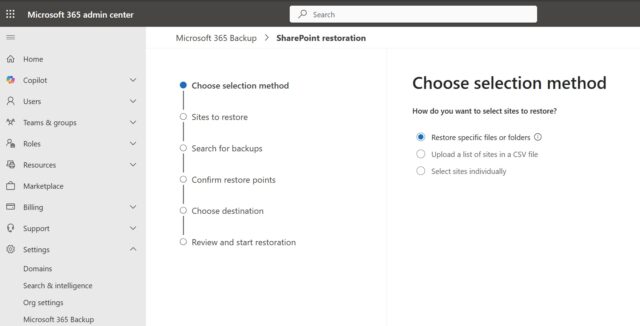
Microsoft is introducing more granular controls to Windows 365 Backup, making it easier to locate specific content to restore when needed.
This welcome change will roll out in preview very soon – the public preview starts this month, in fact. Development is expected to be fast, with the general rollout currently scheduled for next month.
On the Microsoft 365 Roadmap, Microsoft says under the heading “Perform granular file-level restore using Microsoft 365 Backup”: “Perform file-level browse/search and then restore using Microsoft 365 Backup. With this enhancement you will be able to browse for files across in a site from available daily restore points and apply filters to narrow results, restore at the original location by overwriting existing content or to a new place by creating a copy of the content.
Going into rather more detail in message ID MC1245216, Microsoft says: “Microsoft is introducing granular restore capabilities in Microsoft 365 Backup, allowing administrators to browse, search, and restore individual files or folders from restore points for protected SharePoint sites and OneDrive accounts. This update helps organizations reduce recovery time and operational impact by restoring only the content that is needed”.
Going on to talk about the timeline of events and implications for users, the company continues:
[When this will happen:]
- Public Preview (Worldwide): We will begin rolling out in early March 2026 and expect to complete by mid-March 2026.
- General Availability (Worldwide): We will begin rolling out in late April 2026 and expect to complete by early May 2026.
[How this affects your organization:]
Who is affected:
- Microsoft 365 tenants with Microsoft 365 Backup enabled
- Admins responsible for SharePoint Online and OneDrive for Business data protection and recovery
What will happen:
- Admins will be able to browse and search restore points for protected SharePoint sites and OneDrive accounts.
- Admins will be able to restore individual files or folders instead of restoring entire sites or drives.
- Only admins assigned the SharePoint Backup Administrator role can perform granular restore operations for SharePoint sites and OneDrive accounts.
- Existing Microsoft 365 Backup protection policies and restore points are respected.
- This feature is available only to tenants with Microsoft 365 Backup enabled.
- There is no direct impact to users; restore operations remain admin‑initiated.
[What you can do to prepare:]
- No action is required to receive this feature.
- Review your current Microsoft 365 Backup coverage for SharePoint and OneDrive to ensure critical workloads are protected.
- Familiarize backup administrators with the granular restore experience once Public Preview begins.
- Update internal recovery procedures or runbooks to include file- and folder-level restore scenarios.
- Inform helpdesk or IT operations teams when granular restores may be appropriate instead of full restores.
More information is available in this entry in Microsoft Learn.


