

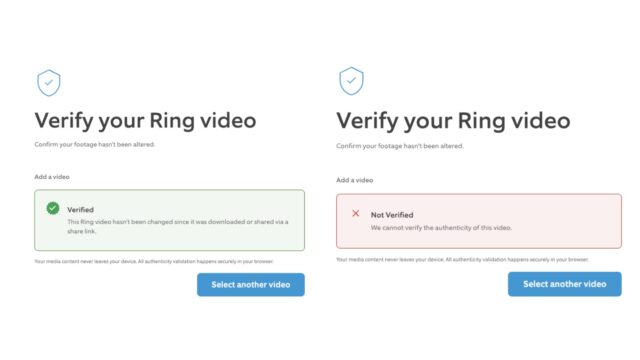
Video cameras were supposed to offer security and peace of mind, but then along came video editing and AI, and it became hard to trust what you see. To help with this problem, camera maker Ring has developed a tool that can be used to determine if a video file has been tampered with or not.
The rather unsurprising name for the tool is Ring Verify, and it is described as a “a new content authenticity feature that allows you to verify that Ring videos you receive haven’t been edited or changed”.
The idea is a pretty simple one – helping to provide assurance that the videos you see really are what they seem to be. Or, as Ring explains:
When someone shares a Ring video with you—whether it’s a neighbor showing you what happened on their porch or a clip explaining an incident—you want confidence the video hasn’t been altered. Now, every Ring video that’s downloaded or shared comes with built-in verification to give you that peace of mind.
The system can only be used to check the veracity of Ring videos, as they have the necessary fingerprinting to allow the necessary checks to be carried out. The company says:
It’s simple. Every video downloaded from Ring now includes a digital security seal. Think of it like the tamper-evident seal on a medicine bottle—if anyone changes the video in any way, even something small like trimming a few seconds or adjusting the brightness, the seal breaks.
It adds: “Whether you’re receiving footage from a neighbor, reviewing a video for a claim, or checking that a shared video is the real deal, you can now verify it’s authentic Ring footage that hasn’t been tampered with”.
Ring provides some information about the verification system:
1. What does it mean when my Ring content is “verified”?
When your Ring video shows as “verified,” it means the video hasn’t been changed in any way since it was downloaded from Ring. Think of it like a security seal on a package—if anyone edits the video in any way (even trimming a second, adjusting brightness, or cropping), the seal breaks.
2. What does it mean if my video is “not verified”?
Videos that were downloaded before this feature launched in December 2025, or videos that have been edited, cropped, filtered, or altered in any way after download (even trimming a second, adjusting brightness, or cropping) cannot be verified. This includes videos uploaded to video sharing sites which compress the video. Even minor changes—like adjusting brightness or trimming a few seconds—will cause verification to fail.
3. What should I do if my Ring video shows as “not verified”?
If a video you received shows as “not verified,” it means Ring cannot confirm the video’s origin. This means the video may have been edited or altered in some way (even trimming a second, adjusting brightness, or cropping), or that the video was downloaded before this feature launched in December 2025. If you need the original, unedited version, ask the person who shared it with you to share a link from their Ring app instead. Videos downloaded directly from the Ring app will be verified and include the security seal.
4. Can Ring tell me how a video might have been edited?
Ring’s verification only confirms that a video has not been modified at all since download – it does not specify what has been edited.
5. Which Ring devices support content verification?
Content verification is available for all videos downloaded or shared from Ring’s cloud, regardless of which Ring device captured them. Every video that leaves Ring’s cloud automatically includes embedded content credentials for verification. Content verification is not compatible for videos recorded with end-to-end encryption. It will always return ‘not verified’.
Ring users do not need to take any action as the company says that the capability was quietly added in December. To verify a video from a Ring device, use the following steps:
- Go to https://ring.com/pages/verify
- Submit the video link —it stays on your browser and never gets sent anywhere
- Get instant results—you’ll see right away if it’s verified Ring footage


