

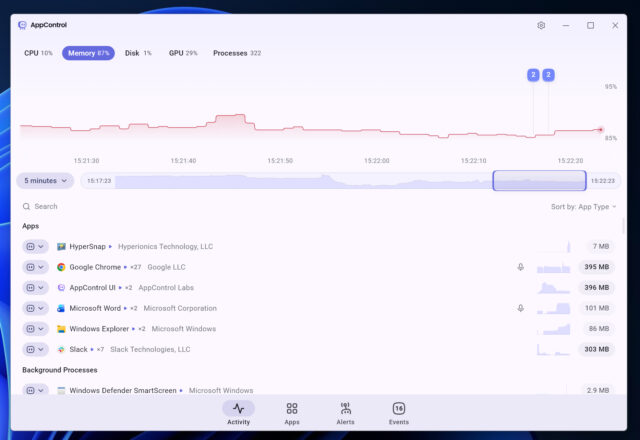
AppControl has launched a new Windows utility that gives users a scrollable history of system activity, showing what their PC is/was doing and why. The tool tracks CPU, GPU, memory, disk, temperature, and privacy-related events, offering a timeline that could help explain slowdowns, spikes, or unexpected background activity.
The software records system activity second by second for up to three days. Users can scroll back through the timeline and see which apps or processes were responsible for a spike in CPU, GPU, memory, disk usage, or temperature at a specific moment.
SEE ALSO: Ashampoo releases UnInstaller 16 with faster and more efficient software removal
It also logs events tied to privacy-sensitive hardware. That includes when an app accesses the webcam, microphone, or location. The aim is to show these events in plain language rather than technical process names.
AppControl gives you control
“People shouldn’t need to be experts to understand their own computers,” said Jon Hundley, Co-Founder and CEO, AppControl. “You paid for your PC hardware, and you deserve to know how it’s being used, especially as Windows PCs are doing far more in the background than they were a few years ago. AppControl was built to replace mystery and anxiety with clarity and confidence.”
The company says the idea came from a common problem. A PC fan suddenly ramps up, but by the time Task Manager opens, the process causing the spike has already disappeared.
“There was no way to see what had just happened,” said Hundley. “When I searched for a historical version of Task Manager, all I found were memes from other people who were clearly dealing with the same problem. AppControl exists to make that visibility and control accessible, understandable, and enjoyable to use.”
AppControl presents its data through a visual interface. Users can hover over a spike in resource usage and see which app was active at that exact moment. The tool also flags silent software updates, new or unsigned applications, and background processes, then explains them in simpler terms. I’ve been using it for a few hours now and can already see it’s going to come in incredibly handy.
The software includes controls that let users disable or block apps causing issues. It also offers optional suspicious-app detection, which only activates with user consent.
“Providing an alternative to Task Manager, AppControl brings to the table a set of features that are sought after by power users, out of which real-time and historical resource monitoring is the most noticeable,” said Mihaela Teodorovici, Windows Editor in Chief, Softpedia. “With custom alerts and continuous event monitoring, AppControl allows you to get a better overview of the PC’s activity and performance status, all to stay in control of processes and resources.”
AppControl runs on all modern versions of Windows and requires no registration. The company says it collects little to no data by default and focuses on local monitoring rather than cloud-based analysis. You can download it here.
What do you think about this new tool? Let us know in the comments
