

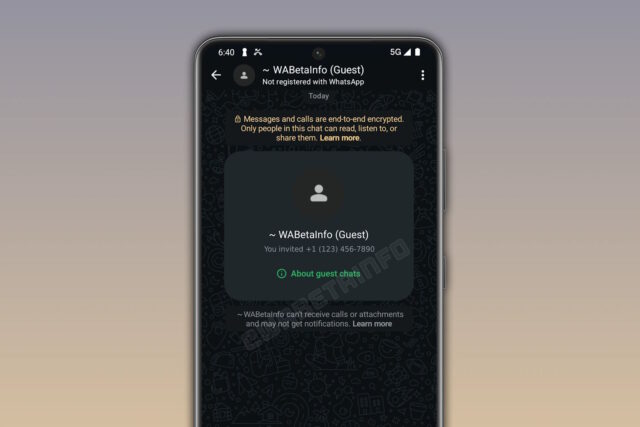
WhatsApp has started the process of rolling out guest chats to both iOS and Android. The feature makes it possible to chat with people who do not have a WhatsApp account by sending them a special invitation link.
The rollout is not widespread – yet – so even if you are using the beta version of the app, you may not see the feature just yet. But it certainly seems that WhatsApp is ready to give people access to this handy option; let’s take a look at how it works.
Like regular WhatsApp chats, guest chats are secured with end-to-end encryption by default. A chat needs to be instigated by someone who does have a WhatsApp account, using the Invite a friend link or the option on a contact to send an invitation to someone who does not use WhatsApp. The invite can be shared however you feel works best – via email, SMS or using another messaging app.
WABetaInfo explains how things work for the guest:
When the recipient receives the chat invite, they can open the link in their browser to join the conversation as a guest. The link can be opened on either a desktop or a mobile device. Once the recipient opens the chat invite link, they can choose to either download WhatsApp or continue as a guest. By tapping on the second option, the browser will open a conversation on WhatsApp Web.
Once users continue as a guest, WhatsApp Web generates a unique identifier that’s used to create the encryption key. This means that guest chats are secured by end-to-end encryption. WhatsApp cannot see the content of the messages, and only the participants in the conversation can read them.
The invitations that are sent out are only valid for a period of ten days, reducing the risk of them falling into the wrong hands and being misused.
Providing more detail about how guest chats work, WABetaInfo says:
WhatsApp makes it clear when the user opens a guest chat by displaying the keyword “Guest” in the top app bar. This label also appears within the chat interface, and the app highlights that the account is not registered with WhatsApp. With this information visible, the account holder can easily recognize when a guest has responded to their invitation. This allows both participants to start messaging seamlessly and securely.
Guest chats offer limited features since they are designed for temporary access and do not require a full WhatsApp account. Specifically, guest chats do not support group chats and media sharing features, including stickers and voice messages. Additionally, other attachments, such as photos, videos, documents, and GIFs, are not available. Voice and video calls are also not supported, as guest access is intended only for basic, temporary messaging.
Clearly, WhatsApp will be hoping that anyone who uses guest chat will be so enamored with the experience that they are encouraged to create a full account, but this is not a requirement.
Do guest chats seem like a good idea to you? Is it something you envision yourself using? Share your thoughts in the comments below.


![how-network-apis-are-transforming-telcos-[q&a]](https://thetechbriefs.com/wp-content/uploads/2025/05/17165-how-network-apis-are-transforming-telcos-qa.jpg)