

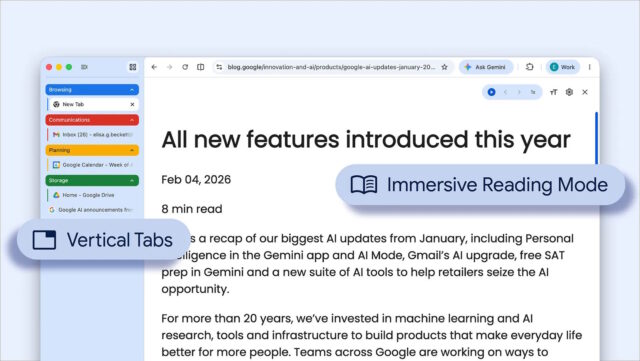
It has been a very long time coming, but Google Chrome has finally caught up with numerous other web browsers thanks to the arrival of vertical tabs. Google is billing this as a productivity booster and it is one of a pair of new features the company is rolling out.
The second feature is more of an update than an addition. Google has revamped Chrome’s reading mode to make it more immersive by removing anything that might distract from text.
There are many reasons for wanting to switch from horizontal to vertical tabs, but it is boosting productivity that Google is focused on. For many people, having tabs appear at the side of the browser window rather than at the top makes much more sense with widescreen monitors as it makes for more efficient use of screen real estate.
Google says that the option to move tabs is in the process of rolling out, but does not provide any more details than this – so if you don’t yet see the option, you will just have to wait a little longer.
Announcing the feature, Google explains:
You now have the option to use vertical tabs in Chrome, depending on your preferences. Just right click on any Chrome window and select “Show Tabs Vertically.” By moving your tabs to the side of your browser window, you can read full page titles and manage tab groups with ease — even when your tab count hits double digits. This layout is perfect for multitasking, saving you time by making sure you never lose a tab.
Google also has a little bit to say about the update immersive reading mode which is in the process of rolling out:
And reading mode, a favorite Chrome feature for deep focus, is even better with a new full-page interface. Right-click on any page and select “Open in reading mode” to remove visual distractions and transform a busy webpage into an immersive, text-focused reading experience.
If you have had the opportunity to play around with either of these features, what do you think of them? Do they live up to expectations, or is there some room for improvement? Share your thoughts in the comments below.


