

BrowserAct Open-Sources Two AI Skills That Let Agents Actually Use the Web — Including One That Builds New Skills on Its Own
Singapore, May 14, 2026 (GLOBE NEWSWIRE) — Imagine asking an AI to compare prices on 100 products, apply to 100 jobs overnight, or monitor a competitor’s site across five countries. Then imagine it replying: “Sorry, the website won’t let me in.”
That’s the quiet failure mode behind most AI agents today. They can think, but they can’t really act on the live web — websites block them, source code overwhelms them, and every new site means starting from scratch.
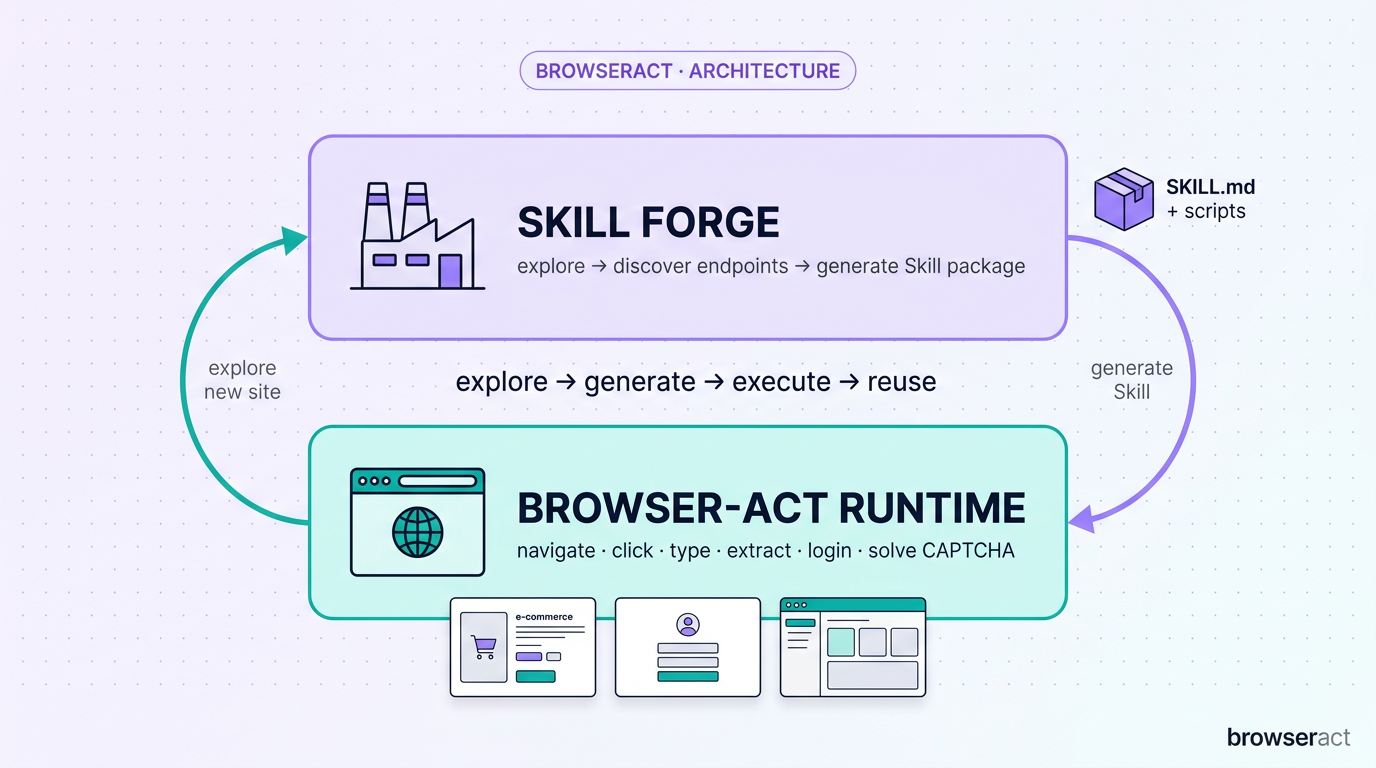
BrowserAct, developed by ECOCREATE TECHNOLOGY PTE. LTD., today open-sourced two free Skills on GitHub that fix this — together they give any AI agent direct, reliable access to the real internet. One Skill is the agent’s hands; the other is a factory that lets the agent build new hands for itself.
The tagline introduced with the launch sums it up: “Give your agent the power to use the web.”
AI Is Smart. Its Hands Are Clumsy.
The reasoning side of AI has improved dramatically in the past two years. The acting side — the part that drives a browser — has barely moved. As a result, agents in production keep hitting the same three walls:
Wall 1: Websites don’t recognize them as human. Bot-detection services like Cloudflare, DataDome, and hCaptcha guard more than 40% of the world’s top 10,000 sites. Most automation tools today are just regular browsers (Puppeteer, Playwright) wearing a thin disguise — and the bouncer sees through it on the first try.
Wall 2: Web pages are too noisy for AI to read. A single page’s raw source code can run thousands of tokens, burning through model budgets and causing agents to hallucinate what they “saw.”
Wall 3: Every new site means rewriting code. Whatever an agent learns about one website can’t be saved, can’t be shared, and breaks the moment the site redesigns.
Earlier attempts have nibbled at the problem — converting web content into AI-friendly text, building search APIs for agents, layering AI features into consumer browsers. None has shipped a complete, open execution layer that agents can both call and extend themselves. That’s what today’s release puts on the table.
What You Can Actually Do With This (Day One)
Before the technical details, here’s what early users are running in production:
Scrape-and-screenshot anything. Feed any URL, get back clean JSON and a full-page PNG — even for sites behind aggressive bot detection or heavy JavaScript rendering. Customers describe this as work that previously took weeks of custom engineering per target.
Apply to 100 jobs in 10 minutes. A composite Skill chains together your live LinkedIn session, an auto-form-filler, and a resume-tailoring step. The agent submits applications on your behalf, drawing on credentials you’re already logged into — no password handoff required.
Monitor competitor prices across regions. Run independent identities from the US, EU, and APAC simultaneously, with each appearing to the target site as a separate, legitimate visitor.
Manage multiple accounts without cross-contamination. Run 10 e-commerce stores or social accounts in parallel. Each session has its own fingerprint, IP, and cookie jar — platforms can’t link them together.
Replace brittle scraping code in Claude Code, Codex,Openclaw,Cursor, or Hermes. Agents using browser-act report up to 90% fewer error-and-retry loops, because a maintained Skill replaces hand-written scrapers that broke whenever a site redesigned. Output comes back as structured JSON instead of raw HTML — a 93% reduction in token consumption when fed back into
Codex or Claude.
Skill 1 — browser-act: A Browser Built for AI, Not Adapted For It
The first Skill is the runtime — a real browser the agent can drive, exposing simple verbs (navigate, click, type, extract, login, screenshot) that the agent calls like tool functions.
Three things make it different from generic browser automation:
1. It’s built from the ground up to look human
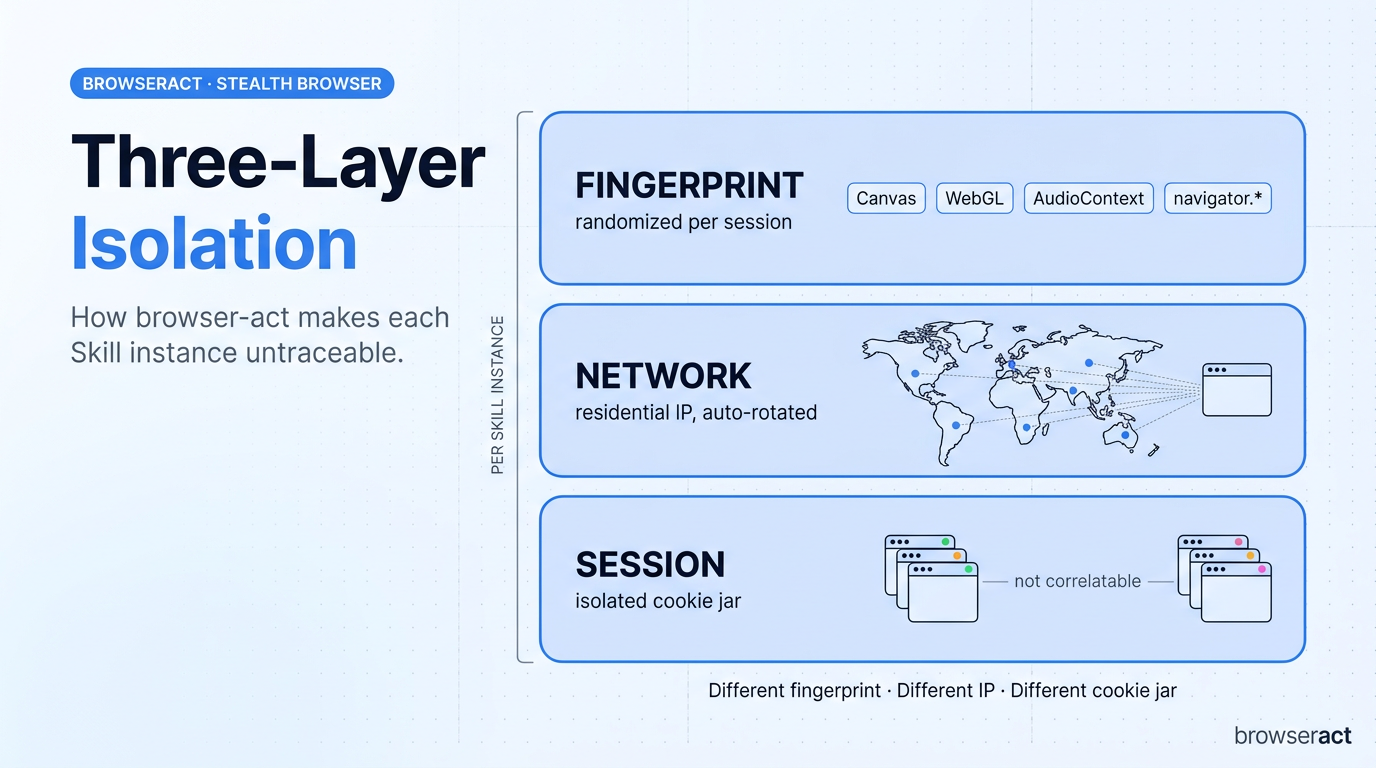
BrowserAct didn’t take Puppeteer or Playwright and bolt on stealth plugins. It built its own browser engine with three-layer isolation:
- Fingerprint: Every session gets fresh randomized canvas, WebGL, audio, and navigator properties. Even in headless mode, sites can’t tell it apart from a real user.
- Network: Each Skill instance runs behind its own residential IP, with auto-rotation for long pipelines.
- Session: Each instance is a fully isolated identity — different fingerprint, different IP, different cookie jar. Two runs of the same Skill can’t be correlated back to the same actor.
Fingerprint isolation, stealth browsing, and CAPTCHA solving (hCaptcha, reCAPTCHA, Turnstile) are all free and open-source. Residential proxy routing across 195+ countries is available as an optional paid add-on for users who need geographically distributed identities at scale.
2. It can borrow the browser you’re already logged into
A feature called Chrome Takeover lets the agent connect directly to your existing Chrome session. It inherits your authenticated state across Gmail, LinkedIn, Amazon, internal company dashboards — without you ever handing over passwords. No OAuth dance, no credential vault. The agent just uses what you’re already logged into.
3. When it gets stuck, a human can step in for 30 seconds — without breaking the session
This is the feature that makes browser-act usable in regulated or high-trust workflows: remote-assist.
Here’s the scenario: the agent is 95% of the way through a task and hits a step it shouldn’t handle alone — an SMS verification code, an unusual identity check, a high-value confirmation that warrants a human signoff. Instead of failing, the Skill generates a link, sends it to the designated human reviewer, and pauses the run.
The reviewer clicks the link, lands in the same live browser session (same fingerprint, same IP, same cookies), completes the step manually, and hands control back. The agent picks up exactly where it left off. The target website never sees a switch — it’s the same browser throughout.
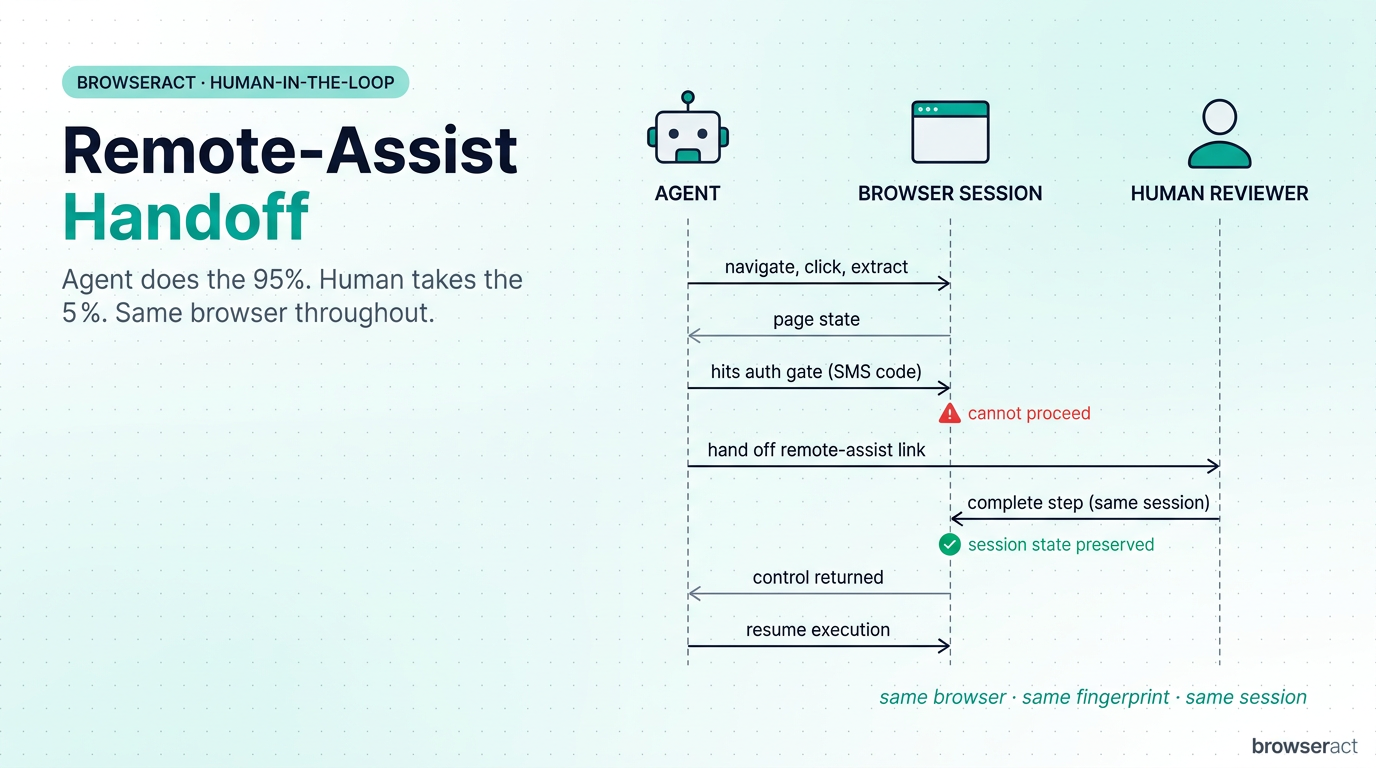
This is what makes the system deployable in workflows where pure automation isn’t acceptable. The agent handles the 95% that’s mechanical. A human handles the 5% that requires judgment. Neither has to redo the other’s work.
Skill 2 — browser-act-skill-forge: An AI That Builds Tools for Itself
This is the more ambitious half of the release.
The problem it solves: today, when an agent encounters a website nobody has automated before, the work falls back on a human writing fresh scraping code — or on the agent regenerating brittle code on every run. There’s no native way for an agent to make a new tool for itself and reuse it later.
browser-act-skill-forge changes that. Point it at any website, and it produces a reusable Skill the agent (and anyone else) can call from then on.
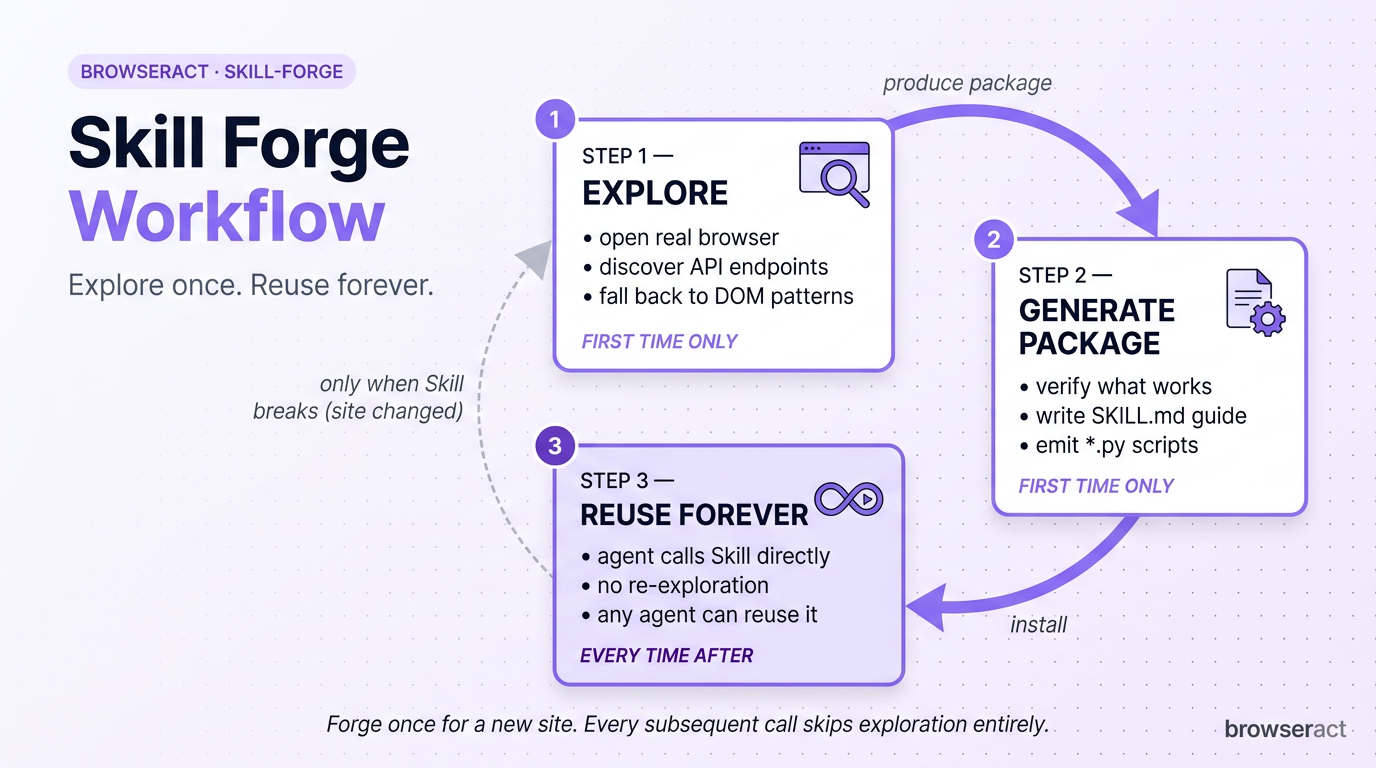
Here’s how it works in practice. Say you want an agent to track inventory on a niche e-commerce site:
- First visit: Forge opens a real browser, explores the site, figures out what’s available — preferring API endpoints when it can find them, falling back to DOM patterns when it can’t.
- Verify and package: It tests what actually works, then generates a deploy-ready Skill package containing a SKILL.md execution guide and Python scripts.
- Every visit after: The agent (or any other agent) just calls the installed Skill directly. No more exploration, no more guessing.
The tagline: Explore once, reuse forever.
An important design boundary
Skill Forge is intentionally constrained: it can only do what the user could manually do in their own browser. It reads data that’s already displayed on the page. It never bypasses authentication. It treats automation as the equivalent of copy-pasting on the user’s behalf.
This boundary matters for production deployment. It means Forge-generated Skills can ship into regulated industries and trust-sensitive sites without a separate compliance review.
When to forge first, when to scrape directly
For one-off data pulls, the agent can call browser-act directly. But for high-volume work — hundreds or thousands of records, multi-keyword searches, paginated workflows — the canonical pattern is: forge a Skill first, then run that Skill at scale. Direct bulk scraping tends to fail precisely because it skips the exploration phase that Forge automates.
Why This Release, Why Now
This is BrowserAct’s first major open-source contribution and signals a shift in how the company positions itself: from a web scraping product to an open execution and tool-creation layer for AI agents.
The two Skills together cover both halves of the “agent meets web” problem:
- A runtime that drives the live web reliably (browser-act).
- A factory that turns any new site into a reusable agent capability, without writing code (skill-forge).
Both are free, open-source, and available immediately.
Availability
Both Skills are live on GitHub today, free of charge:
- browser-act: github.com/browser-act/skills/tree/main/browser-act — open source. Stealth browser, fingerprint isolation, CAPTCHA solving, Chrome Takeover, and remote-assist are all free.
- browser-act-skill-forge: github.com/browser-act/skills/tree/main/browser-act-skill-forge — open source, free.
- Hosted platform: browseract.com — free tier, no credit card required. Residential proxy routing across 195+ countries available as an optional paid add-on.
- Native integrations: Claude Code, Cursor, Codex, Openclaw, Hermes etc.
- REST API: Full programmatic interface available.
About BrowserAct
BrowserAct, developed by ECOCREATE TECHNOLOGY PTE. LTD., is an AI-powered browser automation platform purpose-built for AI agents. Headquartered in Singapore, the platform combines an independently developed stealth browser engine — with three-layer isolation across fingerprint, network, and session — with automatic CAPTCHA resolution, optional global residential-proxy routing, and human-in-the-loop remote-assist handoff.
With today’s open-source release of browser-act and browser-act-skill-forge on GitHub, BrowserAct aims to give any AI agent — hosted or self-hosted — direct, reusable access to the live web. The platform integrates natively with Claude Code, Cursor, and Codex,Openclaw, Hermes etc.
Get started: browseract.com
Open-source Skills: github.com/browser-act/skills
Media contact: support@browseract.com
CONTACT: Wendy cheng
business@browseract.com

