

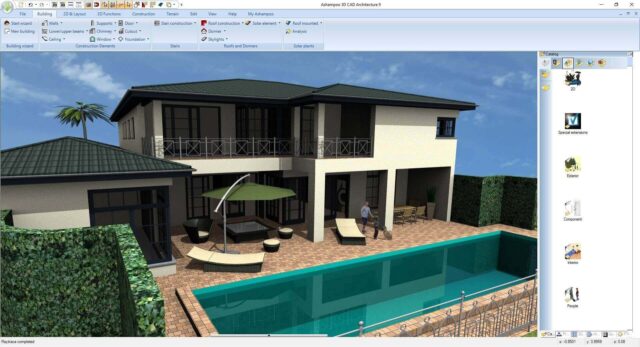
Ashampoo has rolled out Home Design 11 and Home Design Pro 11, the latest versions of its home planning software that allow homeowners to design floor plans and interiors, and visualize full properties in 3D. Both new versions cover everyday renovation ideas and more advanced building plans, providing a simple way to test layouts and concepts ahead of making real-world changes.
Creating floor plans starts with placing walls and defining spaces in 2D, and switching to a 3D view brings those layouts to life in a way that’s easier to understand than flat drawings. Walking through a virtual room often reveals spacing issues that might not be so obvious on paper, especially when faced with tight hallways or larger pieces of furniture.
SEE ALSO: Ashampoo’s Photo Optimizer Pro 26 focuses on faster edits and smaller photo files
Measurements are handled automatically by the program, covering details such as lengths, angles, areas, and volumes while designs take shape. Anyone who has ever sketched renovation ideas by hand knows how quickly measurements can become messy, and mistakes can creep in when juggling numbers alongside layout decisions. Having calculations handled in the background means you can experiment with layouts and not worry about checking your math repeatedly.
Interior design options rely heavily on available objects, and the software supports formats such as SketchUp and Collada that open access to massive collections of ready-made models. Furniture, decorative items, plants, and structural pieces can be placed into rooms with a couple of clicks, making it easier to play with different looks.
Home Design 11 styles
Trying several styles within the same layout often provides a clearer sense of what works and what feels out of place before anything is purchased.
Solar planning is also a feature in the software, with tools that allow photovoltaic systems to be placed directly onto roofs during the design process. Positioning panels while shaping the rest of the structure creates a more complete picture of the finished home, especially for those considering energy upgrades as part of renovation plans.
Exploring a project via a realistic 3D walkthrough adds a sense of depth and moving from room to room from a first-person perspective helps reveal sightlines, furniture placement concerns, and general flow between spaces. Lighting and shadow effects contribute to that realism.
Home Design Pro 11 extends the base experience with additional tools aimed at those looking to create more detailed and structured projects. Multiple plan views can be placed on a single sheet, which suits presentations or printed documentation where different perspectives need to be shown together.
Extended drawing tools introduce custom line styles, fill patterns, and hatching options that represent materials or construction details more clearly.
Importing scanned floor plans as templates offers another practical advantage for those working with existing buildings. Tracing from older drawings keeps layouts accurate while reducing the time spent recreating structures from scratch.
Roof construction tools in the Pro edition can come in handy, especially when working with more complex building shapes or multi-angle roof designs.
Hundreds of additional 3D models covering fixtures, structural components, and photovoltaic elements have been added to the Object libraries in the Pro version.
Together, the standard and Pro versions cover a wide range of projects, from simple room redesigns to more technical building layouts. Ashampoo Home Design 11 is priced at $17 (down from $50) and Ashampoo Home Design Pro 11 is three bucks more at $20 (down from $60). There’s a 30-day trial so you can take the program for a spin before committing yourself.
What do you think about the two new home design programs? Let us know in the comments.


