


Ashampoo has released Photo Optimizer Pro 26, the latest version of its image editing software. This new iteration introduces compression tools, additional creative LUT filters, expanded RAW support, and interface tweaks, offering greater control over image quality and file size.
As always, the software focuses on speedy photo corrections that require little manual input. The program can automatically analyze images and adjust their color, contrast, and exposure with a single click. If you prefer more control, the software includes tools for perspective correction, cropping, watermarking, and artistic effects.
Photo Optimizer Pro 26 sizing
One of the most noticeable additions in this version is a new image compression feature that allows you to cut file sizes for JPG, WebP, and PNG images without visibly reducing picture quality.
The compression tool includes an interactive before and after preview, so you can compare results while adjusting settings. As adjustments are made, the interface shows the expected file size in real time, and you can make whatever changes you need to achieve the balance between image quality and file size you require.
The compression feature will be of particular use to anyone managing large photo libraries or frequently sharing images online, where file size often matters.
SEE ALSO: Ashampoo’s $50 AI-powered Sharpen #5 can fix blurry photos, and it’s free for a limited time
Photo Optimizer Pro 26 also expands its library of LUT filters, adding 27 new options. LUTs, or Look Up Tables, modify multiple image attributes at once, including brightness, saturation, hue, and contrast. You can apply stylized looks instantly without adjusting individual settings.
The new LUT collection covers nine categories including Halloween, Christmas, Autumn, Summer, Vintage, Contrast, HighKey, LowKey, and FX. Each category receives three additional LUT options, offering more presets for seasonal edits, stylized photography, and creative image effects.
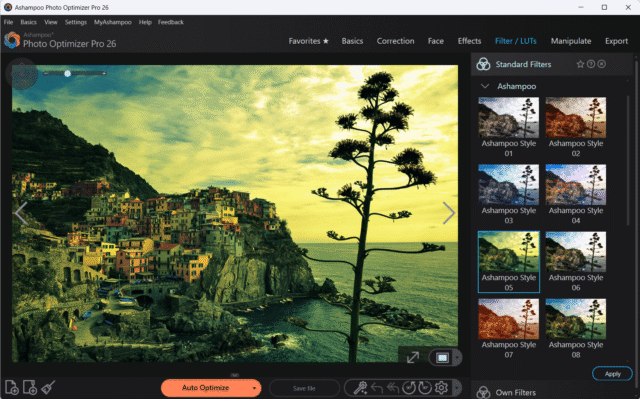
Ashampoo has also added new photo frames that can be applied quickly and combined with other edits, so you can experiment with different styles.
Version 26 gains a redesigned layout that presents the tools in a cleaner, more modern manner. Functions are organized into clearly labeled sections, so common adjustments can be actioned within a few clicks.
RAW files often contain more image data than compressed formats, allowing greater flexibility when adjusting exposure and color balance. Improved RAW handling in Photo Optimizer Pro 26 will allow photographers to work with a wider range of camera files while keeping editing tools consistent across formats.
The software offers the usual batch processing features, allowing multiple images or entire folders to be optimized at once. The feature can automatically adjust lighting, contrast, and color across large photo collections without the hassle of having to edit each image individually.
Ashampoo Photo Optimizer Pro 26 is available to buy now priced from a very affordable $12. There’s a 30-day free trial too so you can take it for a spin first.
What do you think about Ashampoo Photo Optimizer Pro 26? Let us know in the comments.
![data-breach-trends-—-progress,-challenges,-and-what’s-next-[q&a]](https://thetechbriefs.com/wp-content/uploads/2024/12/644-data-breach-trends-progress-challenges-and-whats-next-qa.jpg)

