

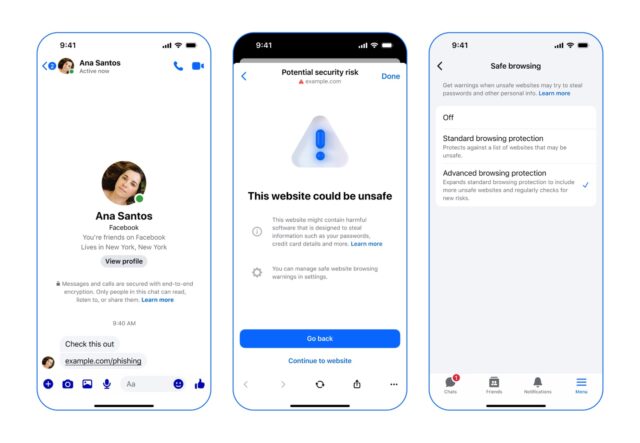
Faced with ever-increasing pressure to protect users online, Meta has published details of some of the techniques used in Facebook Messenger.
But more than just explaining what Advanced Browsing Protection is and how it works, the company also talks about the challenges it faces. We find Meta saying, essentially, that this is a really powerful and effective tool, but it is far from perfect for a variety of reasons.
While Messenger, like pretty much every modern messaging tool, offers end-to-end encryption, this only offers a certain type of protection – protection looked at through a lens of privacy. What E2E encryption cannot help with is content such as malicious URL, and this is where things like Advanced Browser Protection come into play.
Meta explains:
Messenger’s Safe Browsing feature safeguards against malicious links within end-to-end encrypted messages and calls on the app. If you’re sent an unsafe link for some reason – maybe it’s sent by someone you don’t know or by a friend whose account has been compromised – Safe Browsing warns you that the link points to an unsafe website that may try to steal passwords or other personal information from you.
In its standard setting, Safe Browsing uses on-device models to analyze malicious links shared in chats. But we’ve extended this further with an advanced setting called Advanced Browsing Protection (ABP) that leverages a continually updated watchlist of millions more potentially malicious websites.
To build ABP, we had to leverage a series of intricate infrastructure components, a complex system of cryptographic primitives, all working together with the goal of protecting user privacy in Messenger.
One of the key differences between Safe Browsing and Advanced Browser Protection is that while the former is on-device, the latter uses constantly updated information. The fact that a device needs to be updated, and the content of messages needs to be checked introduces privacy concerns, and this is among the engineering challenges Meta talks about having to find a solution for.
The fact that Meta explains all of this in a lengthy post to its engineering blog should give you a sense of the complexity of what is involved.
If you are interested in reading about how Meta managed to overcome the privacy issues to help with the creation of the security feature, you can check out the How Advanced Browsing Protection Works in Messenger post here.


