


Windows 11 continues to frustrate users with sluggish performance and high system demands on older machines, but there is an alternative — Nitrux Linux 6.
After a long wait, the newest version of the Debian-based Linux distribution has arrived with a large set of changes, new tools, and system improvements.
SEE ALSO: SparkyLinux 8.2 arrives with updated desktops and packages
Nitrux 6 updates many of the core components that power the distro. It runs on the Linux 6.19.2 kernel with CachyOS patches, while key software such as Flatpak, NetworkManager, Python 3.13.9, and the Mesa graphics library have also been refreshed.
Graphics and desktop technologies received updates as well. The Hyprland compositor now sits at version 0.53.3 along with related utilities such as Hyprlock, Hyprpaper, and Hypridle. These components handle window management, wallpapers, screen locking, and other desktop behavior.
The system includes updates to Nvidia’s open kernel module and improved support for newer Nvidia GPUs. If you have an older card, be warned that the 590 series of the driver only supports Turing architecture and newer.
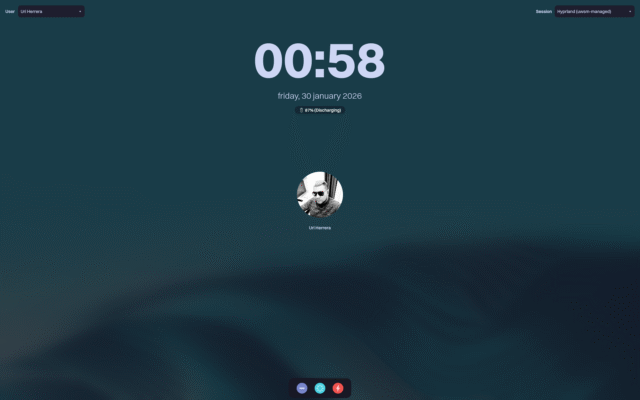
Nitrux Linux 6 login
There’s a cool new login interface called QMLGreet that replaces the older QtGreet system and runs natively on Wayland desktops. This screen supports custom fonts, wallpapers with blur effects, color themes, and icon sets. It also displays the battery status on laptops.
There’s a new notification system called NudgeOSD too. This shows on-screen alerts for actions such as changing the volume and screen brightness, and integrates directly with system shortcuts.
Nitrux 6 also adds VxM, a tool that allows users to run virtual machines with near-native hardware performance. It manages GPU passthrough and other hardware features so another OS can run inside Nitrux. It’s mainly aimed at advanced users, but the developers say they plan to add a graphical interface later to make it easier to use.
Behind the scenes, the Nitrux Update Tool System has been rewritten in C++ and now runs as a client-server setup with a MauiKit interface. It supports atomic updates and creates compressed system snapshots so users can roll back changes if something goes wrong.
Talking of which, this release has a Nitrux Rescue Mode, which restores the system to a previous working state directly from the boot menu using stored snapshots, and doesn’t require external recovery media.
Other changes include adjustments to the kernel prevent NVMe drives from entering deep power-saving states that slow down boot times, and networking settings have been updated to stop the system from modifying routing tables based on unauthenticated messages.
Window animations now slide horizontally when opening and vertically when closing. Hyprlock displays additional information including CPU, RAM, network activity, and media playback details.
Support for the newer Intel Xe graphics driver is also available via a GRUB boot option. Compatible Intel GPUs can switch from the older i915 driver to Xe for improved scheduling and power management.
Some older components have been removed from this release. QtGreet and the previous shell-based update system are no longer included, along with unused network scripts and other legacy pieces.
Nitrux 6 continues to present itself as a Linux desktop focused on modern technologies such as Wayland and immutable system design. That approach can feel different from traditional Linux distributions, although it offers an alternative for users who want something other than Windows.
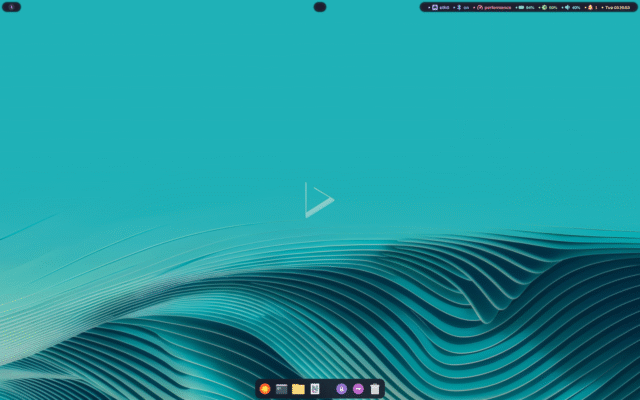
Two ISO versions are available for download from the Nitrux servers, the cachy-nvopen for systems with Nvidia GPUs and the cachy-mesa build for machines running AMD or Intel graphics.
What do you think about Nitrux Linux 6 as a Windows alternative? Let us know in the comments.
Image Credit: DepositPhotos/deagreez1
![how-ai-is-driving-email-phishing-and-how-to-beat-the-threat-[q&a]](https://thetechbriefs.com/wp-content/uploads/2025/10/68989-how-ai-is-driving-email-phishing-and-how-to-beat-the-threat-qa.jpg)

